> ## Documentation Index
> Fetch the complete documentation index at: https://docs.hologram.io/llms.txt
> Use this file to discover all available pages before exploring further.
# Review, add, and remove email addresses that receive credit card receipts and invoices
> Manage who receives billing notification emails for your organization.
## Billing account notifications
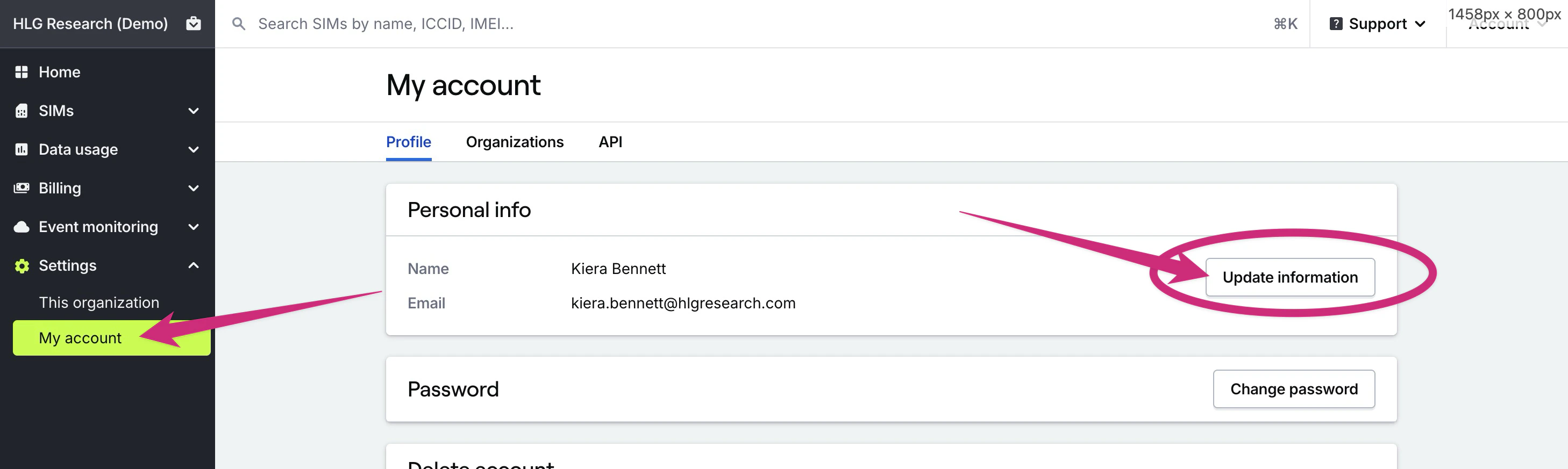
General billing notifications are sent to your organization's **Owner**, the primary contact for your account. To update who receives these notifications, update your organization **Owner**'s email address in the **Settings → My account** page.
 ## Invoice notifications
If you receive invoices from Hologram and need to send invoices to a specific email address, you can change who receives invoice emails in your linked Stripe account.
Invoices are sent through your Stripe account, and will be sent to the [email addresses you specify in Stripe](https://support.stripe.com/questions/change-the-email-address-where-stripe-emails-are-sent). Your Stripe account is created with the same email address as the **Owner** of your Hologram organization. If you are unable to access this email address or the associated account, please contact [support@hologram.io](mailto:support@hologram.io) for assistance.
## Invoice notifications
If you receive invoices from Hologram and need to send invoices to a specific email address, you can change who receives invoice emails in your linked Stripe account.
Invoices are sent through your Stripe account, and will be sent to the [email addresses you specify in Stripe](https://support.stripe.com/questions/change-the-email-address-where-stripe-emails-are-sent). Your Stripe account is created with the same email address as the **Owner** of your Hologram organization. If you are unable to access this email address or the associated account, please contact [support@hologram.io](mailto:support@hologram.io) for assistance.
 ## Credit card receipt notifications
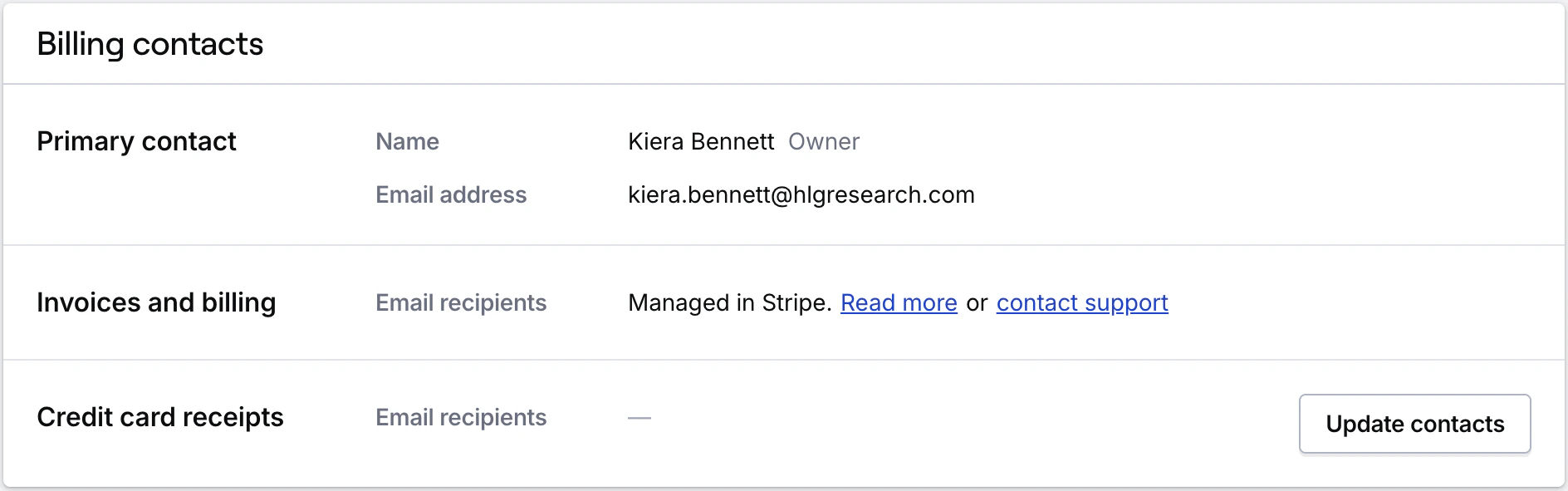
We send limited credit card receipts to your organization's **Owner**, and to any other email addresses you choose. These receipts are **only generated for charges made with a credit card** that are not charged against your account balance. This typically happens only for charges like SIM activations or data plan changes.
To share credit card billing emails go to the **Account** page in the **Billing** section of the main menu.
Scroll down to the **Billing notifications** card where you can add the email addresses of any additional recipients. To add multiple emails, separate them with a comma.
**Note:** Learn more about if you qualify for monthly invoicing by contacting our [sales team](https://www.hologram.io/contact-sales/).
## Credit card receipt notifications
We send limited credit card receipts to your organization's **Owner**, and to any other email addresses you choose. These receipts are **only generated for charges made with a credit card** that are not charged against your account balance. This typically happens only for charges like SIM activations or data plan changes.
To share credit card billing emails go to the **Account** page in the **Billing** section of the main menu.
Scroll down to the **Billing notifications** card where you can add the email addresses of any additional recipients. To add multiple emails, separate them with a comma.
**Note:** Learn more about if you qualify for monthly invoicing by contacting our [sales team](https://www.hologram.io/contact-sales/).