> ## Documentation Index
> Fetch the complete documentation index at: https://docs.hologram.io/llms.txt
> Use this file to discover all available pages before exploring further.
# Coverage Explorer
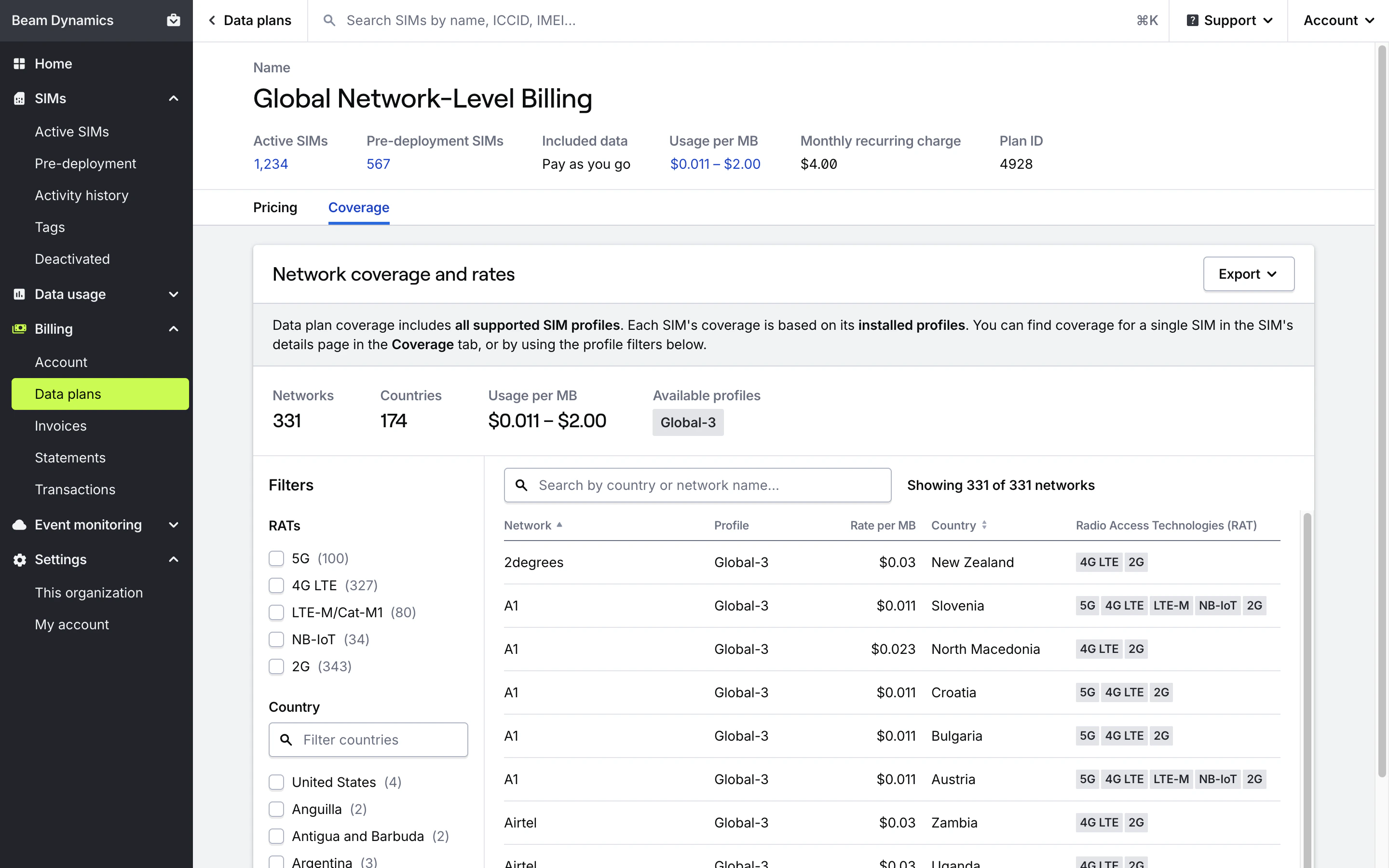
> Use Coverage Explorer to find network coverage and rates available on a data plan. Find specific details with search and filters by profile, RAT, and country.
Coverage Explorer lists out all the **networks** and **rates** available to SIMs on a data plan. You can search and filter by profile, RAT, and country to find specific details. Rates displayed in the Coverage Explorer are determined by the SIM's current data plan.
Each data plan supports specific connectivity profiles that may be installed on SIMs. SIMs activated onto a data plan may have different coverage and rates based on the profiles installed on the SIM.
**Note:** Data plan coverage includes networks and rates for **all profiles** available on the data plan, not just coverage for the SIMs you have selected.
## How do I find coverage and rates for a data plan?
Open the **Billing** section in the main menu and open the **Data plans** page.
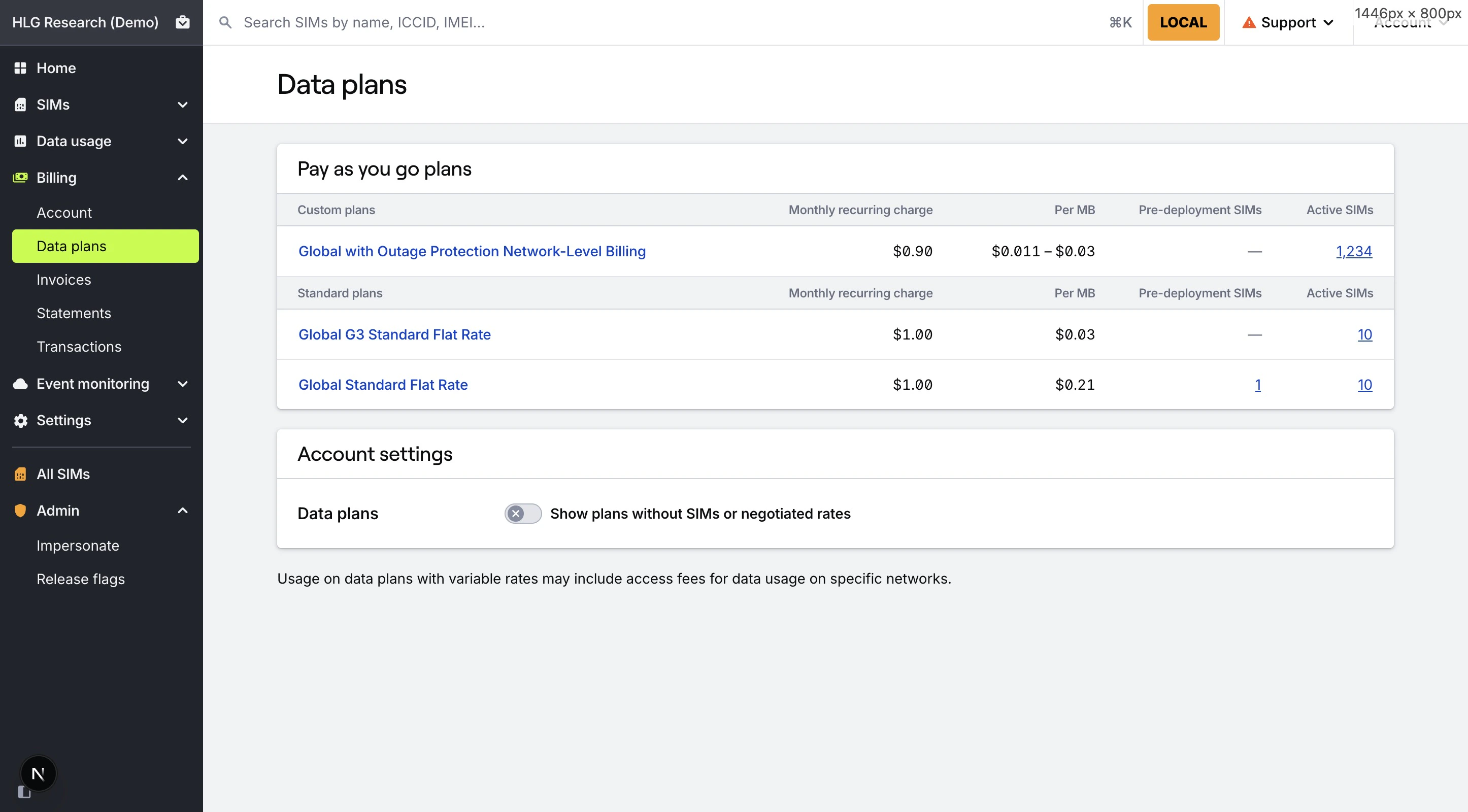 Open the **Coverage** tab in the data plan's details page to view the Coverage Explorer for the data plan.
**Important:** Coverage information for a data plan includes coverage for **all profiles** available on the data plan, not just coverage for the SIMs you have selected. Each SIM's coverage is determined by the **profiles installed on that SIM**.
Open the **Coverage** tab in the data plan's details page to view the Coverage Explorer for the data plan.
**Important:** Coverage information for a data plan includes coverage for **all profiles** available on the data plan, not just coverage for the SIMs you have selected. Each SIM's coverage is determined by the **profiles installed on that SIM**.
 ## How do I find coverage and rates when activating SIMs or changing data plans?
Begin the [activation](/dashboard/activation/activation-overview) or [data plan change](/dashboard/sim-actions/change-data-plans) process.
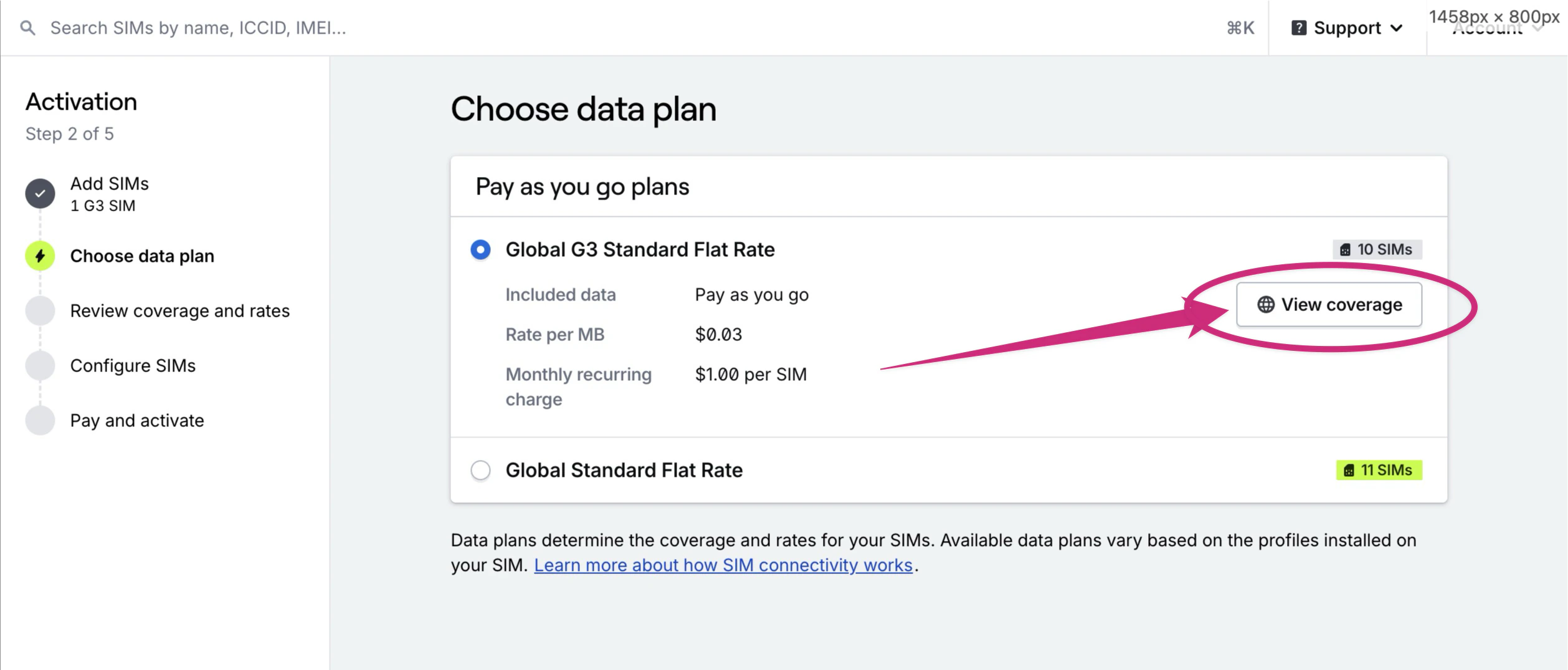
After adding SIMs, while selecting a data plan and after confirming the plan, each data plan listed will have a link to **View coverage and rates**. Click that button to open the Coverage Explorer for the data plan.
## How do I find coverage and rates when activating SIMs or changing data plans?
Begin the [activation](/dashboard/activation/activation-overview) or [data plan change](/dashboard/sim-actions/change-data-plans) process.
After adding SIMs, while selecting a data plan and after confirming the plan, each data plan listed will have a link to **View coverage and rates**. Click that button to open the Coverage Explorer for the data plan.
 ## How do I find coverage and rates for a single SIM?
Coverage details for a single SIM are available in the SIM's **Coverage** tab. Coverage available to a SIM is determined by the SIM's active data plan, and the profiles installed on the SIM card. The enabled profile on a SIM determines networks it can connect to.
## How do I use Coverage Explorer?
### Search
Filter the table by network or country names using the **Search** bar.
### Filters
* **Profile**: Filter by all profiles installed on your SIM, or choose a specific profile to see coverage and rates for a particular Mobile Core Operator. This is especially helpful when evaluating backup coverage on Hyper SIMs with Outage Protection.
* **RAT**: Filter by supported Radio Access Technologies such as NB-IoT, Cat-M1 (LTE-M), or 5G.
* **Country**: Restrict results to specific countries.
### Coverage table
The table lists all networks your SIM can connect to, based on its enabled and installed profiles, and shows the rates determined by the SIM's current data plan. You can sort the table by network name (default) or country name.
Network name. The last connected network for your SIM displays a "Last seen" label.
Profile the network is available on.
Data usage/overage rate when using data on this network, as determined by the SIM's current data plan.
Country the network operates in.
Available Radio Access Technologies for this network/profile/country combination.
### Export to XLSX or CSV
Generate and download a full coverage list for your SIM, including detailed network metadata. Exported data includes the following fields:
* **Profile name**: Name of the profile the network is available on.
* **Network name**: Name of the network.
* **Rate per MB**: Data usage/overage rate when using data on this network, as determined by the data plan.
* **Country**: Country the network operates in.
* **UNC**: Hologram's Universal Network Code that determines network-level billing rates.
* **TADIG**: The TADIG for the network.
* **MCC**: The Mobile Country Code for the network.
* **MNC**: The Mobile Network Code for the network.
* **RATs**: Available Radio Access Technologies for this network/profile/country combination.
### Deep link with URL filters
Share or bookmark a filtered view of coverage and rates by appending URL parameters. Supported filters:
```text theme={null}
?coverage=PROFILESHORTNAME|ALL
?rat=RATNAME|ALL
?search=SEARCHTERM
```
**Note:** Access to some networks requires custom data plans. Review Hologram's public coverage page and contact sales if you need tailored coverage.
## Related guides
## How do I find coverage and rates for a single SIM?
Coverage details for a single SIM are available in the SIM's **Coverage** tab. Coverage available to a SIM is determined by the SIM's active data plan, and the profiles installed on the SIM card. The enabled profile on a SIM determines networks it can connect to.
## How do I use Coverage Explorer?
### Search
Filter the table by network or country names using the **Search** bar.
### Filters
* **Profile**: Filter by all profiles installed on your SIM, or choose a specific profile to see coverage and rates for a particular Mobile Core Operator. This is especially helpful when evaluating backup coverage on Hyper SIMs with Outage Protection.
* **RAT**: Filter by supported Radio Access Technologies such as NB-IoT, Cat-M1 (LTE-M), or 5G.
* **Country**: Restrict results to specific countries.
### Coverage table
The table lists all networks your SIM can connect to, based on its enabled and installed profiles, and shows the rates determined by the SIM's current data plan. You can sort the table by network name (default) or country name.
Network name. The last connected network for your SIM displays a "Last seen" label.
Profile the network is available on.
Data usage/overage rate when using data on this network, as determined by the SIM's current data plan.
Country the network operates in.
Available Radio Access Technologies for this network/profile/country combination.
### Export to XLSX or CSV
Generate and download a full coverage list for your SIM, including detailed network metadata. Exported data includes the following fields:
* **Profile name**: Name of the profile the network is available on.
* **Network name**: Name of the network.
* **Rate per MB**: Data usage/overage rate when using data on this network, as determined by the data plan.
* **Country**: Country the network operates in.
* **UNC**: Hologram's Universal Network Code that determines network-level billing rates.
* **TADIG**: The TADIG for the network.
* **MCC**: The Mobile Country Code for the network.
* **MNC**: The Mobile Network Code for the network.
* **RATs**: Available Radio Access Technologies for this network/profile/country combination.
### Deep link with URL filters
Share or bookmark a filtered view of coverage and rates by appending URL parameters. Supported filters:
```text theme={null}
?coverage=PROFILESHORTNAME|ALL
?rat=RATNAME|ALL
?search=SEARCHTERM
```
**Note:** Access to some networks requires custom data plans. Review Hologram's public coverage page and contact sales if you need tailored coverage.
## Related guides