> ## Documentation Index
> Fetch the complete documentation index at: https://docs.hologram.io/llms.txt
> Use this file to discover all available pages before exploring further.
# Accept an invite to collaborate in an organization
> How to accept an invitation to collaborate on a Hologram organization
To collaborate with your team in an organization, an Admin must invite you. You will receive an email with an invite link to join the organization, or you can accept the invite from your account settings.
## Accept an emailed invitation
Click **Accept Invite** (or **Create Account** if you don't have an account yet) and follow the prompts.
If you already have a Hologram account, sign in to join. If not, create your account, then you'll be taken into the invited organization.
## Accept when logged in to an organization
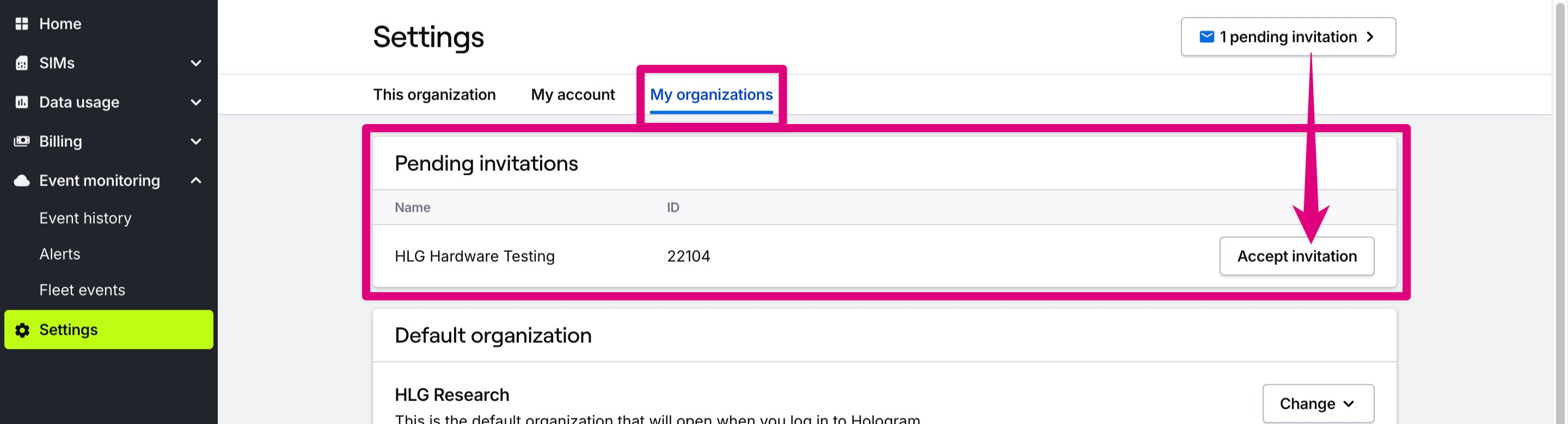 Open the **Settings** section in the main menu, then open the **My account** page.
Scroll to the **Organizations** card, find the organization you were invited to, and click **Accept invitation**.
***
## Related guides
Learn how to invite collaborators and manage access levels
Open the **Settings** section in the main menu, then open the **My account** page.
Scroll to the **Organizations** card, find the organization you were invited to, and click **Accept invitation**.
***
## Related guides
Learn how to invite collaborators and manage access levels