> ## Documentation Index
> Fetch the complete documentation index at: https://docs.hologram.io/llms.txt
> Use this file to discover all available pages before exploring further.
# Take bulk actions on your SIMs
> Your dashboard gives you control to manage, troubleshoot, and act on your devices in a simple interface. This guide covers the bulk actions available for managing multiple SIMs at once through the Hologram Dashboard, providing efficient ways to perform common operations across your fleet.
## How do I take bulk actions on many SIMs?
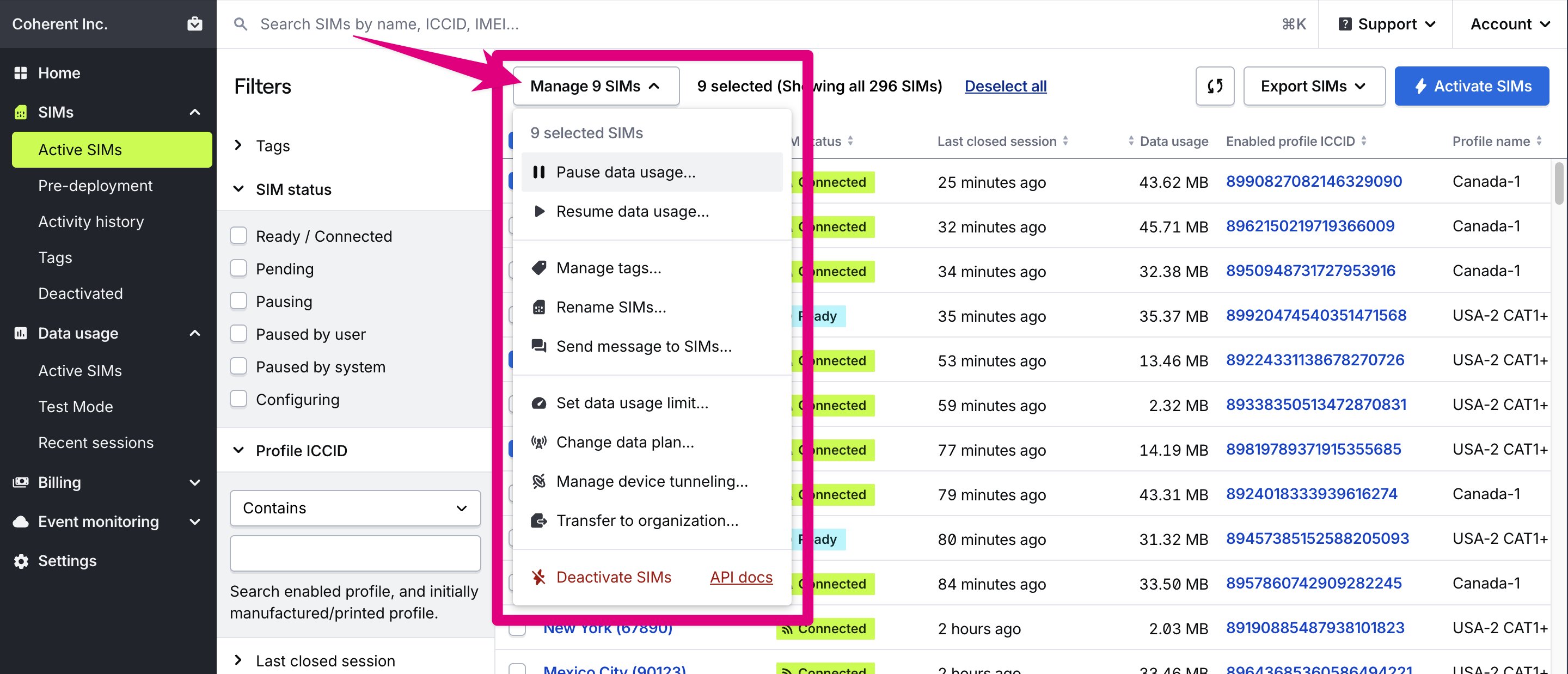
All available bulk actions can be found in the **Manage SIMs** menu at the top of the SIMs pages. Find the SIMs you need to act on with filters and sorting, then select SIMs in the table to take bulk actions. The SIMs and filters you have selected will stay selected even if you change filters or navigate away from the page.
 All of these bulk actions and more can also be [taken on a single SIM](/dashboard/sim-actions/single-sim-actions-overview). For advanced automation or to work around limits for larger fleets, consider using the [Hologram REST API](/api/v1) to programmatically manage your SIM fleet.
**Note:** Some actions may not be available depending on a SIM's current status (active, in testing, or deactivated), your user role permissions, or features available to your organization.
## Available bulk actions
Prevent or allow data usage. No SIM limit.
Add, edit, and delete tags from your SIMs. No SIM limit.
Rename your SIMs using custom prefixes. Limited to 1,000 SIMs.
Send SMS messages, or TCP or UDP cloud messages to your SIMs. No SIM limit.
Activate Test Mode SIMs out of pre-deployment testing before their testing has completed. SIMs must be on the same data plan. Limited to 10,000 SIMs.
Move your SIMs to a different data plan. Limited to 10,000 SIMs.
Set a new data limit for all selected SIMs. Limited to 10 SIMs.
Set a new data warning threshold for all selected SIMs. Limited to 10 SIMs.
Move devices to different organizations. Limited to 10 SIMs.
Configure Spacebridge tunneling settings. Limited to 10 SIMs.
Permanently deactivate SIMs you no longer need. Limited to 10 SIMs.
## How do I track the progress of bulk actions?
Taking bulk actions on thousands of devices may take some time to complete. The **Pending activity list** allows customers to track progress on pending and in progress bulk action requests made through the Hologram Dashboard or REST API.
### View pending bulk actions
When any bulk action is in progress, a new icon will appear in the header of your dashboard between the search field and your organization's name. Click on this activity icon to open the list of pending bulk actions.
**Note:** The pending activity list button will only be visible if there is a pending bulk action.
The pending activity list shows all pending and in progress bulk actions. Each action listed shows the status of the activity, the number of affected devices, when the activity started, and who made the request.
To view completed bulk actions, press the **Review completed actions** button shown immediately beneath the list, which will open the [Activity history](/dashboard/sims/sims-activity-history) page.
**Note:** We plan to add additional bulk actions and lift SIM limits for existing bulk actions in the future. If you have a specific use case in mind, please send us feedback using the **Support** menu in your dashboard.
**Limited functionality:** Some functionality in your dashboard is restricted or unavailable if you are in a Manager, Editor, or Editor Limited role.
All of these bulk actions and more can also be [taken on a single SIM](/dashboard/sim-actions/single-sim-actions-overview). For advanced automation or to work around limits for larger fleets, consider using the [Hologram REST API](/api/v1) to programmatically manage your SIM fleet.
**Note:** Some actions may not be available depending on a SIM's current status (active, in testing, or deactivated), your user role permissions, or features available to your organization.
## Available bulk actions
Prevent or allow data usage. No SIM limit.
Add, edit, and delete tags from your SIMs. No SIM limit.
Rename your SIMs using custom prefixes. Limited to 1,000 SIMs.
Send SMS messages, or TCP or UDP cloud messages to your SIMs. No SIM limit.
Activate Test Mode SIMs out of pre-deployment testing before their testing has completed. SIMs must be on the same data plan. Limited to 10,000 SIMs.
Move your SIMs to a different data plan. Limited to 10,000 SIMs.
Set a new data limit for all selected SIMs. Limited to 10 SIMs.
Set a new data warning threshold for all selected SIMs. Limited to 10 SIMs.
Move devices to different organizations. Limited to 10 SIMs.
Configure Spacebridge tunneling settings. Limited to 10 SIMs.
Permanently deactivate SIMs you no longer need. Limited to 10 SIMs.
## How do I track the progress of bulk actions?
Taking bulk actions on thousands of devices may take some time to complete. The **Pending activity list** allows customers to track progress on pending and in progress bulk action requests made through the Hologram Dashboard or REST API.
### View pending bulk actions
When any bulk action is in progress, a new icon will appear in the header of your dashboard between the search field and your organization's name. Click on this activity icon to open the list of pending bulk actions.
**Note:** The pending activity list button will only be visible if there is a pending bulk action.
The pending activity list shows all pending and in progress bulk actions. Each action listed shows the status of the activity, the number of affected devices, when the activity started, and who made the request.
To view completed bulk actions, press the **Review completed actions** button shown immediately beneath the list, which will open the [Activity history](/dashboard/sims/sims-activity-history) page.
**Note:** We plan to add additional bulk actions and lift SIM limits for existing bulk actions in the future. If you have a specific use case in mind, please send us feedback using the **Support** menu in your dashboard.
**Limited functionality:** Some functionality in your dashboard is restricted or unavailable if you are in a Manager, Editor, or Editor Limited role.