> ## Documentation Index
> Fetch the complete documentation index at: https://docs.hologram.io/llms.txt
> Use this file to discover all available pages before exploring further.
# End Test Mode and activate SIMs
> Activate multiple SIMs out of pre-deployment testing before their free testing period has completed. This action activates SIMs out of Test Mode, and begins regular billing of data usage and monthly recurring charges.
You can force activate SIMs out of Test Mode before their free testing period has completed. This action activates SIMs out of Test Mode, and begins regular billing of data usage and monthly recurring charges. Generally this is not needed for any SIMs except for SIMs that are on a legacy Global-1 (G1) data plan, which experience a brief disconnection when activating to update profile states.
**Note:** SIMs in Test Mode will activate automatically after using free data, with **no downtime or action required** on your part.
Read more about [how Test Mode works](/guides/sims/test-mode).
## How to end testing early and force activate SIMs
To force activate SIMs out of Test Mode, they must be on the same preconfigured data plan. Scroll the pre-deployment SIMs page to the right to see the data plan each SIM will activate into, or use filters to select SIMs on specific plans.
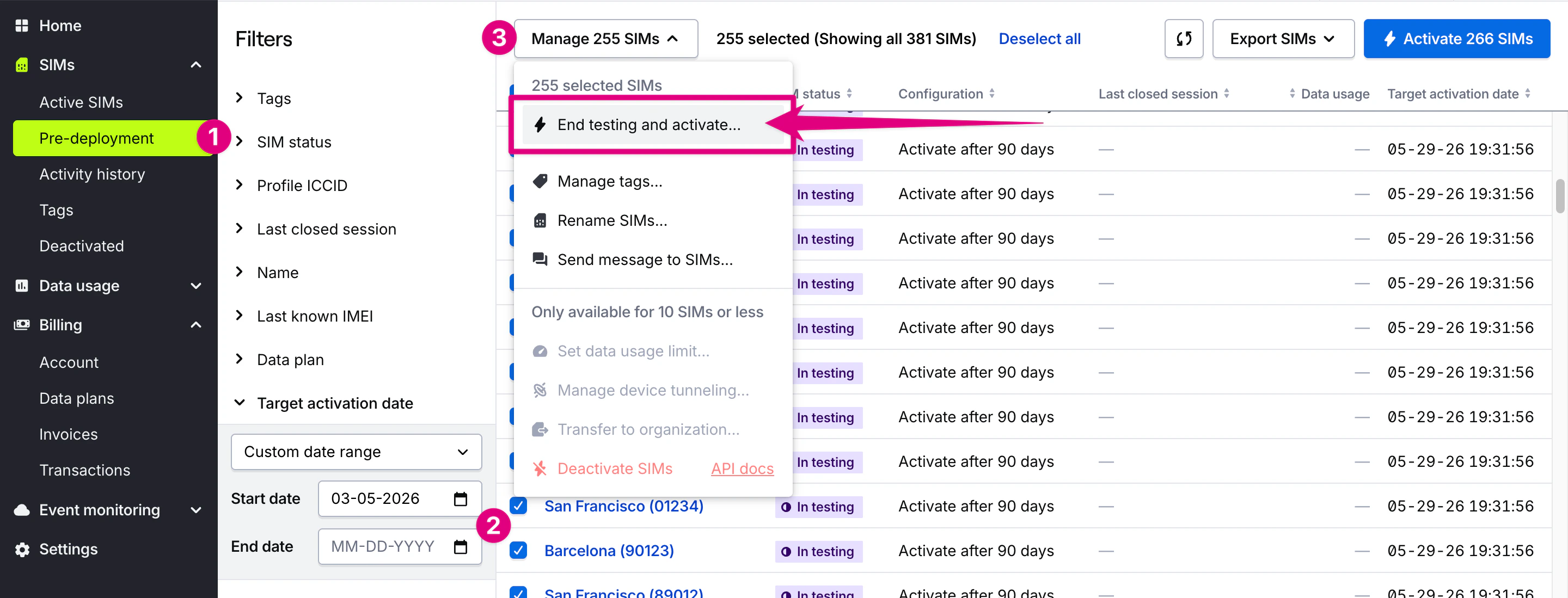 Navigate to the **Pre-deployment SIMs** page in the **SIMs** section in the main menu.
Use filters to **find and select** the SIMs you want to activate. *Required:* Confirm that all selected SIMs are on the same data plan. If SIMs are on different data plans, you can filter and activate SIMs on each data plan separately.
Click the **Manage SIMs** menu at the top of the page and choose **End testing and activate**.
*Optional.* Confirm or change the target data plan from the available options.
Review the plan rates and coverage for the new data plan. *Optional:* You can override or remove existing data limits for SIMs that will be updated.
*Optional.* Update name prefixes or tags.
Review the activation details and charges, then confirm the activation.
**Warning:** Activating SIMs will begin regular Monthly Recurring Charges and data usage billing. Ensure your account has sufficient balance before proceeding. Once activated, SIMs cannot return to Test Mode.
{/* TODO: Add image showing the bulk test mode activation interface */}
## How to activate SIMs using the REST API
For programmatic activation, use the [SIM Activation API endpoints](/api/1/) to activate SIMs via REST API calls.
Force activate SIMs (bulk)
Navigate to the **Pre-deployment SIMs** page in the **SIMs** section in the main menu.
Use filters to **find and select** the SIMs you want to activate. *Required:* Confirm that all selected SIMs are on the same data plan. If SIMs are on different data plans, you can filter and activate SIMs on each data plan separately.
Click the **Manage SIMs** menu at the top of the page and choose **End testing and activate**.
*Optional.* Confirm or change the target data plan from the available options.
Review the plan rates and coverage for the new data plan. *Optional:* You can override or remove existing data limits for SIMs that will be updated.
*Optional.* Update name prefixes or tags.
Review the activation details and charges, then confirm the activation.
**Warning:** Activating SIMs will begin regular Monthly Recurring Charges and data usage billing. Ensure your account has sufficient balance before proceeding. Once activated, SIMs cannot return to Test Mode.
{/* TODO: Add image showing the bulk test mode activation interface */}
## How to activate SIMs using the REST API
For programmatic activation, use the [SIM Activation API endpoints](/api/1/) to activate SIMs via REST API calls.
Force activate SIMs (bulk) POST /links/cellular/bulkclaim
## Related actions
Set data usage limits to control costs after activation
**Limited access:** Learn more about Test Mode and streamline your deployments by contacting our [sales team](https://www.hologram.io/contact-sales?utm_source=docs\&utm_medium=website\&utm_content=test_mode_callout).