> ## Documentation Index
> Fetch the complete documentation index at: https://docs.hologram.io/llms.txt
> Use this file to discover all available pages before exploring further.
# Manage a single SIM
> Your dashboard gives you the ability to take direct actions on your SIMs while referencing the most important information you need for troubleshooting. Take actions on a single SIM from its details page with full control over SIM management.
## What actions can I take from a SIM's details page?
Every action you can take on a single SIM can be found in the page header. You can take actions on a single SIM by finding the SIM using search or from the SIMs pages and opening the SIM's details page.
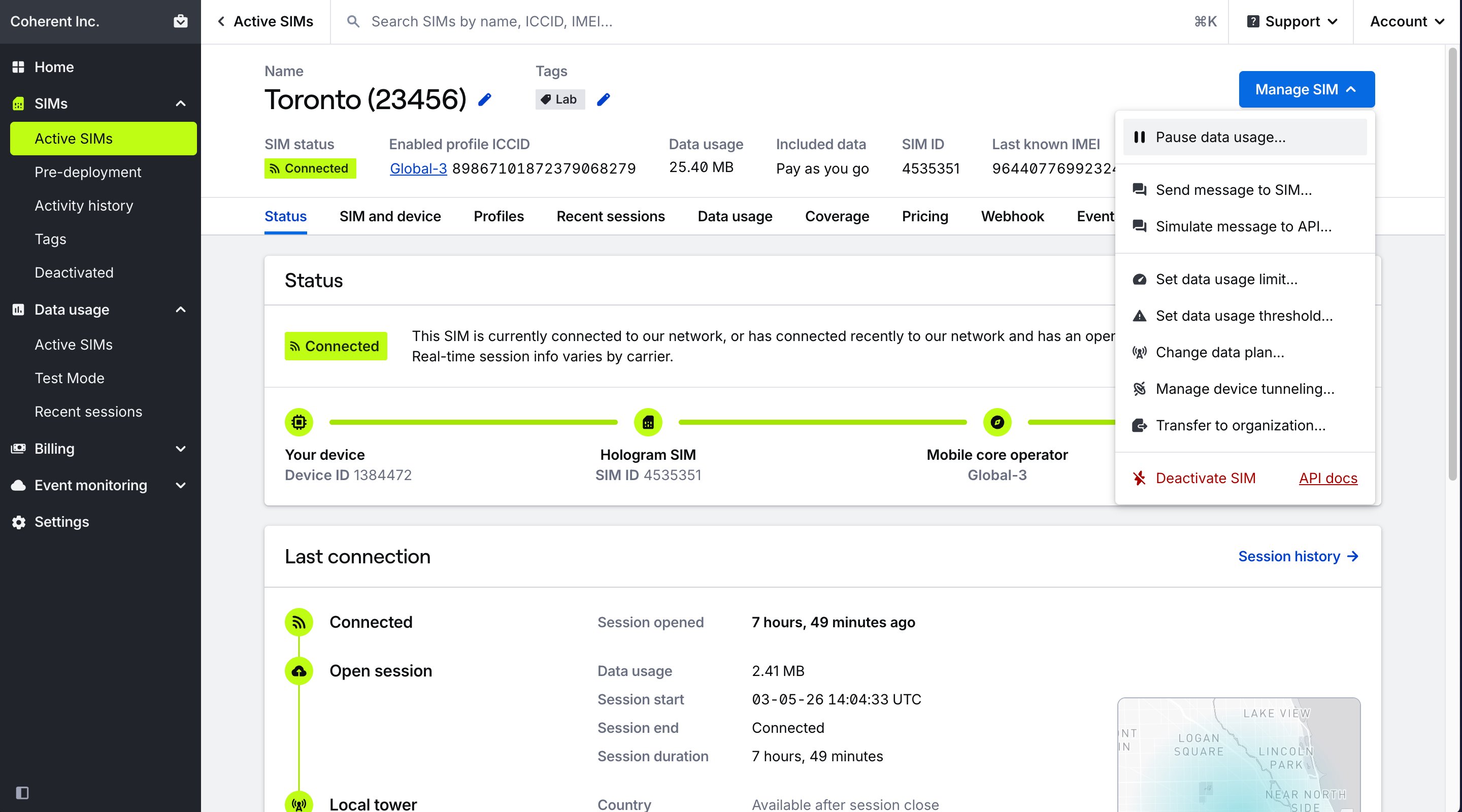 Most actions you can take on a SIM are also available as [bulk actions](/dashboard/sim-actions/bulk-actions-overview) from the SIMs pages.
**Note:** Some actions may not be available depending on your SIM's current status (active, in testing, or deactivated), your user role permissions, or features available to your organization.
## Available single SIM actions
Prevent or allow data usage for the SIM.
Switch this SIM to a different profile.
Add, edit, and delete tags from the SIM using the tags field in the header.
Rename a SIM by clicking on the name in the header.
Send an SMS message to the SIM, or send a TCP or UDP cloud message to the SIM.
Move this SIM to a different data plan.
Set a new data limit for this SIM.
Set a new data warning threshold for this SIM.
Configure secure device tunneling settings for this SIM.
For SIMs with Outage Protection and multiple installed profiles, switch this SIM to a different profile.
Move this SIM to a different organization.
Activate Test Mode SIMs out of pre-deployment testing before their testing has completed.
Permanently deactivate this SIM and remove it from the Hologram network.
## Actions available by SIM status
| Action | Active SIM | Pre-deployment | Deactivated |
| ----------------------------------------- | ------------------------------------------------------ | ------------------------------------------------------ | ------------------------------------------------------ |
| Pause or resume data usage | | | |
| Switch profiles | | | |
| Tag SIM | | | |
| Rename SIM | | | |
| Send message to SIM | | | |
| Set data usage limit | | | |
| Set usage alert threshold | | | |
| Change data plan | | | |
| Transfer to another organization | | | |
| Enable or disable secure device tunneling | | | |
| Transfer to another organization | | | |
| End testing and activate SIM | | | |
| Deactivate SIM | | | |
**Limited access:** Some functionality in your dashboard is restricted or unavailable if you are in a Manager, Editor, or Editor Limited role.
Most actions you can take on a SIM are also available as [bulk actions](/dashboard/sim-actions/bulk-actions-overview) from the SIMs pages.
**Note:** Some actions may not be available depending on your SIM's current status (active, in testing, or deactivated), your user role permissions, or features available to your organization.
## Available single SIM actions
Prevent or allow data usage for the SIM.
Switch this SIM to a different profile.
Add, edit, and delete tags from the SIM using the tags field in the header.
Rename a SIM by clicking on the name in the header.
Send an SMS message to the SIM, or send a TCP or UDP cloud message to the SIM.
Move this SIM to a different data plan.
Set a new data limit for this SIM.
Set a new data warning threshold for this SIM.
Configure secure device tunneling settings for this SIM.
For SIMs with Outage Protection and multiple installed profiles, switch this SIM to a different profile.
Move this SIM to a different organization.
Activate Test Mode SIMs out of pre-deployment testing before their testing has completed.
Permanently deactivate this SIM and remove it from the Hologram network.
## Actions available by SIM status
| Action | Active SIM | Pre-deployment | Deactivated |
| ----------------------------------------- | ------------------------------------------------------ | ------------------------------------------------------ | ------------------------------------------------------ |
| Pause or resume data usage | | | |
| Switch profiles | | | |
| Tag SIM | | | |
| Rename SIM | | | |
| Send message to SIM | | | |
| Set data usage limit | | | |
| Set usage alert threshold | | | |
| Change data plan | | | |
| Transfer to another organization | | | |
| Enable or disable secure device tunneling | | | |
| Transfer to another organization | | | |
| End testing and activate SIM | | | |
| Deactivate SIM | | | |
**Limited access:** Some functionality in your dashboard is restricted or unavailable if you are in a Manager, Editor, or Editor Limited role.