> ## Documentation Index
> Fetch the complete documentation index at: https://docs.hologram.io/llms.txt
> Use this file to discover all available pages before exploring further.
# SIM data usage tab
> Detailed, historical session-level data usage for a SIM is found in the **Data usage tab** for qualifying organizaitons. These reports default to displaying all data usage for the SIM's current billing period, broken down by network, profile, day, and location, with historical session reporting.
**Limited access:** Historical data usage reporting is available to organizations with an active contract, or over \$100 USD in monthly recurring charges and data usage. All other organizations have access to 90 days of [recent data usage](/dashboard/sims/sim-details-data-usage-recent-tab).
## Data usage details tab (default)
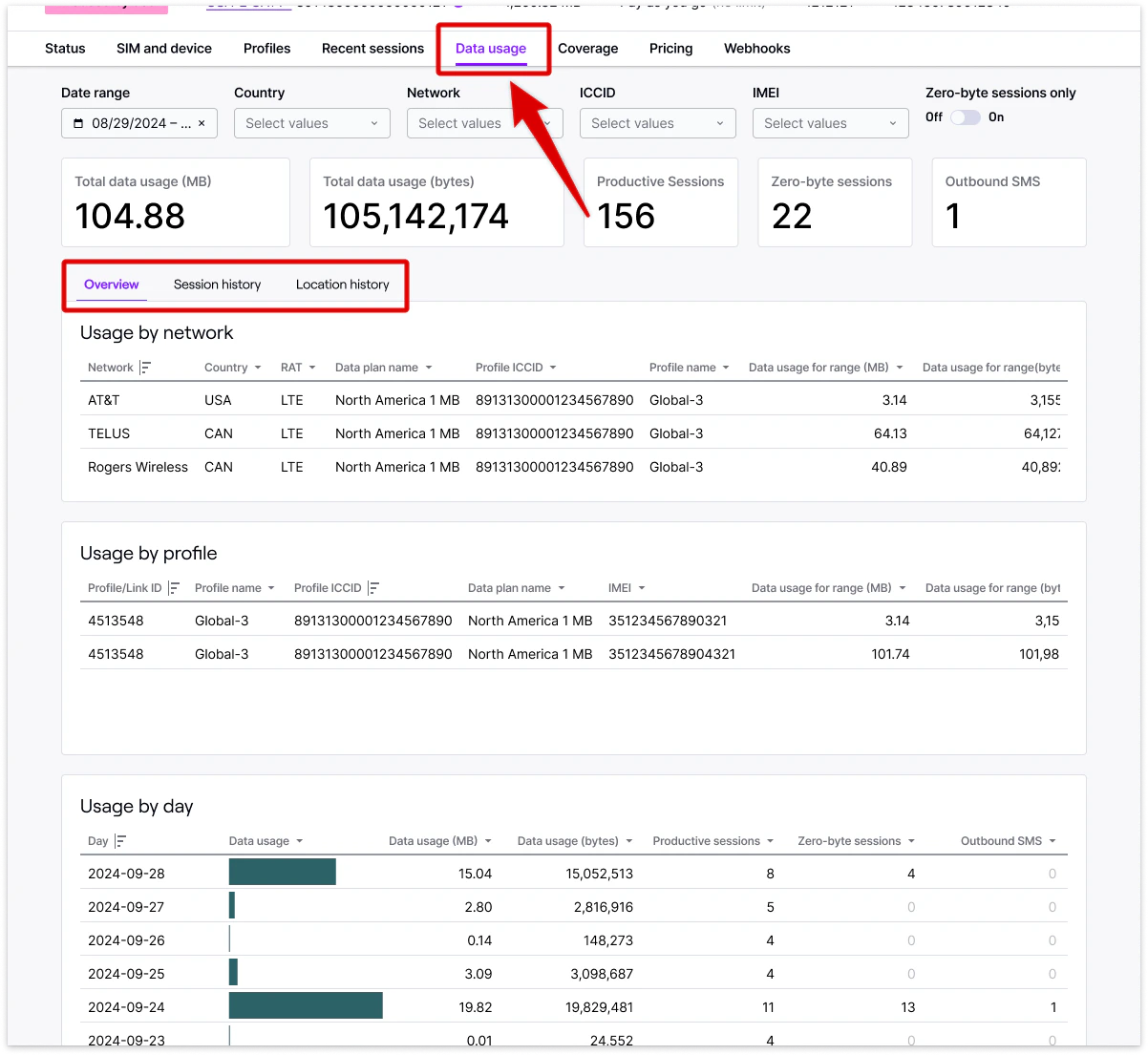
Find summarized data usage within the selected date range for a SIM card by network, profile, or day to understand overall data usage behavior and connectivity changes, and to identify possible device configuration problems from zero-byte sessions.
**Note:** Data within these reports **refreshes hourly**, and may not contain the most recent sessions for a SIM.
* **Data usage by network** - Total data usage broken down by network and profile.
* **Data usage by profile** - Total data usage by profile, especially useful for SIMs with multiple installed profiles and Outage Protection.
* **Data usage by day** - Total data usage broken down by day.
 #### Key metrics and terms
Total data usage for the selected date range in a readable format.
Total data usage for the selected date range in bytes.
Total number of closed sessions in which data was passed through a network.
Total number of sessions in which no data was passed through a network, indicating possible device configuration issues.
Total number of device-originated SMS messages sent from the SIM that count toward a SIM's SMS limit.
## Location history tab
Detailed data usage broken down by location with a map of approximate device location. Data usage is categorized by region, country, network, tower, and latitude and longitude.
**Limited access:** Some functionality in your dashboard is restricted or unavailable if you are in a Manager, Editor, or Editor Limited role.
## Session history tab
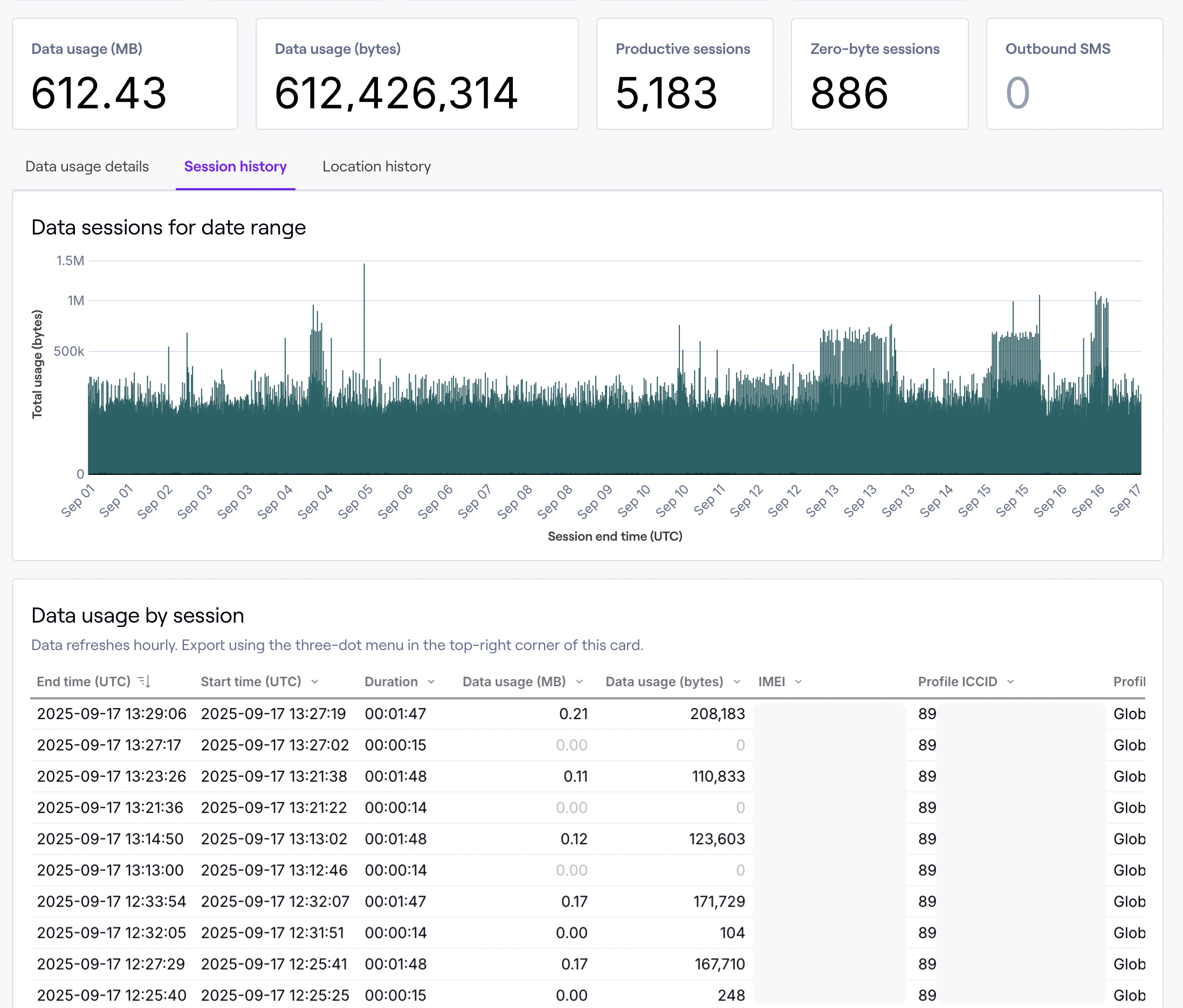
Detailed session-level historical data usage information for a SIM. Detailed data and filtering helps you identify exact issues and pinpoint exactly where and why problems occurred.
#### Key metrics and terms
Total data usage for the selected date range in a readable format.
Total data usage for the selected date range in bytes.
Total number of closed sessions in which data was passed through a network.
Total number of sessions in which no data was passed through a network, indicating possible device configuration issues.
Total number of device-originated SMS messages sent from the SIM that count toward a SIM's SMS limit.
## Location history tab
Detailed data usage broken down by location with a map of approximate device location. Data usage is categorized by region, country, network, tower, and latitude and longitude.
**Limited access:** Some functionality in your dashboard is restricted or unavailable if you are in a Manager, Editor, or Editor Limited role.
## Session history tab
Detailed session-level historical data usage information for a SIM. Detailed data and filtering helps you identify exact issues and pinpoint exactly where and why problems occurred.
 #### Field descriptions
Date/time in UTC the data session ended. Data usage reporting references this date as when data was “used” and billed.
Date/time in UTC the data session started.
Duration in seconds the session lasted.
Total data usage for the session in a readable format.
Total data usage for the session in bytes.
Session or reporting windows if the carrier returns data in timed blocks.
Name of the network used to pass data.
Radio access technology used.
Country the cellular tower was located within.
Cellular tower ID as returned by the carrier, if provided.
Crowdsourced tower location, if provided.
ICCID of the connectivity profile used to connect.
Name of the profile used to connect.
ID of the SIM card.
IMEI of the modem the SIM card connected through, if provided by the carrier and network.
Data plan active on the SIM at the time the session closed, useful for identifying when a change in rates occurred.
#### Field descriptions
Date/time in UTC the data session ended. Data usage reporting references this date as when data was “used” and billed.
Date/time in UTC the data session started.
Duration in seconds the session lasted.
Total data usage for the session in a readable format.
Total data usage for the session in bytes.
Session or reporting windows if the carrier returns data in timed blocks.
Name of the network used to pass data.
Radio access technology used.
Country the cellular tower was located within.
Cellular tower ID as returned by the carrier, if provided.
Crowdsourced tower location, if provided.
ICCID of the connectivity profile used to connect.
Name of the profile used to connect.
ID of the SIM card.
IMEI of the modem the SIM card connected through, if provided by the carrier and network.
Data plan active on the SIM at the time the session closed, useful for identifying when a change in rates occurred.