> ## Documentation Index
> Fetch the complete documentation index at: https://docs.hologram.io/llms.txt
> Use this file to discover all available pages before exploring further.
# Device tab
> Find details about the last known device a SIM was seen in, including the device ID, IMEI, modem and hardware, and basic device settings like the required APN and secure tunneling.
The **Device** tab shows the last known device a SIM was seen in. SIMs can move between physical devices, so device details are tracked separately from the SIM. Device information is based on IMEI information provided through session data if and when available, and Hologram generally does not manage information about your devices.
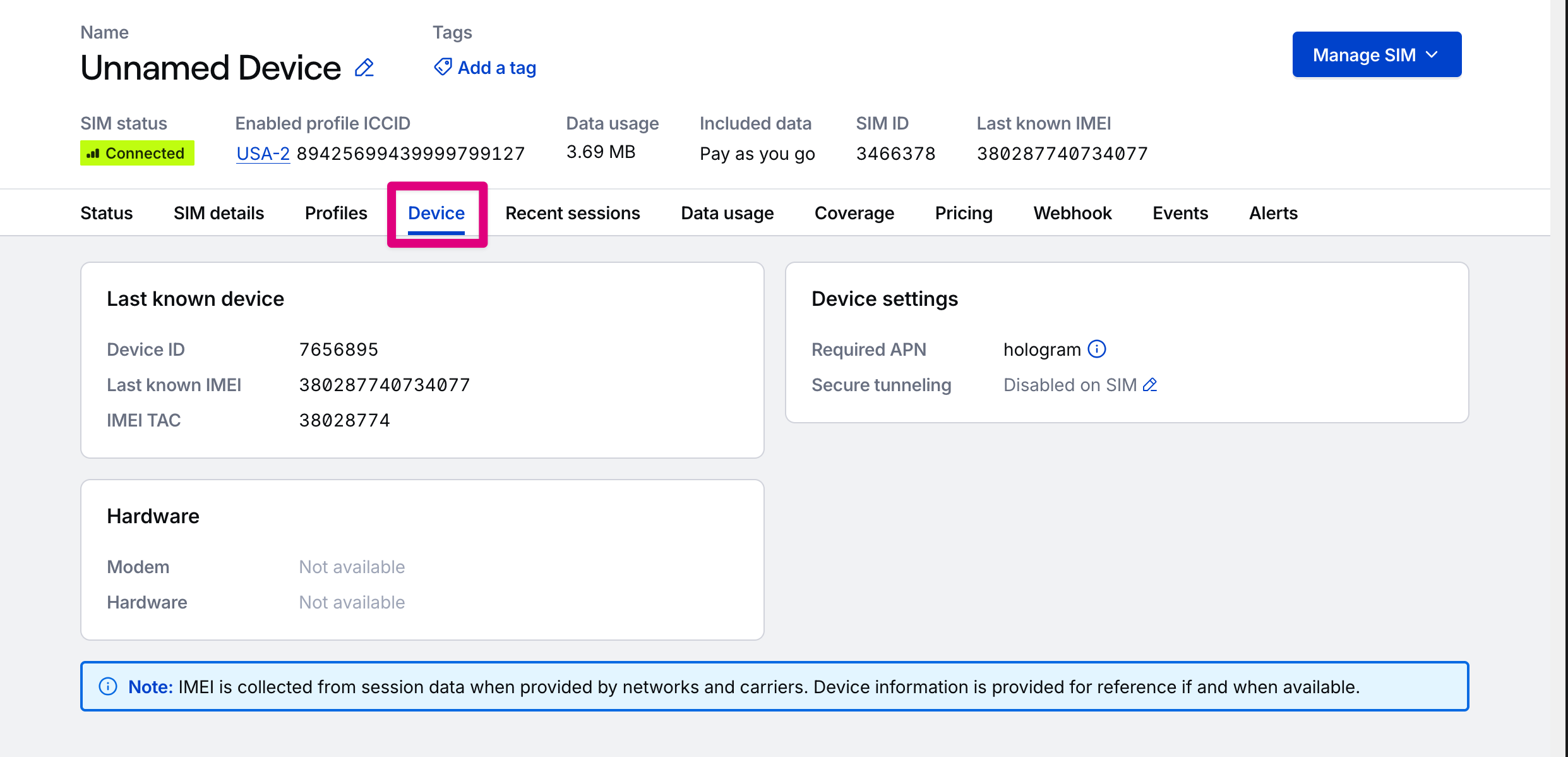 ## Last known device card
The primary identifiers for the last known device. IMEI is collected from session data when provided by networks and carriers. Device information is provided for reference if and when available.
Hologram-assigned ID for your device. Click to copy to clipboard.
Last known IMEI for the device, if available and provided by a network. Click to copy to clipboard.
TAC prefix for the IMEI, the first 8 digits. Click to copy to clipboard. Displays only when the device has a known IMEI.
## Hardware card
What Hologram can determine about the device's hardware from the IMEI TAC if we have associated hardware information for it.
Name of the modem manufacturer, if it can be determined.
Hardware model, if it can be determined.
## Device settings card
Settings that affect the device a SIM is installed within, based on its enabled profile.
The Access Point Name (APN) your device needs to connect through the SIM's enabled profile. If the SIM's profiles require different APNs, all of them display, and your device must switch APNs when the SIM switches profiles. [Learn how to set the APN](/guides/get-started/set-the-device-apn).
Whether secure device tunneling with [Spacebridge](/dashboard/sim-actions/spacebridge-tunneling) is enabled and available through the SIM's enabled profile.
## Related actions
Get device details
## Last known device card
The primary identifiers for the last known device. IMEI is collected from session data when provided by networks and carriers. Device information is provided for reference if and when available.
Hologram-assigned ID for your device. Click to copy to clipboard.
Last known IMEI for the device, if available and provided by a network. Click to copy to clipboard.
TAC prefix for the IMEI, the first 8 digits. Click to copy to clipboard. Displays only when the device has a known IMEI.
## Hardware card
What Hologram can determine about the device's hardware from the IMEI TAC if we have associated hardware information for it.
Name of the modem manufacturer, if it can be determined.
Hardware model, if it can be determined.
## Device settings card
Settings that affect the device a SIM is installed within, based on its enabled profile.
The Access Point Name (APN) your device needs to connect through the SIM's enabled profile. If the SIM's profiles require different APNs, all of them display, and your device must switch APNs when the SIM switches profiles. [Learn how to set the APN](/guides/get-started/set-the-device-apn).
Whether secure device tunneling with [Spacebridge](/dashboard/sim-actions/spacebridge-tunneling) is enabled and available through the SIM's enabled profile.
## Related actions
Get device details GET /devices/{"{deviceId}"}
Enable or disable secure tunneling with Spacebridge
**Limited access:** Some functionality in your dashboard is restricted to [roles with access](/guides/permissions/roles-and-permissions).
This documentation is built and hosted on [Mintlify](https://mintlify.com), a developer documentation platform.