> ## Documentation Index
> Fetch the complete documentation index at: https://docs.hologram.io/llms.txt
> Use this file to discover all available pages before exploring further.
# SIM Events tab
> Event history is a record of Hologram Cloud events tracked for a SIM, including messaging, IMEI changes, data limits reached, and more. Events are created when specific events occur in your fleet, and are tracked using event tags. Get notified when events occur by creating an [alert](/dashboard/event-monitoring/alerts-and-notifications).
**Note:** The information in this page used to be displayed in the **Activity Console** drawer that opened from the bottom of your dashboard.
The Events tab contains a list of Hologram Cloud events that occurred for apply to the current SIM. Each record shows whether the event was inbound to a SIM or outbound from it, the date and time of the event, the message passed through the event, and any event tags associated with the event that can be used with **Alerts** to trigger notifications. Any errors that occurred during the event are listed beneath the event tags.
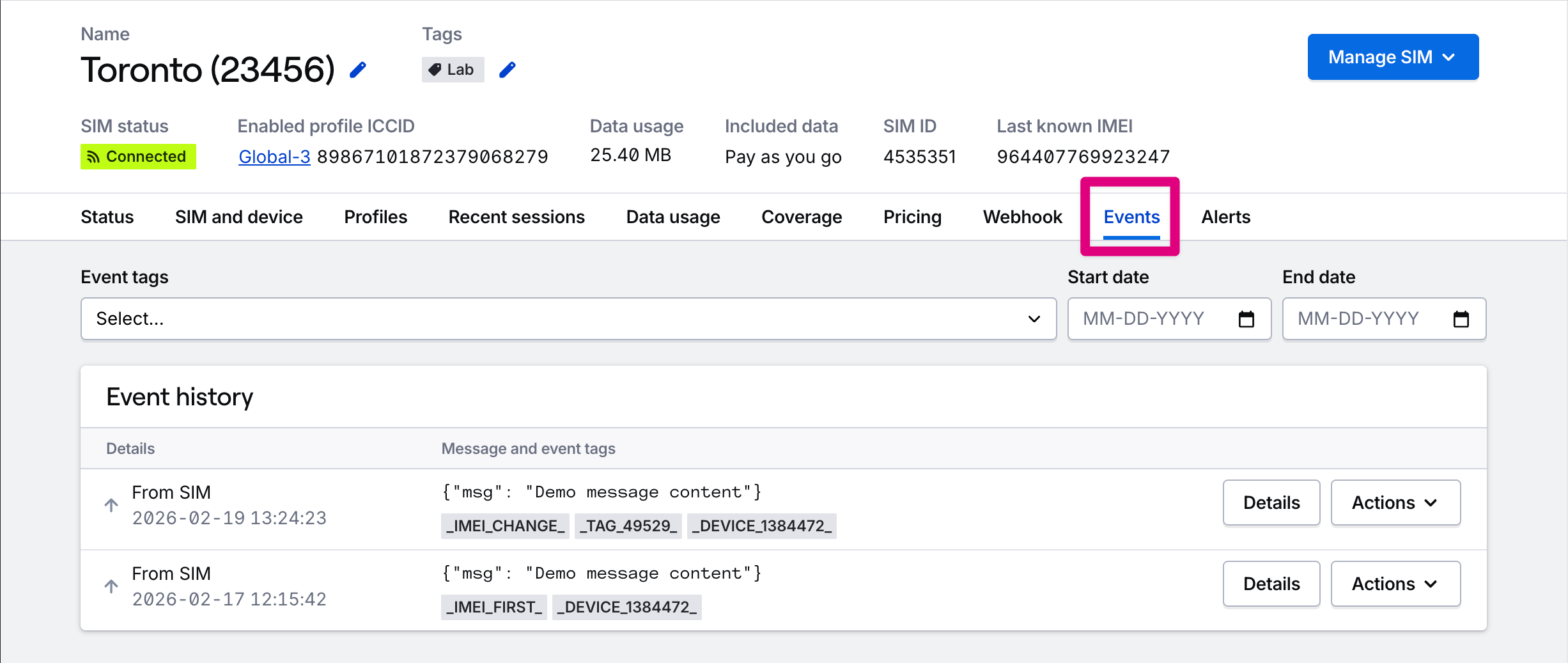 Pressing the **Details** button will open a modal with more information about the event, including raw message contents.
The **Actions** menu provides a shortcut to send a SMS or TCP/UDP cloud message to the SIM.
Pressing the **Details** button will open a modal with more information about the event, including raw message contents.
The **Actions** menu provides a shortcut to send a SMS or TCP/UDP cloud message to the SIM.