> ## Documentation Index
> Fetch the complete documentation index at: https://docs.hologram.io/llms.txt
> Use this file to discover all available pages before exploring further.
# SIM Recent sessions tab
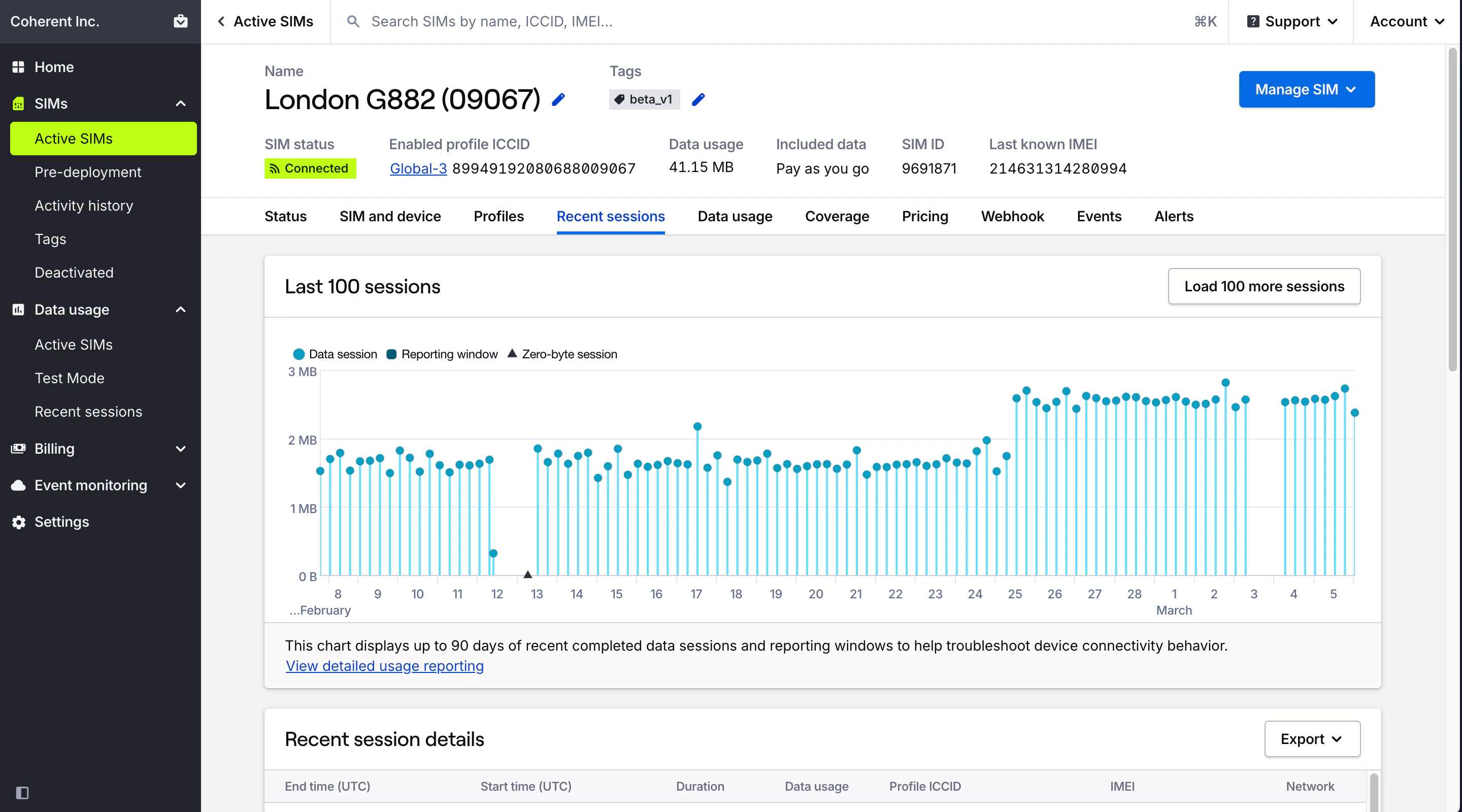
> This view of a SIM provides near-real-time view of recent, closed data sessions within the last 90 days.
 **Caution:** This report provides information about closed sessions that occurred **within the last 90 days**. Organizations with over \$100 USD in monthly recurring charges and data usage gain access to full historical reporting in the **Data usage** tab.
## Recent sessions chart
This chart provides a visual overview of the last 100 closed data sessions for a SIM and is useful for identifying patterns in session activity. Consecutive zero-byte sessions can be an indicator of device configuration issues. Hover over sessions for more details.
## Recent session details card
Lists detailed information about recent data session for a SIM, including start and end times, duration, network, profile ICCID, IMEI (if available), and RAT. You can export the data to XLSX, CSV, or JSON formats using the **Export menu** in the top right of the Recent sessions card.
Fallback events for SIMs with Outage Protection are indicated with a visual indicator and label.
**Limited access:** Prevent unexpected outages with Outage Protection and get contractually guaranteed reliability by contacting our [sales team](https://www.hologram.io/contact-sales?utm_source=docs\&utm_medium=website\&utm_content=outage_protection_callout).
Sessions that occurred during Test Mode are indicated with a Test Mode indicator and label.
**Limited access:** Learn more about Test Mode and streamline your deployments by contacting our [sales team](https://www.hologram.io/contact-sales?utm_source=docs\&utm_medium=website\&utm_content=test_mode_callout).
## Related guides
View session history and usage analytics for a single SIM
Understand SIM-level plan rates and add-ons
**Caution:** This report provides information about closed sessions that occurred **within the last 90 days**. Organizations with over \$100 USD in monthly recurring charges and data usage gain access to full historical reporting in the **Data usage** tab.
## Recent sessions chart
This chart provides a visual overview of the last 100 closed data sessions for a SIM and is useful for identifying patterns in session activity. Consecutive zero-byte sessions can be an indicator of device configuration issues. Hover over sessions for more details.
## Recent session details card
Lists detailed information about recent data session for a SIM, including start and end times, duration, network, profile ICCID, IMEI (if available), and RAT. You can export the data to XLSX, CSV, or JSON formats using the **Export menu** in the top right of the Recent sessions card.
Fallback events for SIMs with Outage Protection are indicated with a visual indicator and label.
**Limited access:** Prevent unexpected outages with Outage Protection and get contractually guaranteed reliability by contacting our [sales team](https://www.hologram.io/contact-sales?utm_source=docs\&utm_medium=website\&utm_content=outage_protection_callout).
Sessions that occurred during Test Mode are indicated with a Test Mode indicator and label.
**Limited access:** Learn more about Test Mode and streamline your deployments by contacting our [sales team](https://www.hologram.io/contact-sales?utm_source=docs\&utm_medium=website\&utm_content=test_mode_callout).
## Related guides
View session history and usage analytics for a single SIM
Understand SIM-level plan rates and add-ons