> ## Documentation Index
> Fetch the complete documentation index at: https://docs.hologram.io/llms.txt
> Use this file to discover all available pages before exploring further.
# SIM details tab
> Find a SIM's identifiers, configuration, fallback behavior, settings, and key dates in the SIM details tab, and change settings like data limits and data warnings.
The **SIM details** tab shows how a single SIM is identified and configured, how it falls back between profiles, and the settings and key dates for the SIM. Details about the device the SIM was last seen in are on the [Device tab](/dashboard/sims/sim-details-device-tab), and details about each installed profile are on the [Profiles tab](/dashboard/sims/sim-details-profiles-tab).
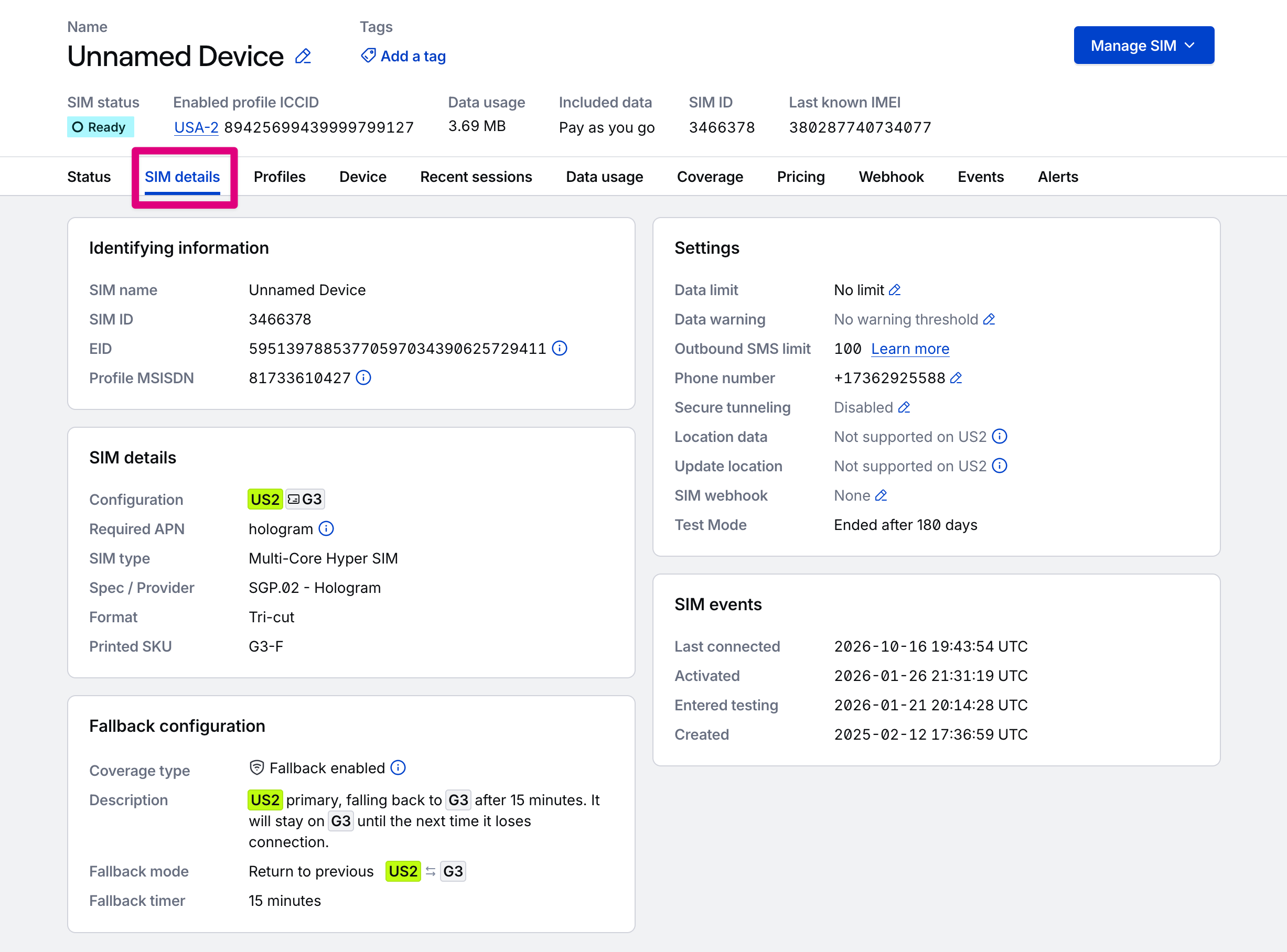 ## SIM details page content
### Identifying information
The primary identifiers for the SIM and its enabled profile.
Name of the SIM. To rename the SIM, use the name in the page header.
Hologram's unique ID for the SIM card. Click to copy to clipboard.
The eUICC identifier (EID) is the permanent ID of the chip in the SIM. It doesn't change when profiles are added to or removed from the card. Displays only for SIMs with an EID.
MSISDN of the enabled profile on the SIM.
### SIM details
Details about the SIM's configuration and specifications.
The profiles on the SIM, in configuration order, shown as pills. The enabled profile is highlighted. A ticket icon marks the first backup profile the SIM would move to, and profiles the SIM can't or won't switch to are dimmed. Hover over a profile to see its name, ICCID, Profile/Link ID, installation status, network status, and, if the SIM has an intended configuration, what that configuration asks of the profile. Select a profile to open its [profile details](/dashboard/sims/sim-details-profiles-tab#profile-details).
Displays only for SIMs that connect using a single profile and have no fallback configuration.
The Access Point Name (APN) your device needs to connect. If the SIM's profiles require different APNs, all of them display separated by slashes, with the enabled profile's APN emphasized, and your device must switch APNs when the SIM switches profiles. [Learn how to set the APN](/guides/get-started/set-the-device-apn).
The coverage type of the SIM, like Dual-Core SIM, Multi-Core SIM, or Single-Core SIM. Hover over the information icon for what the type means.
The eUICC specification and provider of the SIM. Displays **Unknown** if it isn't available.
The physical format of the SIM, like Tri-cut, MFF2, or eSIM.
The SKU printed on the SIM hardware. Displays **Not available** if it isn't known.
### Fallback configuration
How the SIM falls back between its installed profiles. This card doesn't display for SIMs that can't use or don't support fallback, like single profile UICC SIMs.
Whether the SIM is protected against outages on a single profile:
* **Fallback enabled:** The SIM automatically falls back to a backup profile if the primary profile loses connection. With Outage Protection™, you also have a guaranteed uptime SLA.
* **Dual-core capable:** The SIM has multiple profiles installed, but fallback isn't active.
* **Single-core SIM:** The SIM has a single profile installed and depends on a single carrier for connectivity and coverage.
A plain-language summary of the SIM's current configuration, with profiles shown as pills.
How the SIM switches between profiles automatically. SIMs with a SKU ending in "-F" default to **Return to previous** fallback mode. **Return to previous** switches between the primary profile and a single target fallback profile. SIMs with a SKU ending in "-R" default to **Cyclical** fallback mode. **Cyclical** moves through the backup profiles in order and then return to the primary profile after a Recovery Period.
How long the SIM tries to reconnect on its enabled profile before it falls back to a backup profile. Default is 15 minutes.
How long the SIM waits before it tries to return to its primary profile. Displays only for SIMs that support a recovery timer (SKU ends in "-R"). Default is 24 hours.
### Intended configuration
The configuration the SIM is meant to be in. For organizations with an active contract, this generally matches the contracted configuration for the SIM so you can see how the SIM's current configuration compares.
This card lists only information that differs from the SIM's current configuration. Select **Details** to compare the current and intended configurations side by side.
## Settings card
All the settings that can be configured or otherwise are available to or limited for a SIM, such as data usage limits and communication settings. Editable fields will show an edit icon and can be clicked. Some settings are restricted to certain roles, configurations, SIM types, or based on the SIM's installed profiles.
The SIM's [data usage limit](/dashboard/sim-actions/set-usage-limits) at which the SIM is paused.
The SIM's [data usage warning threshold](/dashboard/sim-actions/set-data-warning-threshold).
The SIM's [outbound SMS limit](/guides/rest-api/set-a-sims-sms-limit-using-the-rest-api) at which the SIM is paused.
The SIM's [phone number](/dashboard/sims/sim-details-pricing-tab), if purchased and available.
Displays when some or all of the SIM's profiles don't support SMS. Profiles that don't support SMS can't receive messages sent from the dashboard or API.
Whether [Spacebridge](/dashboard/sim-actions/spacebridge-tunneling) secure tunneling is **Enabled** or **Disabled** for the SIM. If none of the SIM's profiles support it, the row reads **Not supported**, with the SIM's current setting in parentheses. Displays only when Spacebridge is available to your organization. If the SIM's enabled profile doesn't support secure tunneling, the setting can't be changed and your device cannot connect via Spacebridge.
Displays when some or all of the SIM's profiles don't support location data, or when location data is turned off for your organization, in which case it reads **Disabled**. Sessions on profiles without location data have no country or tower location.
Displays when some or all of the SIM's profiles don't support updating location. A [network refresh](/dashboard/sim-actions/network-refresh) can't update the location of a SIM running a profile without it.
Whether a [webhook](/dashboard/sims/sim-details-webhook-tab) is **Configured** for the SIM or **None**. Displays only when webhooks are available to your organization.
The SIM's [Test Mode](/dashboard/sims/sim-details-test-mode-tab) duration, along with the free data and SMS allowances that end testing early. After testing ends, it shows how long the SIM was in testing. Displays only for SIMs that are configured with Test Mode.
### SIM events
Key dates for the SIM, such as when it was last connected, when it was activated, and when it entered Test Mode. Dates are in UTC. Hover over a date to see it in your local time.
When the SIM last connected.
The date the SIM is scheduled to leave Test Mode and activate. Displays only for SIMs that are configured with Test Mode.
When the SIM was activated.
Displays whether the SIM was activated at the end of its testing period. If not specified for a SIM in test mode, it was force activated, or reached its free data or SMS limit.
When the SIM entered Test Mode. Displays only for SIMs that are configured with Test Mode.
When the SIM was created.
## How do I resolve configuration warnings?
Your SIM has fallen back or switched to a backup profile and is not on the preferred profile for its configuration. Select **Switch profiles** to [recover the SIM manually](/dashboard/sim-actions/switch-profiles).
On a SIM using the **Return to previous** fallback mode, the target fallback profile is in a network state that doesn't allow switching profiles. The SIM can't use Outage Protection™ or fall back automatically until you switch profiles manually to update the state of the SIM.
If profiles installed on a single SIM use different APNs, your device must be able to identify and switch APNs when the SIM switches profiles. [Learn how to set the APN](/guides/get-started/set-the-device-apn).
Conductor is running eUICC operations on your SIM and may take some time to process. Some actions on a SIM aren't available while this process is underway. Conductor event records and any errors that occurred can be found in the [Events tab](/dashboard/sims/sim-details-events-tab) or in the [Event monitoring → Event history](/dashboard/event-monitoring/event-history) page.
## Related actions
Pause a SIM when it reaches a data usage limit
Create an event when a SIM reaches a data usage threshold
Manually switch the enabled profile on a SIM
**Limited access:** Some functionality in your dashboard is restricted to [roles with access](/guides/permissions/roles-and-permissions).
This documentation is built and hosted on [Mintlify](https://mintlify.com), a developer documentation platform.
## SIM details page content
### Identifying information
The primary identifiers for the SIM and its enabled profile.
Name of the SIM. To rename the SIM, use the name in the page header.
Hologram's unique ID for the SIM card. Click to copy to clipboard.
The eUICC identifier (EID) is the permanent ID of the chip in the SIM. It doesn't change when profiles are added to or removed from the card. Displays only for SIMs with an EID.
MSISDN of the enabled profile on the SIM.
### SIM details
Details about the SIM's configuration and specifications.
The profiles on the SIM, in configuration order, shown as pills. The enabled profile is highlighted. A ticket icon marks the first backup profile the SIM would move to, and profiles the SIM can't or won't switch to are dimmed. Hover over a profile to see its name, ICCID, Profile/Link ID, installation status, network status, and, if the SIM has an intended configuration, what that configuration asks of the profile. Select a profile to open its [profile details](/dashboard/sims/sim-details-profiles-tab#profile-details).
Displays only for SIMs that connect using a single profile and have no fallback configuration.
The Access Point Name (APN) your device needs to connect. If the SIM's profiles require different APNs, all of them display separated by slashes, with the enabled profile's APN emphasized, and your device must switch APNs when the SIM switches profiles. [Learn how to set the APN](/guides/get-started/set-the-device-apn).
The coverage type of the SIM, like Dual-Core SIM, Multi-Core SIM, or Single-Core SIM. Hover over the information icon for what the type means.
The eUICC specification and provider of the SIM. Displays **Unknown** if it isn't available.
The physical format of the SIM, like Tri-cut, MFF2, or eSIM.
The SKU printed on the SIM hardware. Displays **Not available** if it isn't known.
### Fallback configuration
How the SIM falls back between its installed profiles. This card doesn't display for SIMs that can't use or don't support fallback, like single profile UICC SIMs.
Whether the SIM is protected against outages on a single profile:
* **Fallback enabled:** The SIM automatically falls back to a backup profile if the primary profile loses connection. With Outage Protection™, you also have a guaranteed uptime SLA.
* **Dual-core capable:** The SIM has multiple profiles installed, but fallback isn't active.
* **Single-core SIM:** The SIM has a single profile installed and depends on a single carrier for connectivity and coverage.
A plain-language summary of the SIM's current configuration, with profiles shown as pills.
How the SIM switches between profiles automatically. SIMs with a SKU ending in "-F" default to **Return to previous** fallback mode. **Return to previous** switches between the primary profile and a single target fallback profile. SIMs with a SKU ending in "-R" default to **Cyclical** fallback mode. **Cyclical** moves through the backup profiles in order and then return to the primary profile after a Recovery Period.
How long the SIM tries to reconnect on its enabled profile before it falls back to a backup profile. Default is 15 minutes.
How long the SIM waits before it tries to return to its primary profile. Displays only for SIMs that support a recovery timer (SKU ends in "-R"). Default is 24 hours.
### Intended configuration
The configuration the SIM is meant to be in. For organizations with an active contract, this generally matches the contracted configuration for the SIM so you can see how the SIM's current configuration compares.
This card lists only information that differs from the SIM's current configuration. Select **Details** to compare the current and intended configurations side by side.
## Settings card
All the settings that can be configured or otherwise are available to or limited for a SIM, such as data usage limits and communication settings. Editable fields will show an edit icon and can be clicked. Some settings are restricted to certain roles, configurations, SIM types, or based on the SIM's installed profiles.
The SIM's [data usage limit](/dashboard/sim-actions/set-usage-limits) at which the SIM is paused.
The SIM's [data usage warning threshold](/dashboard/sim-actions/set-data-warning-threshold).
The SIM's [outbound SMS limit](/guides/rest-api/set-a-sims-sms-limit-using-the-rest-api) at which the SIM is paused.
The SIM's [phone number](/dashboard/sims/sim-details-pricing-tab), if purchased and available.
Displays when some or all of the SIM's profiles don't support SMS. Profiles that don't support SMS can't receive messages sent from the dashboard or API.
Whether [Spacebridge](/dashboard/sim-actions/spacebridge-tunneling) secure tunneling is **Enabled** or **Disabled** for the SIM. If none of the SIM's profiles support it, the row reads **Not supported**, with the SIM's current setting in parentheses. Displays only when Spacebridge is available to your organization. If the SIM's enabled profile doesn't support secure tunneling, the setting can't be changed and your device cannot connect via Spacebridge.
Displays when some or all of the SIM's profiles don't support location data, or when location data is turned off for your organization, in which case it reads **Disabled**. Sessions on profiles without location data have no country or tower location.
Displays when some or all of the SIM's profiles don't support updating location. A [network refresh](/dashboard/sim-actions/network-refresh) can't update the location of a SIM running a profile without it.
Whether a [webhook](/dashboard/sims/sim-details-webhook-tab) is **Configured** for the SIM or **None**. Displays only when webhooks are available to your organization.
The SIM's [Test Mode](/dashboard/sims/sim-details-test-mode-tab) duration, along with the free data and SMS allowances that end testing early. After testing ends, it shows how long the SIM was in testing. Displays only for SIMs that are configured with Test Mode.
### SIM events
Key dates for the SIM, such as when it was last connected, when it was activated, and when it entered Test Mode. Dates are in UTC. Hover over a date to see it in your local time.
When the SIM last connected.
The date the SIM is scheduled to leave Test Mode and activate. Displays only for SIMs that are configured with Test Mode.
When the SIM was activated.
Displays whether the SIM was activated at the end of its testing period. If not specified for a SIM in test mode, it was force activated, or reached its free data or SMS limit.
When the SIM entered Test Mode. Displays only for SIMs that are configured with Test Mode.
When the SIM was created.
## How do I resolve configuration warnings?
Your SIM has fallen back or switched to a backup profile and is not on the preferred profile for its configuration. Select **Switch profiles** to [recover the SIM manually](/dashboard/sim-actions/switch-profiles).
On a SIM using the **Return to previous** fallback mode, the target fallback profile is in a network state that doesn't allow switching profiles. The SIM can't use Outage Protection™ or fall back automatically until you switch profiles manually to update the state of the SIM.
If profiles installed on a single SIM use different APNs, your device must be able to identify and switch APNs when the SIM switches profiles. [Learn how to set the APN](/guides/get-started/set-the-device-apn).
Conductor is running eUICC operations on your SIM and may take some time to process. Some actions on a SIM aren't available while this process is underway. Conductor event records and any errors that occurred can be found in the [Events tab](/dashboard/sims/sim-details-events-tab) or in the [Event monitoring → Event history](/dashboard/event-monitoring/event-history) page.
## Related actions
Pause a SIM when it reaches a data usage limit
Create an event when a SIM reaches a data usage threshold
Manually switch the enabled profile on a SIM
**Limited access:** Some functionality in your dashboard is restricted to [roles with access](/guides/permissions/roles-and-permissions).
This documentation is built and hosted on [Mintlify](https://mintlify.com), a developer documentation platform.