> ## Documentation Index
> Fetch the complete documentation index at: https://docs.hologram.io/llms.txt
> Use this file to discover all available pages before exploring further.
# SIM Status tab
> This view of a single SIM provides an overview of the SIM's current connectivity, status, last known session details, last known location, and data usage for the SIM's current billing period.
## Status card
An overview of the connectivity status of a SIM. It displays a path of connectivity to illustrate how a SIM connects to the internet and where communication for various status changes take place. Click to copy device, SIM, and enabled profile (link) IDs from this card.
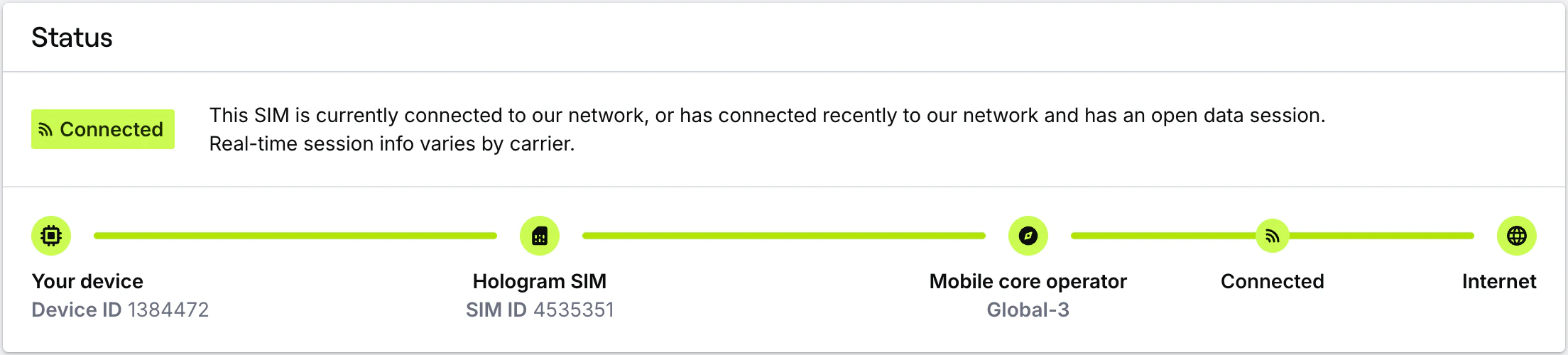 The SIM's current status and description.
Displays the customer device ID. Click to copy to clipboard.
Displays the Hologram SIM ID. Click to copy to clipboard.
Displays the profile name of the mobile core operator. Hover to view and copy profile (link) ID for the profile.
Represents the SIM's connection to the internet.
## Last connection card
An overview of the last known session information for a SIM, as provided by the network and carrier. You can find open session details, location information, and information about reporting windows and the APN required for your device to connect. Note that not every network, carrier, or session provides information like IMEI, location, or ongoing data usage for open sessions.
The SIM's current status and description.
Displays the customer device ID. Click to copy to clipboard.
Displays the Hologram SIM ID. Click to copy to clipboard.
Displays the profile name of the mobile core operator. Hover to view and copy profile (link) ID for the profile.
Represents the SIM's connection to the internet.
## Last connection card
An overview of the last known session information for a SIM, as provided by the network and carrier. You can find open session details, location information, and information about reporting windows and the APN required for your device to connect. Note that not every network, carrier, or session provides information like IMEI, location, or ongoing data usage for open sessions.
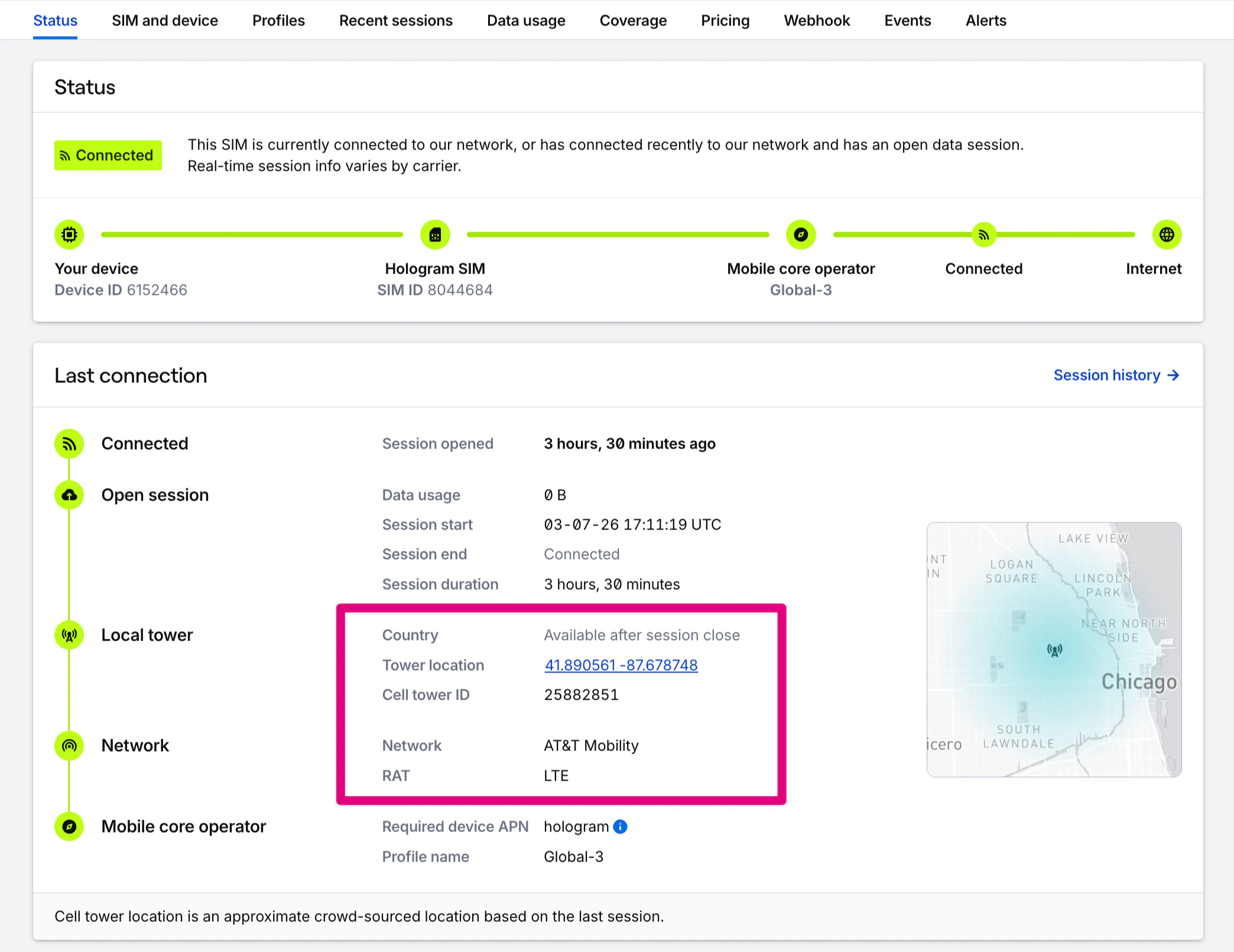 Relative time since the SIM's last closed session or the start of its current open session. This matches the Last active column in the SIMs pages. For SIMs configured with pre-deployment testing, this session may have occurred during Test Mode.
Summarizes total data usage for the last closed session.
Displays only for reporting windows for carriers that return timed blocks of data usage rather than individual sessions.
UTC timestamps of the last closed session, and how long it lasted.
The cellular network the SIM last connected to in a data session.
Radio Access Technology for the last closed session (e.g., 3G, 4G LTE).
Country in which the last closed session occurred.
Approximate crowdsourced latitude/longitude of the cell tower the SIM connected to, if available.
ID of the network cell tower the SIM connected to, if provided by a network.
Map of the latitude/longitude of the last known connection if known. Click to view in Google Maps.
APN(s) required for device configuration, as determined by the SIM's installed profiles.
The name and ICCID of the currently enabled connectivity profile a SIM can use data through.
## Usage this billing period card
An overview of the data usage for the SIM's current billing period.
If your account uses prepaid self-service billing, SIMs use data and are billed on a 30-day billing period beginning when the SIM was activated. If your account uses invoiced monthly billing, SIMs use data and are billed monthly. Data plan included data and data limits always apply to each SIM's unique 30-day billing period.
Relative time since the SIM's last closed session or the start of its current open session. This matches the Last active column in the SIMs pages. For SIMs configured with pre-deployment testing, this session may have occurred during Test Mode.
Summarizes total data usage for the last closed session.
Displays only for reporting windows for carriers that return timed blocks of data usage rather than individual sessions.
UTC timestamps of the last closed session, and how long it lasted.
The cellular network the SIM last connected to in a data session.
Radio Access Technology for the last closed session (e.g., 3G, 4G LTE).
Country in which the last closed session occurred.
Approximate crowdsourced latitude/longitude of the cell tower the SIM connected to, if available.
ID of the network cell tower the SIM connected to, if provided by a network.
Map of the latitude/longitude of the last known connection if known. Click to view in Google Maps.
APN(s) required for device configuration, as determined by the SIM's installed profiles.
The name and ICCID of the currently enabled connectivity profile a SIM can use data through.
## Usage this billing period card
An overview of the data usage for the SIM's current billing period.
If your account uses prepaid self-service billing, SIMs use data and are billed on a 30-day billing period beginning when the SIM was activated. If your account uses invoiced monthly billing, SIMs use data and are billed monthly. Data plan included data and data limits always apply to each SIM's unique 30-day billing period.
 Total data usage for this SIM's current billing period.
The amount of data included in the SIM's current data plan, and the data usage limit if set.
The SIM's current outbound SMS count and SMS limit.
The SIM's current billing period. This is every 30 days for prepaid organizations, and monthly for postpaid organizations.
SIMs in Test Mode configured for pre-deployment testing use data over their testing period and automatically activate after their testing period ends, using 100 KB of data, or sending 10 outbound SMS messages, whichever comes first.
**Limited access:** Learn more about Test Mode and streamline your deployments by contacting our [sales team](https://www.hologram.io/contact-sales?utm_source=docs\&utm_medium=website\&utm_content=test_mode_callout).
Lifetime test data usage for this SIM, and the threshold of data usage at which it will automatically activate.
The SIM's current data usage against the free 100 KB it can use before activating.
Total number of outbound SMS the SIM can use before activating.
The date at which the SIM will automatically activate if it has not reached its data or outbound SMS limits.
Total data usage for this SIM's current billing period.
The amount of data included in the SIM's current data plan, and the data usage limit if set.
The SIM's current outbound SMS count and SMS limit.
The SIM's current billing period. This is every 30 days for prepaid organizations, and monthly for postpaid organizations.
SIMs in Test Mode configured for pre-deployment testing use data over their testing period and automatically activate after their testing period ends, using 100 KB of data, or sending 10 outbound SMS messages, whichever comes first.
**Limited access:** Learn more about Test Mode and streamline your deployments by contacting our [sales team](https://www.hologram.io/contact-sales?utm_source=docs\&utm_medium=website\&utm_content=test_mode_callout).
Lifetime test data usage for this SIM, and the threshold of data usage at which it will automatically activate.
The SIM's current data usage against the free 100 KB it can use before activating.
Total number of outbound SMS the SIM can use before activating.
The date at which the SIM will automatically activate if it has not reached its data or outbound SMS limits.