> ## Documentation Index
> Fetch the complete documentation index at: https://docs.hologram.io/llms.txt
> Use this file to discover all available pages before exploring further.
# Active SIMs page
> The default view of your SIMs shows all Hologram SIMs that are able to connect to the internet, including all Paused and Ready SIMs. These SIMs have been activated are charged a per-SIM monthly recurring charge for access to our platform and network.
## Active SIMs overview
The table lists recent data usage for each SIM, and provides a quick overview of each SIM's status and current configuration. Active SIMs are sorted by **Last closed session** date to help quickly identify SIMs with recent connections.
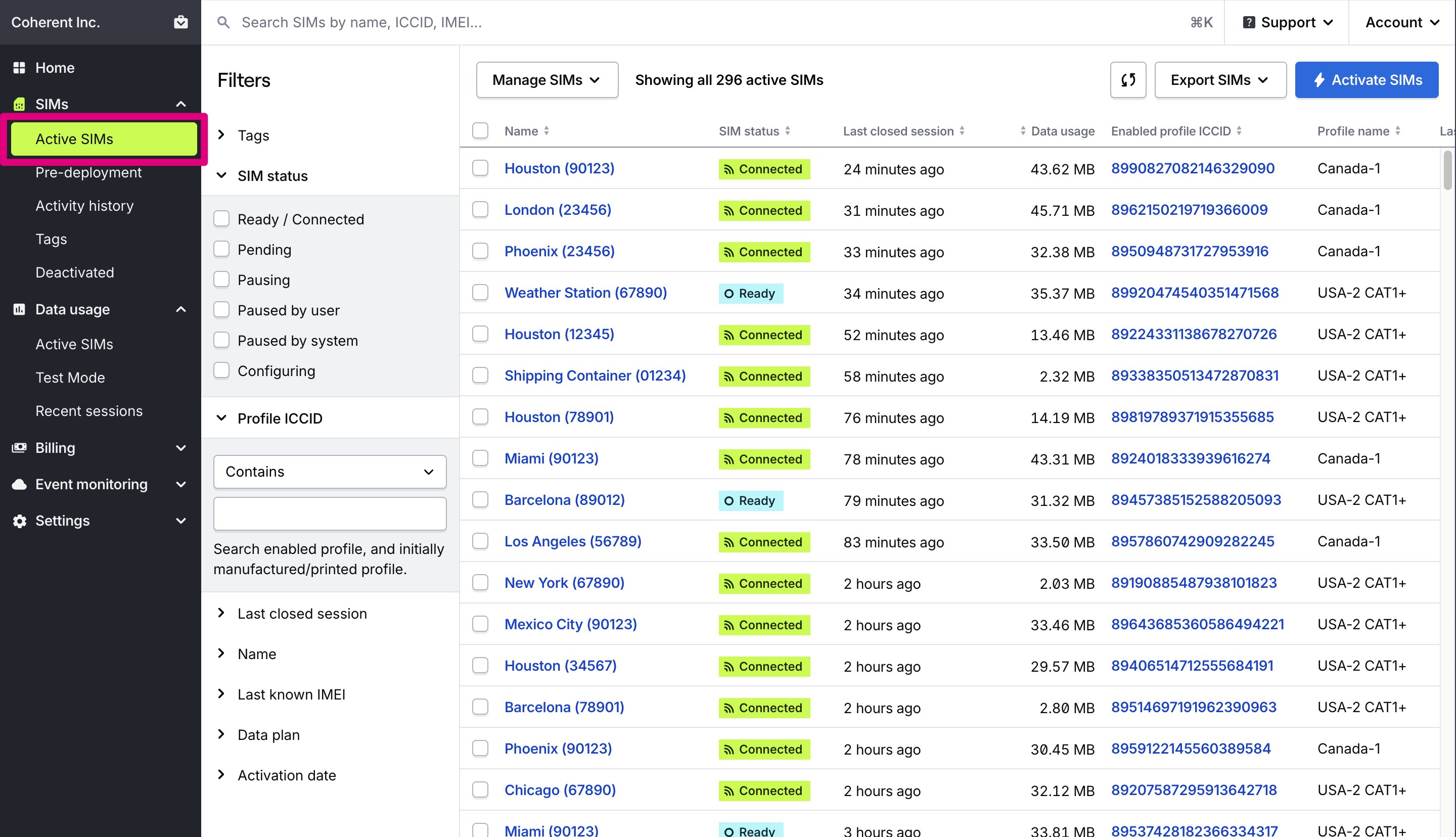 Active SIMs include all SIMs in a `LIVE...` or `PAUSED...` network state. Read more about [SIM statuses and states](/dashboard/sims/sim-states-and-statuses).
## Active SIMs fields
Name given to this SIM card.
The status of this SIM, which helps describe its ability to use data. Hover for a detailed description
Date and time in UTC of the last closed session for the SIM. This is when data is billed and how we calculate data usage.
Data usage for the SIM's current billing period. For prepaid/self-service billing, data usage is for the SIM's unique 30-day billing period. For postpaid invoiced billing, data usage is for the current calendar month.
ICCID of the currently enabled profile able to use data. Click to view the SIM's installed profiles and fallback events.
Name of the enabled profile, which generally describes available carrier coverage.
IMEI of the last known device associated with the SIM, if known and provided by a carrier or network.
Hologram's unique ID for a SIM card.
Name of the currently active data plan which determine's a SIM's coverage and cost. *Not available to Editor Limited roles.*
Date and time in UTC that this SIM was activated and was able to begin using
## Related guides
Active SIMs include all SIMs in a `LIVE...` or `PAUSED...` network state. Read more about [SIM statuses and states](/dashboard/sims/sim-states-and-statuses).
## Active SIMs fields
Name given to this SIM card.
The status of this SIM, which helps describe its ability to use data. Hover for a detailed description
Date and time in UTC of the last closed session for the SIM. This is when data is billed and how we calculate data usage.
Data usage for the SIM's current billing period. For prepaid/self-service billing, data usage is for the SIM's unique 30-day billing period. For postpaid invoiced billing, data usage is for the current calendar month.
ICCID of the currently enabled profile able to use data. Click to view the SIM's installed profiles and fallback events.
Name of the enabled profile, which generally describes available carrier coverage.
IMEI of the last known device associated with the SIM, if known and provided by a carrier or network.
Hologram's unique ID for a SIM card.
Name of the currently active data plan which determine's a SIM's coverage and cost. *Not available to Editor Limited roles.*
Date and time in UTC that this SIM was activated and was able to begin using
## Related guides