> ## Documentation Index
> Fetch the complete documentation index at: https://docs.hologram.io/llms.txt
> Use this file to discover all available pages before exploring further.
# SIMs pages
> Organize, manage, and take actions on all the SIMs in your fleet from the SIMs pages.
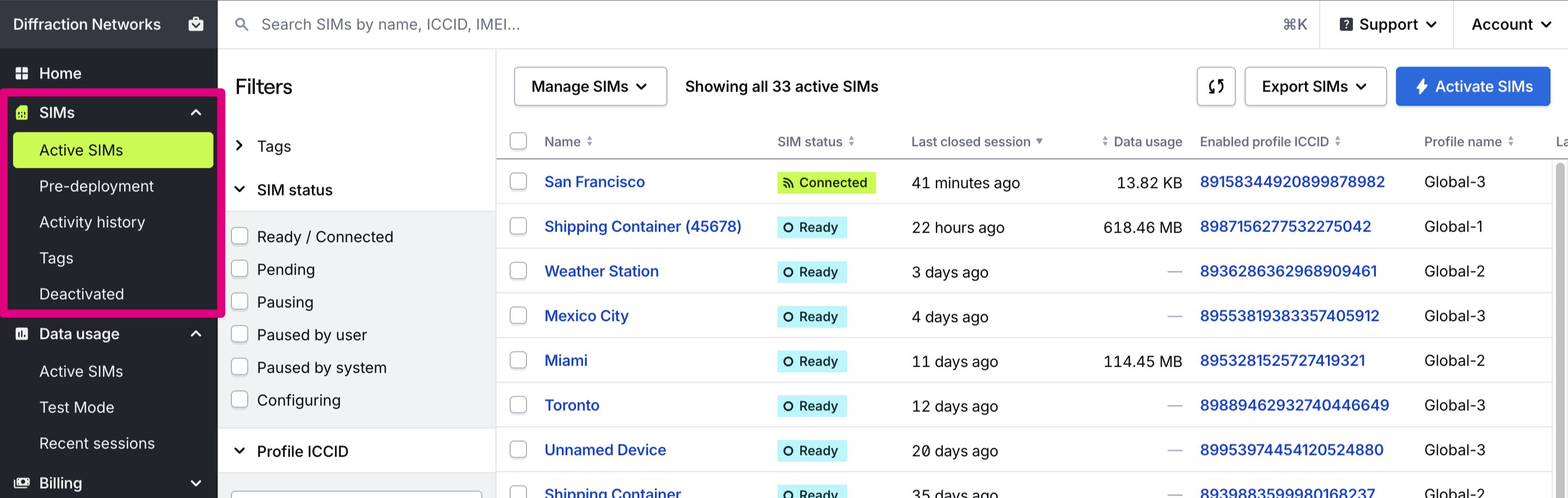 ## SIMs pages
Contains all "active" SIMs, which are SIMs that are activated, able to use data and connect to the internet, and are being billed for data usage and monthly recurring charges.
Clicking into a single SIMs for detailed information, including status, recent connections, installed profiles, usage reports, coverage, pricing, webhooks, and routes.
Contains all SIMs that have not yet been activated, including Test Mode SIMs configured for pre-deployment testing. *This page will only display if you have SIMs configured with Test Mode.*
Contains a historical record of all SIMs that have been permanently deactivated from Hologram's network. Deactivated SIMs cannot be reactivated.
## Bulk actions
Quickly take actions on multiple SIMs, such as pausing or resuming data usage, tagging, renaming, transferring, and deactivating SIMs.
## Filters
Quickly find SIMs by various identifiers (ICCID, Device ID, SIM ID, etc.), status, data plan, tags, activation date, and more.
## Export
Export SIM data in multiple formats for reporting, analysis, or testing API calls.
## SIMs pages
Contains all "active" SIMs, which are SIMs that are activated, able to use data and connect to the internet, and are being billed for data usage and monthly recurring charges.
Clicking into a single SIMs for detailed information, including status, recent connections, installed profiles, usage reports, coverage, pricing, webhooks, and routes.
Contains all SIMs that have not yet been activated, including Test Mode SIMs configured for pre-deployment testing. *This page will only display if you have SIMs configured with Test Mode.*
Contains a historical record of all SIMs that have been permanently deactivated from Hologram's network. Deactivated SIMs cannot be reactivated.
## Bulk actions
Quickly take actions on multiple SIMs, such as pausing or resuming data usage, tagging, renaming, transferring, and deactivating SIMs.
## Filters
Quickly find SIMs by various identifiers (ICCID, Device ID, SIM ID, etc.), status, data plan, tags, activation date, and more.
## Export
Export SIM data in multiple formats for reporting, analysis, or testing API calls.