> ## Documentation Index
> Fetch the complete documentation index at: https://docs.hologram.io/llms.txt
> Use this file to discover all available pages before exploring further.
# Pre-deployment SIMs page
> The Pre-deployment SIMs page lists all SIMs that have not yet been activated, and are not being charged monthly recurring charges. This is the main page used to manage SIMs configured for pre-deployment testing using Test Mode.
## Pre-deployment SIMs overview
**Limited access:** Learn more about Test Mode and streamline your deployments by contacting our [sales team](https://www.hologram.io/contact-sales?utm_source=docs\&utm_medium=website\&utm_content=test_mode_callout).
The table shows the pre-deployment testing configuration of each SIM, its total data usage, and the target activation date at which the SIM will automatically activate if it has not yet used its available test data or SMS messages.
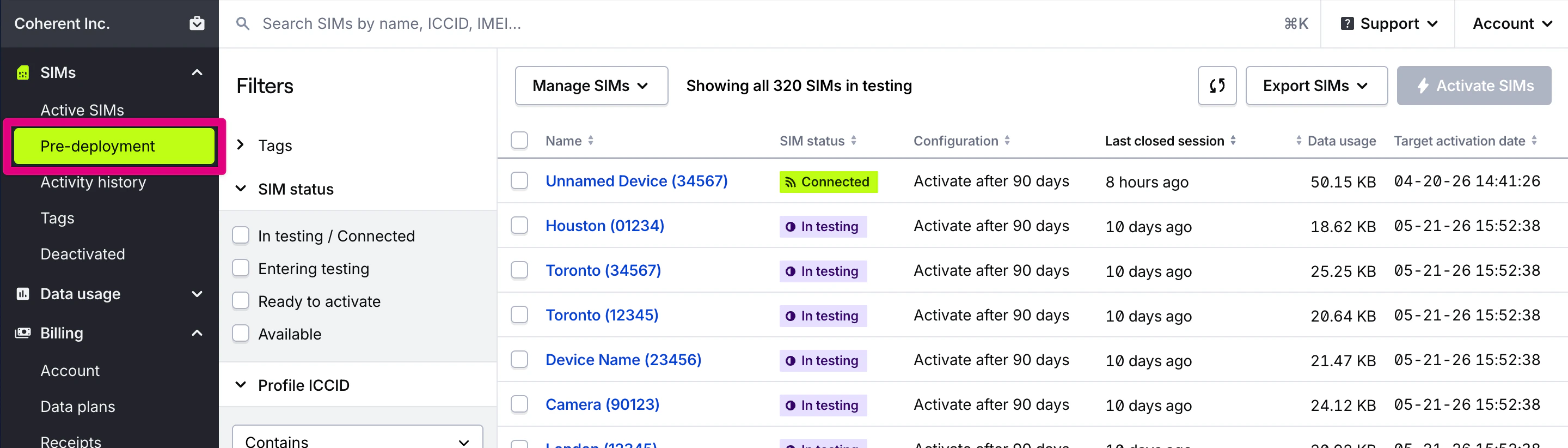 Pre-deployment SIMs include all SIMs in a `TEST...` or `INACTIVE...` network state. Read more about [SIM statuses and states](/dashboard/sims/sim-states-and-statuses).
Pre-deployment SIMs can also be manually activated out of test mode if you need to avoid configuration downtime after a device is delivered to your customers for SIMs with a Global-1 profile.
**Note:** SIMs in Test Mode will activate automatically after using free data, with **no downtime or action required** on your part.
Pre-deployment SIMs include all SIMs in a `TEST...` or `INACTIVE...` network state. Read more about [SIM statuses and states](/dashboard/sims/sim-states-and-statuses).
Pre-deployment SIMs can also be manually activated out of test mode if you need to avoid configuration downtime after a device is delivered to your customers for SIMs with a Global-1 profile.
**Note:** SIMs in Test Mode will activate automatically after using free data, with **no downtime or action required** on your part.
The only exception is legacy SIMs with an active Global-1 (G1) profile, which will experience a brief disconnection when activating to update profile states.
## Pre-deployment SIM fields
Name given to this SIM card.
The status of this SIM, which helps describe its ability to use data. Hover for a detailed description
The configured Test Mode free testing period for this SIM.
Relative time in UTC of the last closed session for the SIM. This is when data is billed and how we calculate data usage.
Lifetime data usage for this SIM. SIMs in pre-deployment testing automatically activate after a session closes in which the SIM used at least 100 KB of data.
The date at which this SIM will automatically activate after its free test period ends.
Name of the data plan which determine's this SIM's coverage, and will determine its cost after the SIM is activated and exits testing.
Lifetime data usage for this SIM. SIMs in pre-deployment testing automatically activate after a session closes in which the SIM used at least 100 KB of data.
The date at which this SIM will automatically activate after its free test period ends.
Name of the data plan which determine's this SIM's coverage, and will determine its cost after the SIM is activated and exits testing.
ICCID of the currently enabled profile able to use data. Click to view the SIM's installed profiles and fallback events.
Name of the enabled profile, which generally describes available carrier coverage.
IMEI of the last known device associated with the SIM, if known and provided by a carrier or network.
Hologram's unique ID for a SIM card.
Date and time in UTC that this SIM was activated and was able to begin using data.
## Related actions
Activate SIMs out of Test Mode
Force activate SIMs (bulk) POST /links/cellular/bulkclaim