> ## Documentation Index
> Fetch the complete documentation index at: https://docs.hologram.io/llms.txt
> Use this file to discover all available pages before exploring further.
# View and track fleet data usage
> We provide a wide range of data usage reports to help analyze and manage data usage across your fleet and optimize your IoT operations. This suite of reporting is built to answer the common questions encountered during configuration, deployment, field testing, and troubleshooting.
The **Usage** section of your dashboard contains the main reports that will help you view and manage data usage across your fleet.
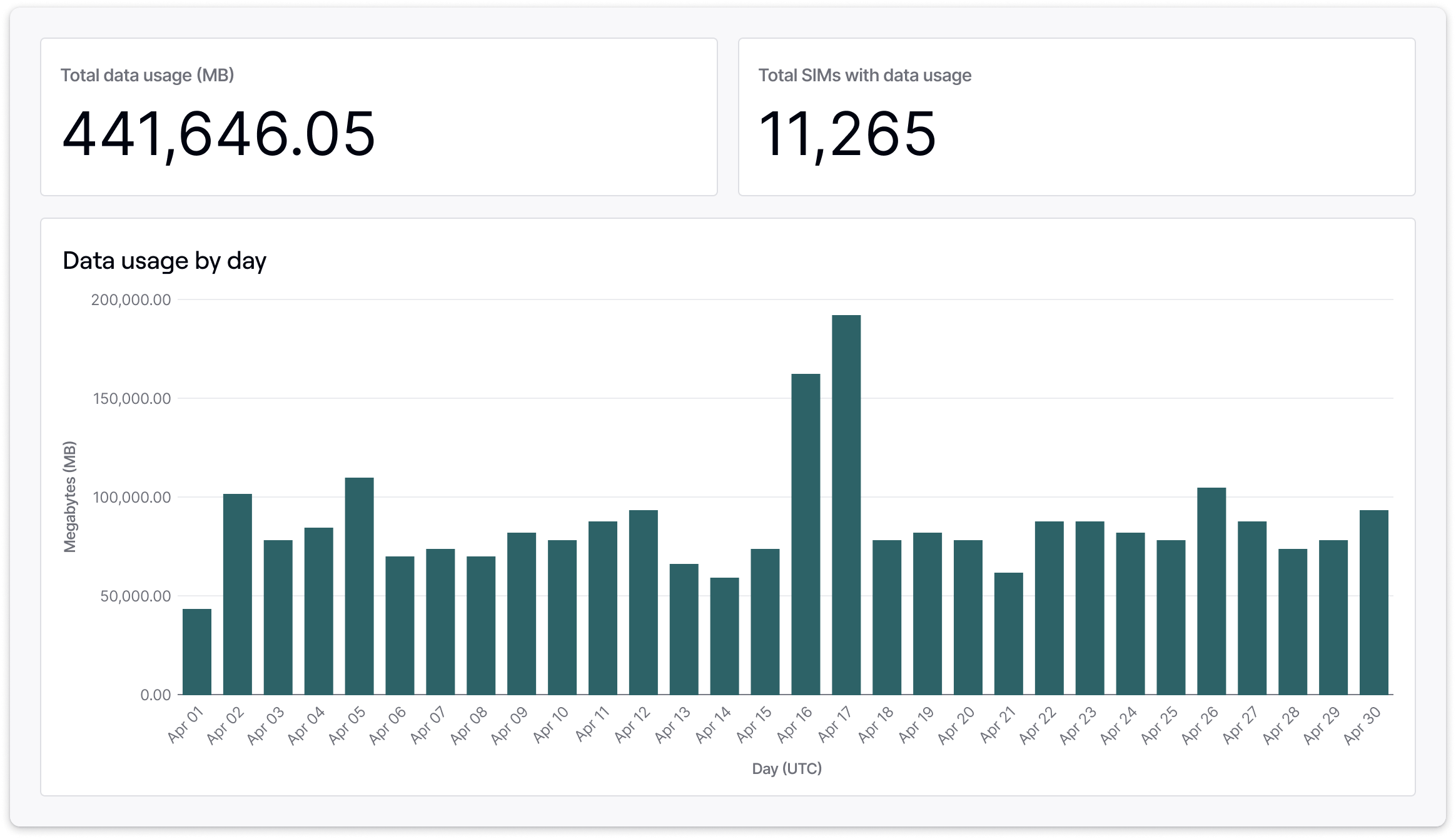 Each report has detailed filtering, reports session details to the second for at least a year of data, including productive and zero-byte session counts, SMS usage, SIM configuration, and location information. All reports feature visualizations or conditional formatting to help you understand the context around your SIMs' data usage and quickly identify problems and potential issues.
All data usage summarizes data sessions at the time the session closed, to the second. We do not receive millisecond-level data usage information from our carrier partners. All data usage information provided by Hologram is displayed in UTC.
## Data usage reports
Used for data usage reporting against all active SIMs in your fleet that are able to use and be billed for data.
Reporting to manage SIMs in Test Mode, including data usage, SMS usage, remaining time in testing, and activation history.
Reporting to help you troubleshoot specific SIM data usage behavior and device-level issues.
## Exporting data usage
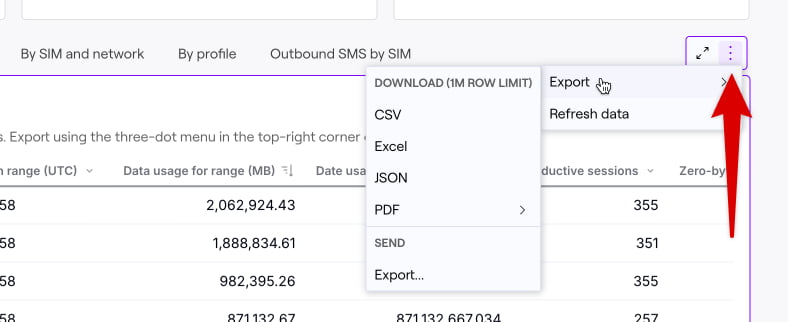
**Download records** using the the three-dot menu that appears when hovering over the any card within the report.
Each report has detailed filtering, reports session details to the second for at least a year of data, including productive and zero-byte session counts, SMS usage, SIM configuration, and location information. All reports feature visualizations or conditional formatting to help you understand the context around your SIMs' data usage and quickly identify problems and potential issues.
All data usage summarizes data sessions at the time the session closed, to the second. We do not receive millisecond-level data usage information from our carrier partners. All data usage information provided by Hologram is displayed in UTC.
## Data usage reports
Used for data usage reporting against all active SIMs in your fleet that are able to use and be billed for data.
Reporting to manage SIMs in Test Mode, including data usage, SMS usage, remaining time in testing, and activation history.
Reporting to help you troubleshoot specific SIM data usage behavior and device-level issues.
## Exporting data usage
**Download records** using the the three-dot menu that appears when hovering over the any card within the report.
 ## Data availability
Recent data usage reporting is available for the last 90 days and is reported in near-real-time. These reports are available to self-service accounts.
Historical data usage is available for at least 365 days and is updated every 60 minutes. Historical data usage reporting is available to all contracted accounts, and self-service accounts with over \$100 USD in monthly recurring charges.
Data usage reporting availability is separate from a SIM's [billing period](/guides/billing/how-billing-works). An invoice or statement of transactions covers a single calendar month, and for customers with monthly invoicing these totals are generally available *after* the 1st day of the following month. In addition, totals in usage reports may not match a single invoice precisely due to reconciliation, sub-cent-rounding, and other updates that happen at the time charges are finalized. Use usage reports to analyze consumption over time, and [statements and transactions](/guides/billing/statements-and-transactions) to reconcile charges for a billing period.
## Data availability
Recent data usage reporting is available for the last 90 days and is reported in near-real-time. These reports are available to self-service accounts.
Historical data usage is available for at least 365 days and is updated every 60 minutes. Historical data usage reporting is available to all contracted accounts, and self-service accounts with over \$100 USD in monthly recurring charges.
Data usage reporting availability is separate from a SIM's [billing period](/guides/billing/how-billing-works). An invoice or statement of transactions covers a single calendar month, and for customers with monthly invoicing these totals are generally available *after* the 1st day of the following month. In addition, totals in usage reports may not match a single invoice precisely due to reconciliation, sub-cent-rounding, and other updates that happen at the time charges are finalized. Use usage reports to analyze consumption over time, and [statements and transactions](/guides/billing/statements-and-transactions) to reconcile charges for a billing period.