> ## Documentation Index
> Fetch the complete documentation index at: https://docs.hologram.io/llms.txt
> Use this file to discover all available pages before exploring further.
# Single SIM data usage reports
> Data usage reporting at the SIM level across networks, locations, profiles, and sessions to help troubleshoot specific SIM data usage behavior and device-level issues.
## Where can I find data usage reports for a single SIM?
Find your SIM from the **SIMs** pages or using **search**. The **Recent sessions** tab contains a live view of recent sessions. The **Data usage** tab contains a detailed historical reporting.
## Recent sessions
For a live view of recent, closed sessions, find your SIM from the SIMs pages or using search, and open the **Recent sessions** tab. This page contains a data visualization of recent sessions over time, useful for understanding the connectivity behavior of your SIM.
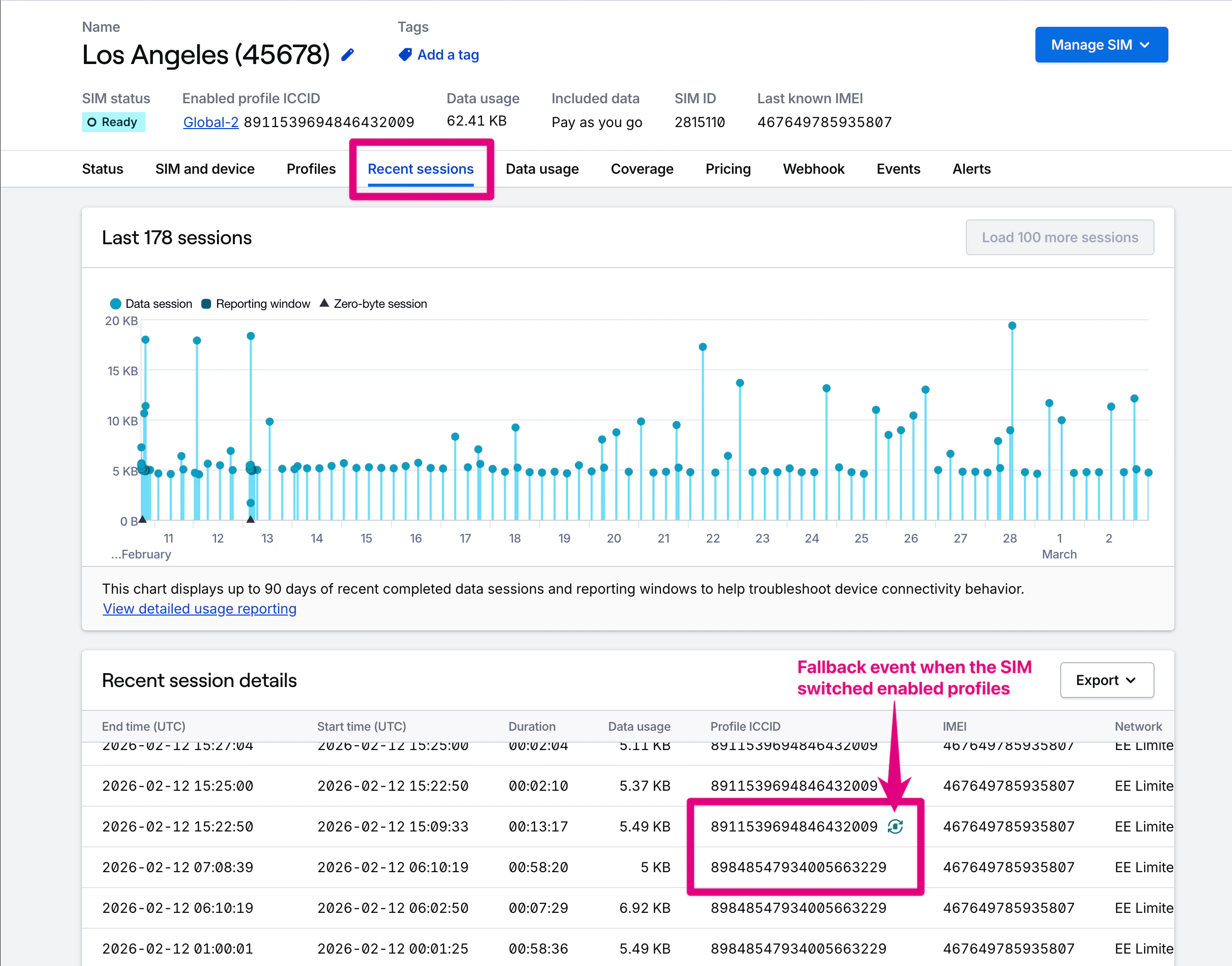 **Export session data** in XLSX, CSV, or JSON formats using the **Export menu** in the top right of the Recent sessions card. JSON exports have additional fields not contained in spreadsheet formats.
**Note:** For your security, Hologram only operates with session metadata. If you want to dive even deeper into your usage you'd need to use a device side network analyzer tool like [tshark](https://www.wireshark.org/dashboard/man-pages/tshark.html) or [bmon](https://www.linux.com/learn/bmon-powerful-network-bandwidth-monitoring-and-debugging-tool-linux).
## Data usage reports
Detailed session-level data usage for a SIM is found in the **Data usage tab**. These reports default to displaying all data usage for the SIM's current billing period, and mirror the fleet-level data usage reporting available in the **[Usage](/dashboard/usage/usage-overview)** section of your dashboard.
### Data usage details
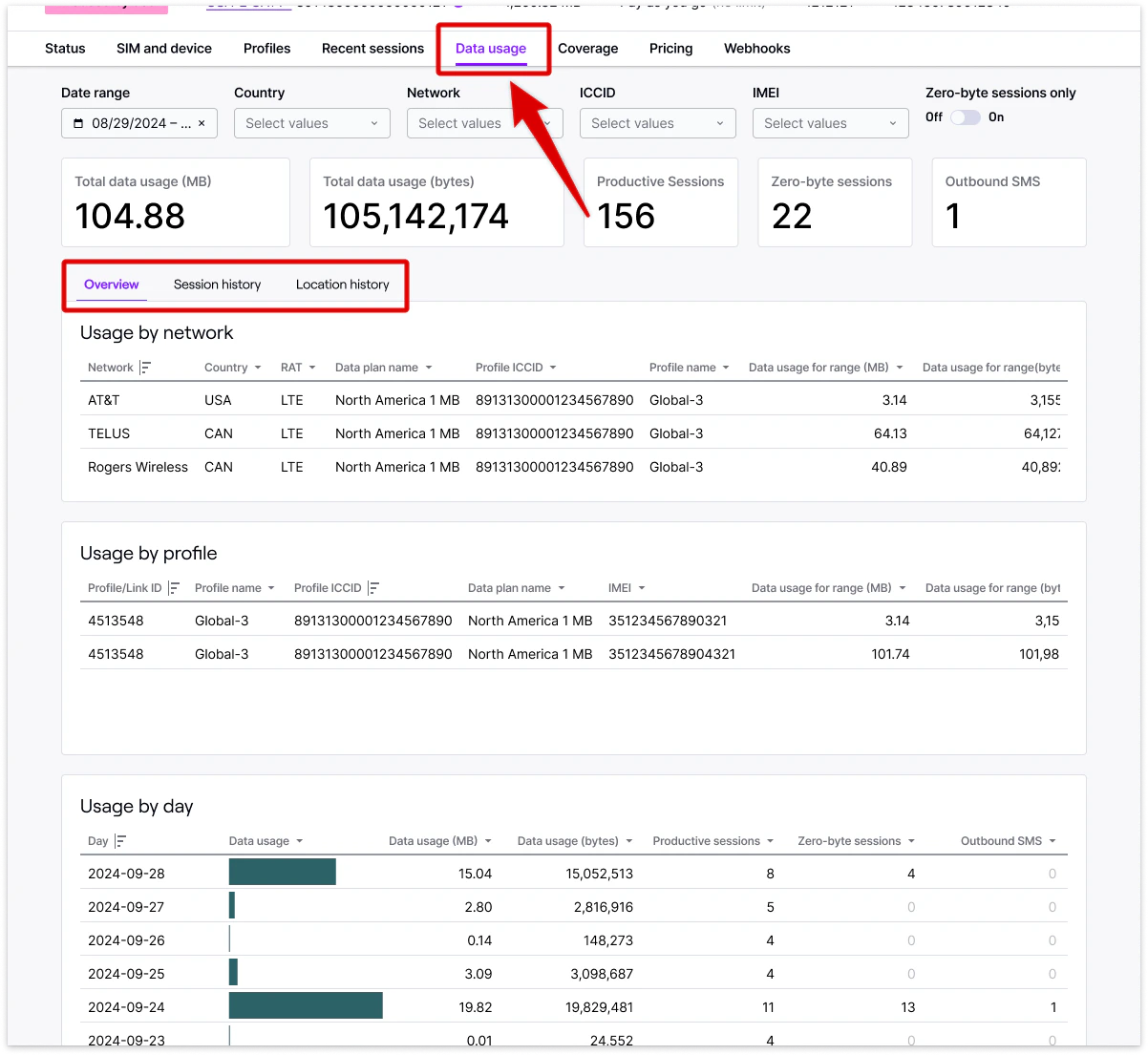
Find summarized data usage within the selected date for a SIM card by network, profile, or day to understand overall data usage behavior and connectivity changes, and to identify possible device configuration problems from zero-byte sessions.
**Note:** Data within our detailed data usage reports refresh hourly, and may not contain the most recent sessions for a SIM.
* **Data usage by network** - Total data usage broken down by network and profile.
* **Data usage by profile** - Total data usage by profile, especially useful for SIMs with multiple installed profiles and Outage Protection.
* **Data usage by day** - Total data usage broken down by day.
**Export session data** in XLSX, CSV, or JSON formats using the **Export menu** in the top right of the Recent sessions card. JSON exports have additional fields not contained in spreadsheet formats.
**Note:** For your security, Hologram only operates with session metadata. If you want to dive even deeper into your usage you'd need to use a device side network analyzer tool like [tshark](https://www.wireshark.org/dashboard/man-pages/tshark.html) or [bmon](https://www.linux.com/learn/bmon-powerful-network-bandwidth-monitoring-and-debugging-tool-linux).
## Data usage reports
Detailed session-level data usage for a SIM is found in the **Data usage tab**. These reports default to displaying all data usage for the SIM's current billing period, and mirror the fleet-level data usage reporting available in the **[Usage](/dashboard/usage/usage-overview)** section of your dashboard.
### Data usage details
Find summarized data usage within the selected date for a SIM card by network, profile, or day to understand overall data usage behavior and connectivity changes, and to identify possible device configuration problems from zero-byte sessions.
**Note:** Data within our detailed data usage reports refresh hourly, and may not contain the most recent sessions for a SIM.
* **Data usage by network** - Total data usage broken down by network and profile.
* **Data usage by profile** - Total data usage by profile, especially useful for SIMs with multiple installed profiles and Outage Protection.
* **Data usage by day** - Total data usage broken down by day.
 #### Key metrics and terms
Total data usage for the selected date range in a readable format.
Total data usage for the selected date range in bytes.
Total number of closed sessions in which data was passed through a network.
Total number of sessions in which no data was passed through a network, indicating possible device configuration issues.
Total number of device-originated SMS messages sent from the SIM that count toward a SIM's SMS limit.
### Location history report
Detailed data usage broken down by location with a map of approximate device location. Data usage is categorized by region, country, network, tower, and latitude and longitude.
### Session history report
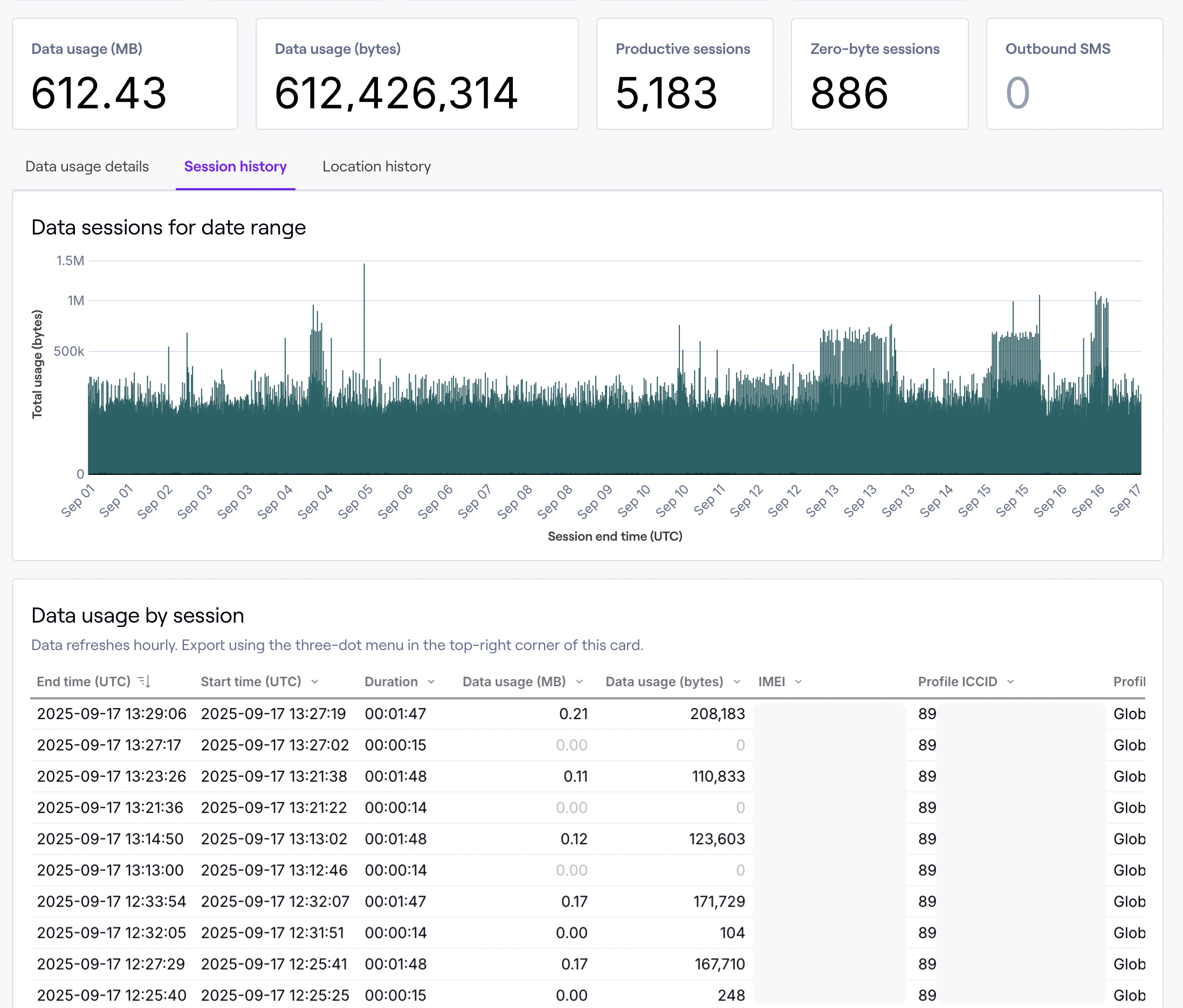
Detailed session-level historical data usage information for a SIM. Detailed data and filtering helps you identify exact issues and pinpoint exactly where and why problems occurred.
#### Key metrics and terms
Total data usage for the selected date range in a readable format.
Total data usage for the selected date range in bytes.
Total number of closed sessions in which data was passed through a network.
Total number of sessions in which no data was passed through a network, indicating possible device configuration issues.
Total number of device-originated SMS messages sent from the SIM that count toward a SIM's SMS limit.
### Location history report
Detailed data usage broken down by location with a map of approximate device location. Data usage is categorized by region, country, network, tower, and latitude and longitude.
### Session history report
Detailed session-level historical data usage information for a SIM. Detailed data and filtering helps you identify exact issues and pinpoint exactly where and why problems occurred.
 #### Field descriptions
Date/time in UTC the data session ended. Data usage reporting references this date as when data was “used” and billed.
Date/time in UTC the data session started.
Duration in seconds the session lasted.
Total data usage for the session in a readable format.
Total data usage for the session in bytes.
Session or reporting windows if the carrier returns data in timed blocks.
Name of the network used to pass data.
Radio access technology used.
Country the cellular tower was located within.
Cellular tower ID as returned by the carrier, if provided.
Crowdsourced tower location, if provided.
ICCID of the connectivity profile used to connect.
Name of the profile used to connect.
ID of the SIM card.
IMEI of the modem the SIM card connected through, if provided by the carrier and network.
Data plan active on the SIM at the time the session closed, useful for identifying when a change in rates occurred.
## Data availability
Recent data usage is available for the last 90 days and is reported in near-real-time. Historical data usage is available for at least 365 days and is updated every 60 minutes. Historical data usage is available to all contracted accounts, and self-service accounts with over \$100 USD in monthly recurring charges.
## Data usage reporting using the REST API
Limited data usage reporting is also available [through the REST API](/api/v1). The `/usage` endpoints retrieve usage per profile using the link ID found in the Profiles tab.
List recent data sessions
#### Field descriptions
Date/time in UTC the data session ended. Data usage reporting references this date as when data was “used” and billed.
Date/time in UTC the data session started.
Duration in seconds the session lasted.
Total data usage for the session in a readable format.
Total data usage for the session in bytes.
Session or reporting windows if the carrier returns data in timed blocks.
Name of the network used to pass data.
Radio access technology used.
Country the cellular tower was located within.
Cellular tower ID as returned by the carrier, if provided.
Crowdsourced tower location, if provided.
ICCID of the connectivity profile used to connect.
Name of the profile used to connect.
ID of the SIM card.
IMEI of the modem the SIM card connected through, if provided by the carrier and network.
Data plan active on the SIM at the time the session closed, useful for identifying when a change in rates occurred.
## Data availability
Recent data usage is available for the last 90 days and is reported in near-real-time. Historical data usage is available for at least 365 days and is updated every 60 minutes. Historical data usage is available to all contracted accounts, and self-service accounts with over \$100 USD in monthly recurring charges.
## Data usage reporting using the REST API
Limited data usage reporting is also available [through the REST API](/api/v1). The `/usage` endpoints retrieve usage per profile using the link ID found in the Profiles tab.
List recent data sessions GET /usage/data
List total usage for billing period GET /usage/data/monthly
List outbound SMS usage GET /usage/sms
## Related guides
Read more about the SIM details page and all the information you can find there.
Learn more about the actions you can take on a single SIM.