> ## Documentation Index
> Fetch the complete documentation index at: https://docs.hologram.io/llms.txt
> Use this file to discover all available pages before exploring further.
# Pre-deployment testing with Test Mode
> **Hologram Test Mode** is a set of tools and capabilities to streamline the cellular IoT supply chain for your organization. Test your devices with free data, deploy to your customers seamlessly, and minimize costs.
**Limited access:** Learn more about Test Mode and streamline your deployments by contacting our [sales team](https://www.hologram.io/contact-sales?utm_source=docs\&utm_medium=website\&utm_content=test_mode_callout).
## Benefits of pre-deployment testing
### Manage inventory
Rather than manually activating devices, Hologram Test Mode provides a **clear view of your SIM inventory** and allows you to test devices **before incurring monthly subscription costs**. As soon as SIM cards ship from our warehouse, all SIMs will appear in the SIMs section your dashboard under the Pre-deployment page. You can then tag your SIMs to organize them based on hardware, contract manufacturer, staging location, or final deployment region.
### Automate your workflow
Your devices in Hologram Test Mode will **automatically activate on a specific data plan** after using their free data, with no downtime or actions needed on your part.
### Powering a seamless supply chain
Ensure that devices are fully tested and QA-approved before leaving your warehouse or manufacturer. SIMs in Test Mode come with 90 days of testing. This includes 100 KB of free data and up to 10 free device-originated SMS messages.
## How is a SIM in Test Mode configured?
Each SIM in Test Mode can use **up to 100 KB of free data** and **up to 10 device-originated SMS messages** on the Hologram network. These SIMs have **90 days to use this data for free** before they automatically activate. A SIM will automatically activate under any of the following conditions, whichever comes first:
* 100 KB of data is used
* 10 outbound SMS messages are sent
* 90 days of Test Mode have elapsed
Upon activation, the SIM will transition to the preconfigured data plan set when the SIMs were ordered with no action needed on your part.
## How does Test Mode work
SIMs in Test Mode allow your manufacturer to **test cellular connectivity** and **verify device functionality**.
1. Hologram SIMs ship from our warehouse to your hardware manufacturer. Once shipped, these SIMs will show up under the **SIMs section** of your dashboard under the **Pre-deployment page**.
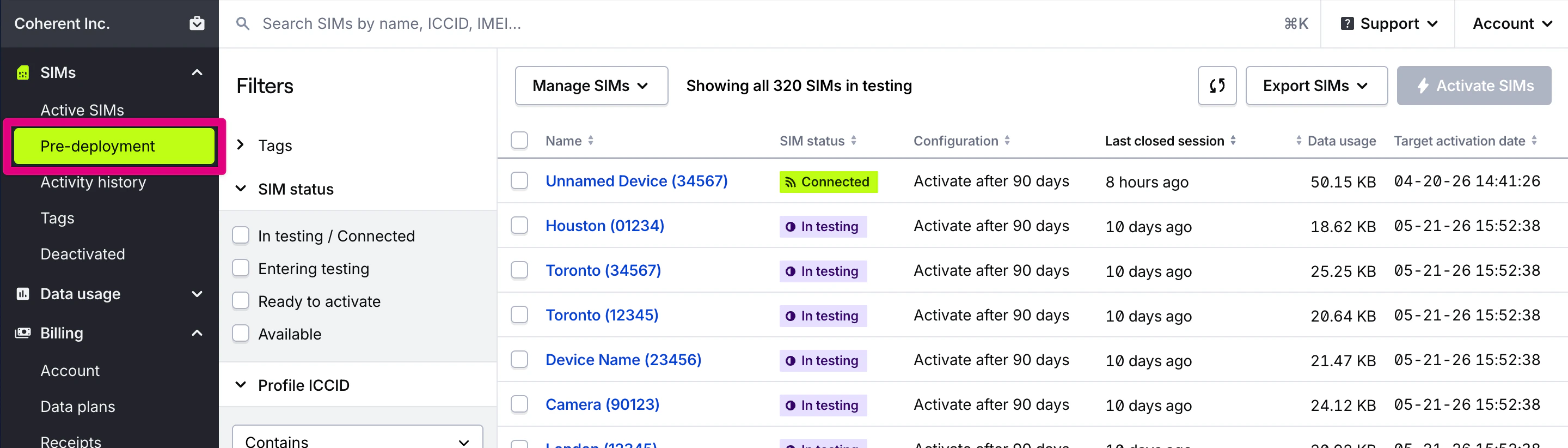 2. These SIMs are configured with **Test Mode**. Once your SIMs are configured for testing and ready to use test data, they will have the **In testing** status in your dashboard. The SIM's state often referenced in the API will be set to `TEST-ACTIVATE`.
3. Once your devices reach their final deployment destination, they will **automatically activate** once they reach their test data or testing duration. They are automatically configured with the **correct cellular data plan** and capabilities with no additional action needed on your part.
## Where can I find more detailed reporting of SIMs in Test Mode
Dashboard's usage reports enables better **inventory management, activation tracking, and optimization of testing timelines** for your IoT deployment.
1. Comprehensive data usage and activation reporting on SIMs in Test Mode can be found under the **Usage section** of your dashboard in the **Pre-deployment SIMs page**.
2. These SIMs are configured with **Test Mode**. Once your SIMs are configured for testing and ready to use test data, they will have the **In testing** status in your dashboard. The SIM's state often referenced in the API will be set to `TEST-ACTIVATE`.
3. Once your devices reach their final deployment destination, they will **automatically activate** once they reach their test data or testing duration. They are automatically configured with the **correct cellular data plan** and capabilities with no additional action needed on your part.
## Where can I find more detailed reporting of SIMs in Test Mode
Dashboard's usage reports enables better **inventory management, activation tracking, and optimization of testing timelines** for your IoT deployment.
1. Comprehensive data usage and activation reporting on SIMs in Test Mode can be found under the **Usage section** of your dashboard in the **Pre-deployment SIMs page**.
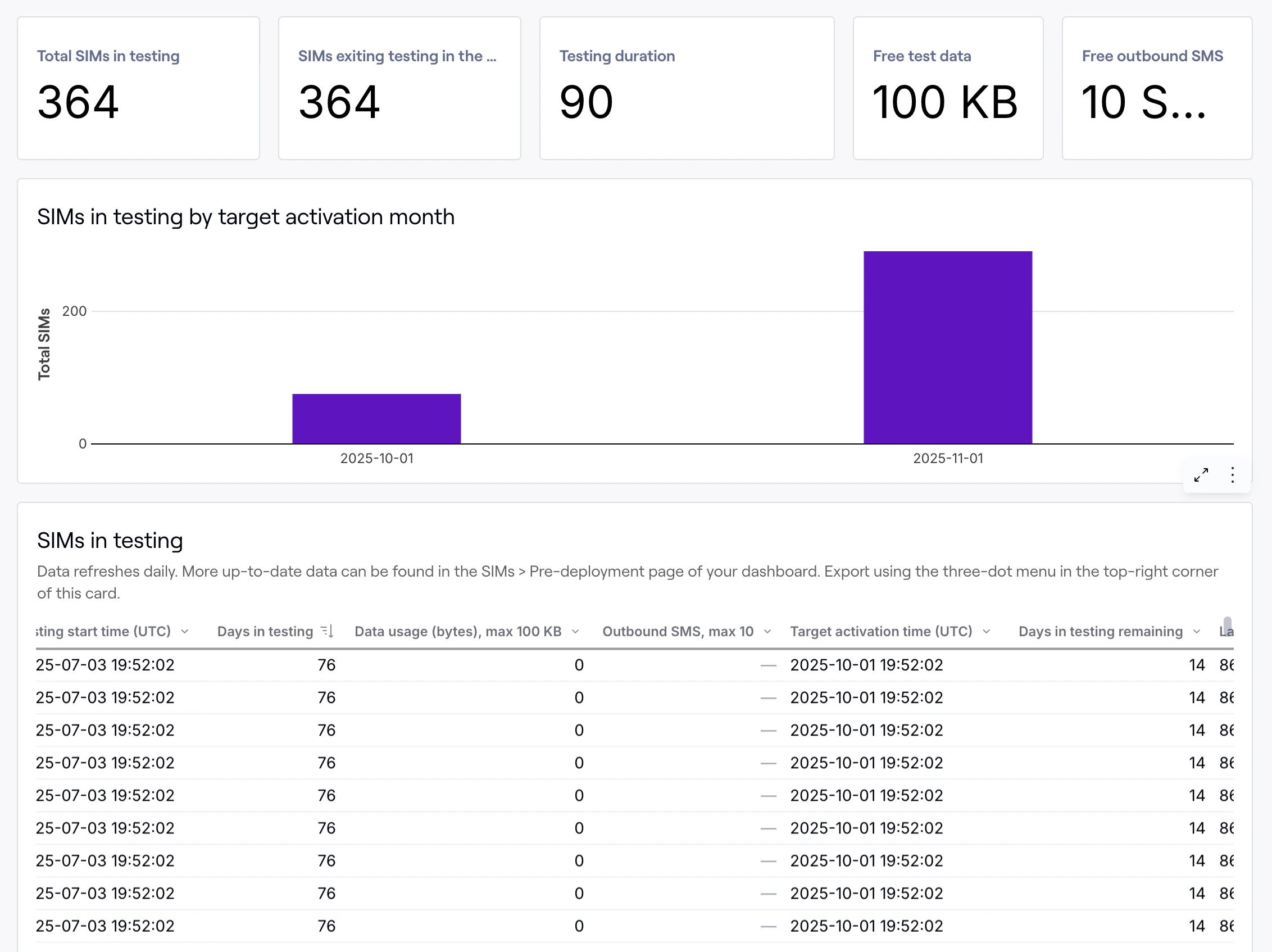 2. The **SIMs in testing** report lists a complete inventory of all SIMs currently configured with Test Mode, allowing you to track which devices are still in the testing phase.
3. The **Activation History** report shows a record of SIMs that have **recently transitioned from Test Mode to active status**, providing visibility into your activation history.
4. From the **SIMs page** in your dashboard, you can also **Export** all your SIMs currently in Testing with similar detailed information found on these usage reports.
2. The **SIMs in testing** report lists a complete inventory of all SIMs currently configured with Test Mode, allowing you to track which devices are still in the testing phase.
3. The **Activation History** report shows a record of SIMs that have **recently transitioned from Test Mode to active status**, providing visibility into your activation history.
4. From the **SIMs page** in your dashboard, you can also **Export** all your SIMs currently in Testing with similar detailed information found on these usage reports.