> ## Documentation Index
> Fetch the complete documentation index at: https://docs.hologram.io/llms.txt
> Use this file to discover all available pages before exploring further.
# What is a Hyper SIM with Outage Protection?
> Overview of Hologram Hyper SIMs with Outage Protection, network fallback, benefits, and FAQs.
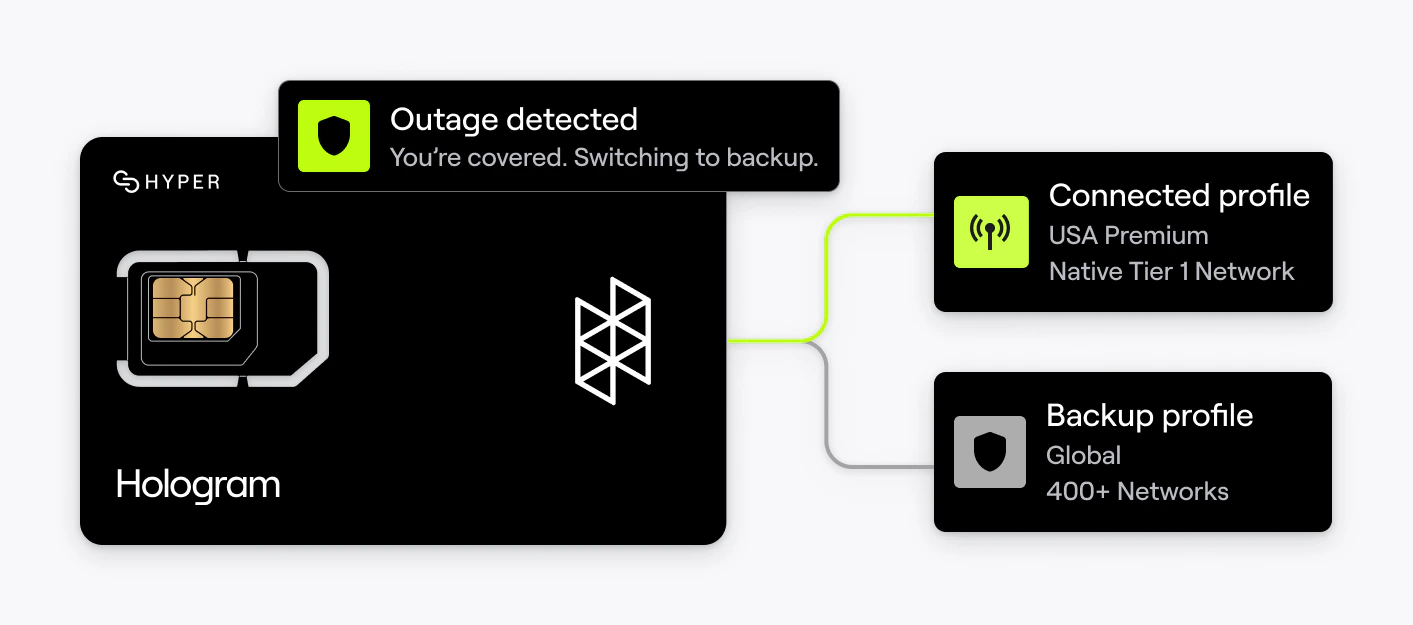
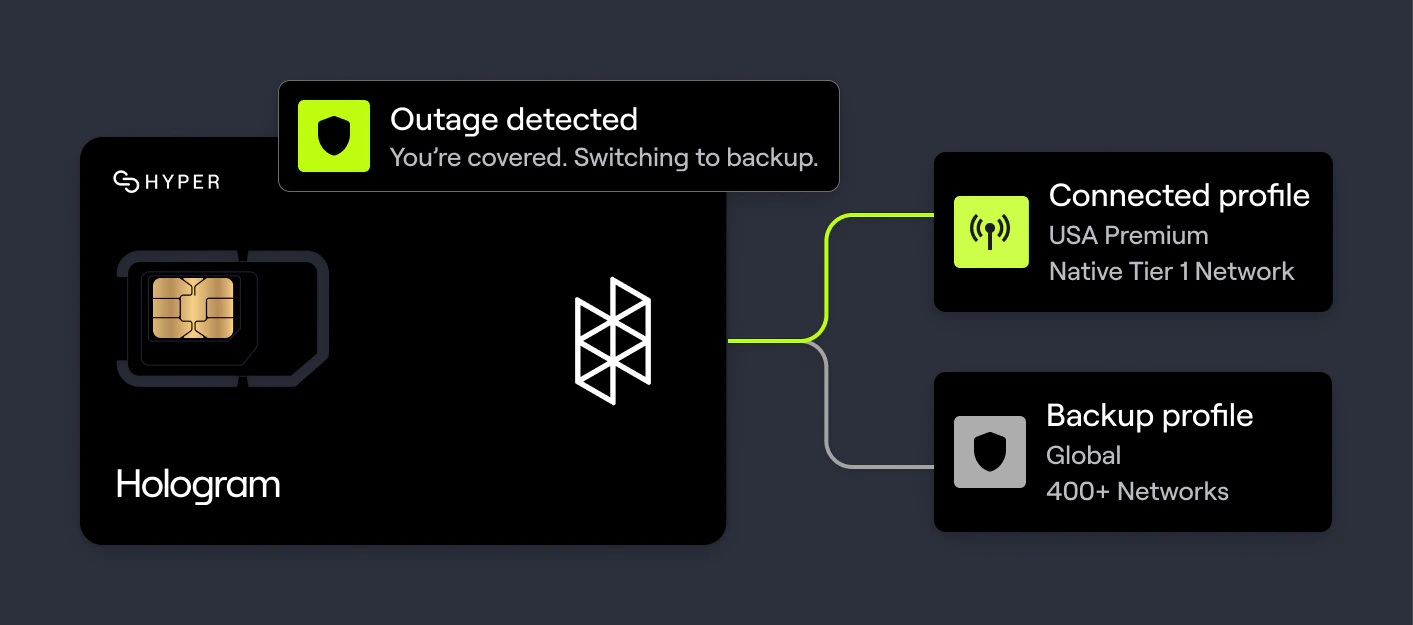
No network is fail proof, and a single outage can devastate your business. That's why Hologram developed **Outage Protection** on our Multi-Core Hyper SIMs. With two fully independent mobile cores on a single SIM, it offers total redundancy and reliability, making it the strongest outage protection in IoT history.
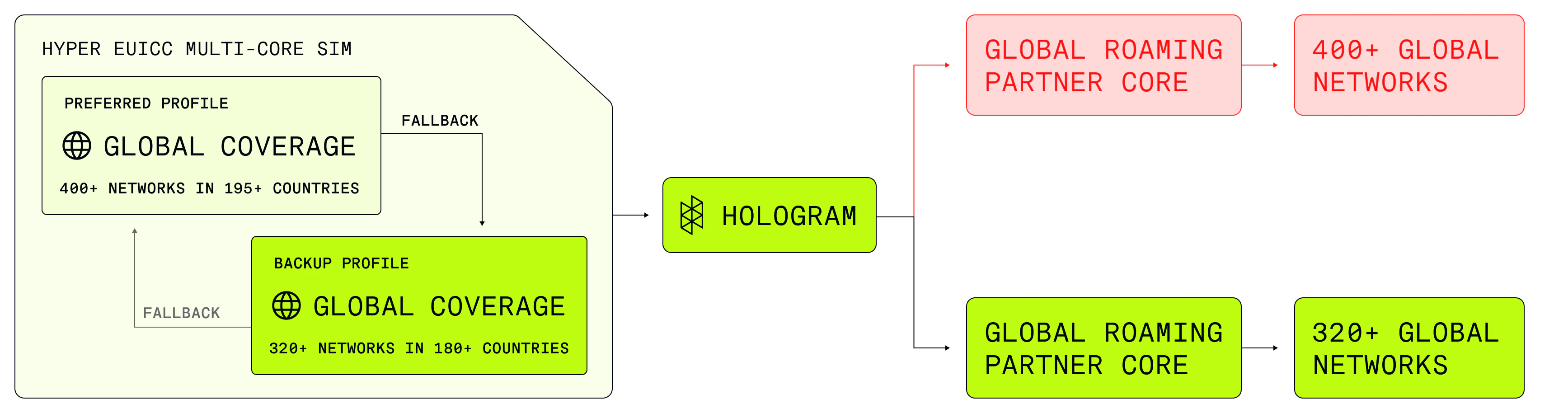
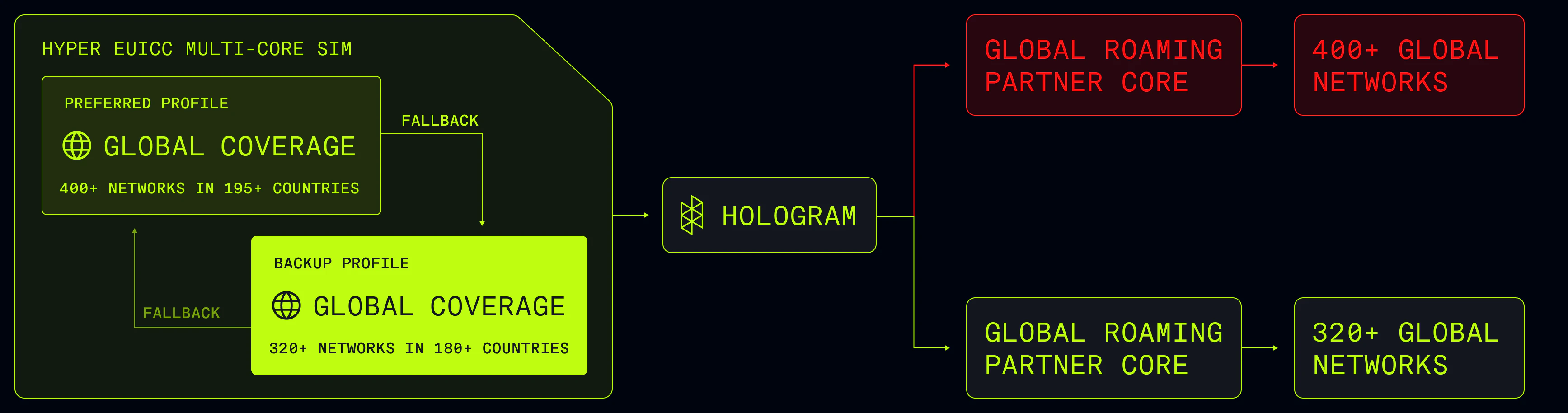
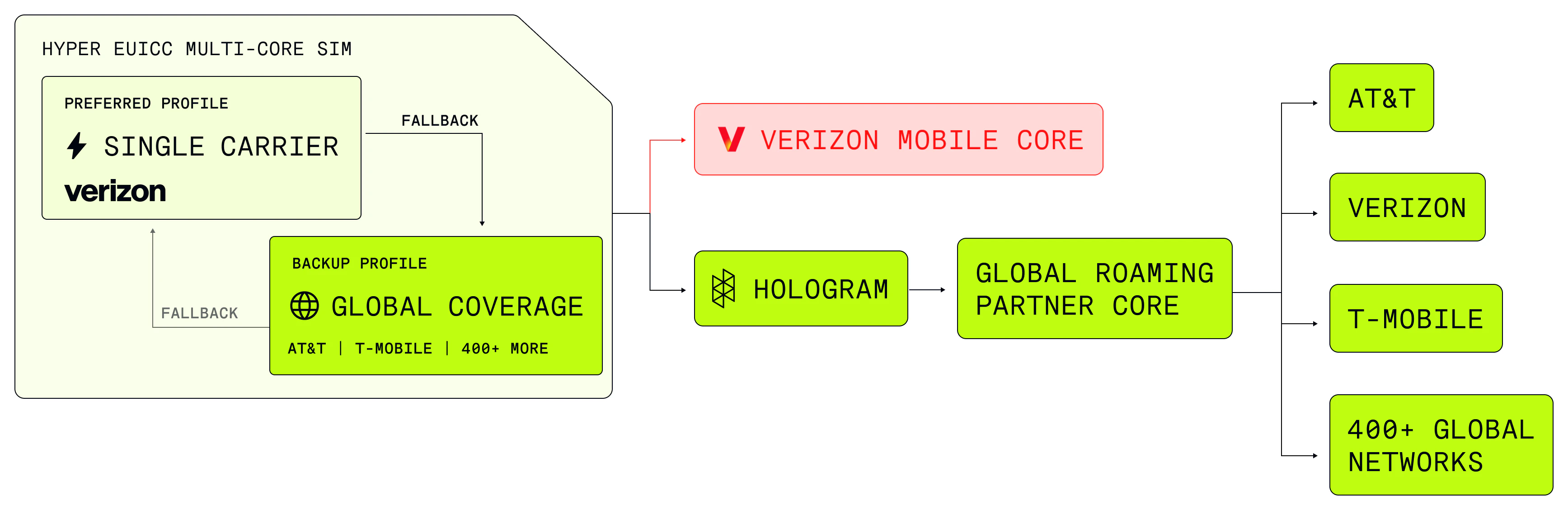
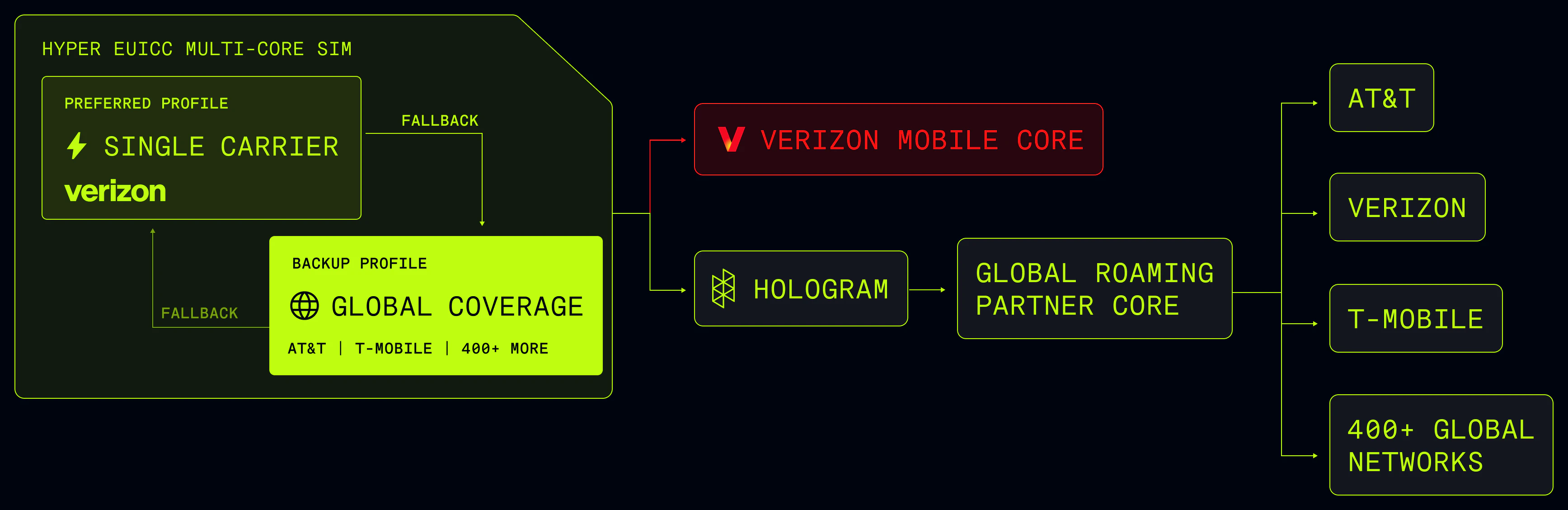
Each SIM with Outage Protection is uniquely equipped with two connectivity profiles, doubling your network resilience. If a core failure or outage prevents your SIM from connecting to its primary network, our built-in configurable **Fallback** technology immediately switches to a secondary network. It's a seamless handover that ensures your devices stay online, with very minimal downtime.
 ## What Multi-Core SIMs does Hologram offer?
Hologram's Multi-Core SIMs are designed to fit your unique needs, whether you're optimizing for cost, performance, or roaming coverage. Multi-Core SIMs provide the ultimate redundancy and reliability, with access to two completely independent mobile cores and distinct profiles.
### Global SIMs with Outage Protection
Access two global networks, with twice the roaming coverage from 500+ carriers in 200+ countries.
## What Multi-Core SIMs does Hologram offer?
Hologram's Multi-Core SIMs are designed to fit your unique needs, whether you're optimizing for cost, performance, or roaming coverage. Multi-Core SIMs provide the ultimate redundancy and reliability, with access to two completely independent mobile cores and distinct profiles.
### Global SIMs with Outage Protection
Access two global networks, with twice the roaming coverage from 500+ carriers in 200+ countries.
 ### Performance SIMs with Outage Protection
Connect with Tier-1 providers in the US or Canada, backed up by a global roaming profile. With low latency and high throughput, these SIMs are designed for exceptional performance.
### Performance SIMs with Outage Protection
Connect with Tier-1 providers in the US or Canada, backed up by a global roaming profile. With low latency and high throughput, these SIMs are designed for exceptional performance.
 ## How does network fallback work?
The simplest way to think of network fallback is as a timer that communicates with the cellular modem and is constantly watching for extended periods without network connectivity. When the modem begins experiencing a period of limited or no service, the timer starts. Once the timer reaches a customizable threshold, it automatically executes an eUICC profile operation to enable the fallback profile and attempt to reconnect to the Internet. If it is successful in doing so, it lets the Hologram platform know that a fallback event has occurred and stays connected with the backup profile until it receives further instruction.
Here are some additional things to know about network fallback:
* The default timer value for network fallback is **15 minutes**.
* By default, network fallback also supports **reverse fallback** - switching from a backup profile to the primary profile - based on the same trigger conditions.
* Network fallback supports multiple customizable trigger thresholds including some that are volatile (will reset if the device is restarted) and nonvolatile (can persist between device resets).
## What are the benefits of Outage Protection?
The biggest benefit of network fallback is a significant reduction in the duration of incidental loss of connectivity (from hours or days to minutes).
Although cellular networks are considered to be highly available and reliable compared to alternate wireless protocols (ex: Wi-Fi), periodic loss of connectivity caused by lost coverage, network downtime, or device roaming is inevitable. These outages may take hours or even days to resolve, stranding the device without connectivity without recourse. This downtime may result in lost data, lost revenue, or failures of mission-critical operational systems.
Multi-Core SIMs help devices that get disconnected reconnect quickly using an alternate connectivity profile so they can resume normal operation in minutes.
## What are the primary use cases for network fallback?
There are three primary use cases for network fallback:
1. **Resiliency to downtime.** As discussed above, product creators may wish to add and link a backup profile to their SIM with network fallback to attempt to automatically reestablish connectivity to prevent lost data or revenue in the event the primary profile loses connectivity.
2. **Regional profile selection.** Many product creators have primary markets that drive the majority of their demand, and long tails of international customers that may benefit from an alternate connectivity solution due to cost or performance considerations. Stitching multiple profiles together with network fallback allows SIMs to automatically localize connectivity to the most effective profile without building and supporting multiple individual SKUs.
3. **Combining coverage footprints.** In rare instances, Hologram's connectivity relationships may not enable access to every carriers in a particular country using a single connectivity profile, or may provide more cost-effective access to the same carrier via a different profile. Linking multiple profiles together using network fallback allows devices to access the richest selection of carriers at the best possible cost, all on a single SIM.
## Can I customize the behavior of network fallback on my SIMs?
Yes! Network fallback was designed with thoughtful defaults that work with most applications. Fallback behavior can be thoroughly customized to meet the needs of your application as part of a professional services engagement with us. [Contact our Sales team](https://www.hologram.io/contact-sales?utm_source=helpcenter\&utm_medium=guide\&utm_content=dual-core-sims) to learn more.
* Turning network fallback ON or OFF
* Setting trigger thresholds for network fallback (15 minute default)
* Changing the default profile your SIM ships with
* Turning reverse fallback ON or OFF
## FAQs
[Contact our Sales team](https://www.hologram.io/contact-sales?utm_source=helpcenter\&utm_medium=guide\&utm_content=dual-core-sims), or if you already work with an Account Executive reach out to ask about how Outage Protection can protect your connectivity.
Network fallback tracks limited and no service status messages from the modem and evaluates them against a threshold that triggers the SIM to enable the backup profile. Limited and no service status events can occur in any of the following scenarios:
* The network is not available (outage or coverage)
* The profile is paused while the device is powered
* The profile is blocked from accessing a carrier by the underlying steering for its connectivity plan
You can also manually switch enabled profiles using our REST API and bypass the network fallback timer.
The SIM intelligence that enables network fallback is signed and encrypted at the time the SIM is provisioned, and thus can only added at the time of SIM manufacturing. Support for network fallback cannot be flashed or added to SIMs previous generation Hyper or UICC SIMs from Hologram shipped prior to June 2023.
Network fallback is supported on all Hologram SIMs shipped after November 2023. For older SIMs, the SKU printed on your SIM will end in `-F` or `-AFB` and were commonly called Dual-Core or Dual-Core Capable SIMs. You can also find this information in your dashboard.
When devices reconnect to the Internet, they pass a callback to the Hologram platform to let us know it's reconnected. This allows us to update the status of your SIM card, and the data session information will contain the new ICCID that will tell you that a profile has changed. [Read about how to view network fallback events for a SIM](/guides/sims/fallback-events).
The biggest benefit of network fallback over multi-IMSI solutions is that it provides the device with full route redundancy — an alternate networking path to the Internet. Multi-IMSI solutions typically house all alternate IMSIs within a single profile, which makes them susceptible to single points of failure in operator maintaining the multi-IMSI profile's mobile core and connectivity infrastructure.
## Related actions
View comprehensive SIM information and status
See when and how your SIMs switched profiles
Monitor individual SIM data consumption
## How does network fallback work?
The simplest way to think of network fallback is as a timer that communicates with the cellular modem and is constantly watching for extended periods without network connectivity. When the modem begins experiencing a period of limited or no service, the timer starts. Once the timer reaches a customizable threshold, it automatically executes an eUICC profile operation to enable the fallback profile and attempt to reconnect to the Internet. If it is successful in doing so, it lets the Hologram platform know that a fallback event has occurred and stays connected with the backup profile until it receives further instruction.
Here are some additional things to know about network fallback:
* The default timer value for network fallback is **15 minutes**.
* By default, network fallback also supports **reverse fallback** - switching from a backup profile to the primary profile - based on the same trigger conditions.
* Network fallback supports multiple customizable trigger thresholds including some that are volatile (will reset if the device is restarted) and nonvolatile (can persist between device resets).
## What are the benefits of Outage Protection?
The biggest benefit of network fallback is a significant reduction in the duration of incidental loss of connectivity (from hours or days to minutes).
Although cellular networks are considered to be highly available and reliable compared to alternate wireless protocols (ex: Wi-Fi), periodic loss of connectivity caused by lost coverage, network downtime, or device roaming is inevitable. These outages may take hours or even days to resolve, stranding the device without connectivity without recourse. This downtime may result in lost data, lost revenue, or failures of mission-critical operational systems.
Multi-Core SIMs help devices that get disconnected reconnect quickly using an alternate connectivity profile so they can resume normal operation in minutes.
## What are the primary use cases for network fallback?
There are three primary use cases for network fallback:
1. **Resiliency to downtime.** As discussed above, product creators may wish to add and link a backup profile to their SIM with network fallback to attempt to automatically reestablish connectivity to prevent lost data or revenue in the event the primary profile loses connectivity.
2. **Regional profile selection.** Many product creators have primary markets that drive the majority of their demand, and long tails of international customers that may benefit from an alternate connectivity solution due to cost or performance considerations. Stitching multiple profiles together with network fallback allows SIMs to automatically localize connectivity to the most effective profile without building and supporting multiple individual SKUs.
3. **Combining coverage footprints.** In rare instances, Hologram's connectivity relationships may not enable access to every carriers in a particular country using a single connectivity profile, or may provide more cost-effective access to the same carrier via a different profile. Linking multiple profiles together using network fallback allows devices to access the richest selection of carriers at the best possible cost, all on a single SIM.
## Can I customize the behavior of network fallback on my SIMs?
Yes! Network fallback was designed with thoughtful defaults that work with most applications. Fallback behavior can be thoroughly customized to meet the needs of your application as part of a professional services engagement with us. [Contact our Sales team](https://www.hologram.io/contact-sales?utm_source=helpcenter\&utm_medium=guide\&utm_content=dual-core-sims) to learn more.
* Turning network fallback ON or OFF
* Setting trigger thresholds for network fallback (15 minute default)
* Changing the default profile your SIM ships with
* Turning reverse fallback ON or OFF
## FAQs
[Contact our Sales team](https://www.hologram.io/contact-sales?utm_source=helpcenter\&utm_medium=guide\&utm_content=dual-core-sims), or if you already work with an Account Executive reach out to ask about how Outage Protection can protect your connectivity.
Network fallback tracks limited and no service status messages from the modem and evaluates them against a threshold that triggers the SIM to enable the backup profile. Limited and no service status events can occur in any of the following scenarios:
* The network is not available (outage or coverage)
* The profile is paused while the device is powered
* The profile is blocked from accessing a carrier by the underlying steering for its connectivity plan
You can also manually switch enabled profiles using our REST API and bypass the network fallback timer.
The SIM intelligence that enables network fallback is signed and encrypted at the time the SIM is provisioned, and thus can only added at the time of SIM manufacturing. Support for network fallback cannot be flashed or added to SIMs previous generation Hyper or UICC SIMs from Hologram shipped prior to June 2023.
Network fallback is supported on all Hologram SIMs shipped after November 2023. For older SIMs, the SKU printed on your SIM will end in `-F` or `-AFB` and were commonly called Dual-Core or Dual-Core Capable SIMs. You can also find this information in your dashboard.
When devices reconnect to the Internet, they pass a callback to the Hologram platform to let us know it's reconnected. This allows us to update the status of your SIM card, and the data session information will contain the new ICCID that will tell you that a profile has changed. [Read about how to view network fallback events for a SIM](/guides/sims/fallback-events).
The biggest benefit of network fallback over multi-IMSI solutions is that it provides the device with full route redundancy — an alternate networking path to the Internet. Multi-IMSI solutions typically house all alternate IMSIs within a single profile, which makes them susceptible to single points of failure in operator maintaining the multi-IMSI profile's mobile core and connectivity infrastructure.
## Related actions
View comprehensive SIM information and status
See when and how your SIMs switched profiles
Monitor individual SIM data consumption