

How to search for SIMs
To find a SIM, use the Search bar at the top of the page. Search is globally available from every page of your dashboard. The search modal can be opened by clicking on the search bar in the nav menu, or use the Ctrl+K keyboard shortcut on Windows or ⌘+K on a Mac.
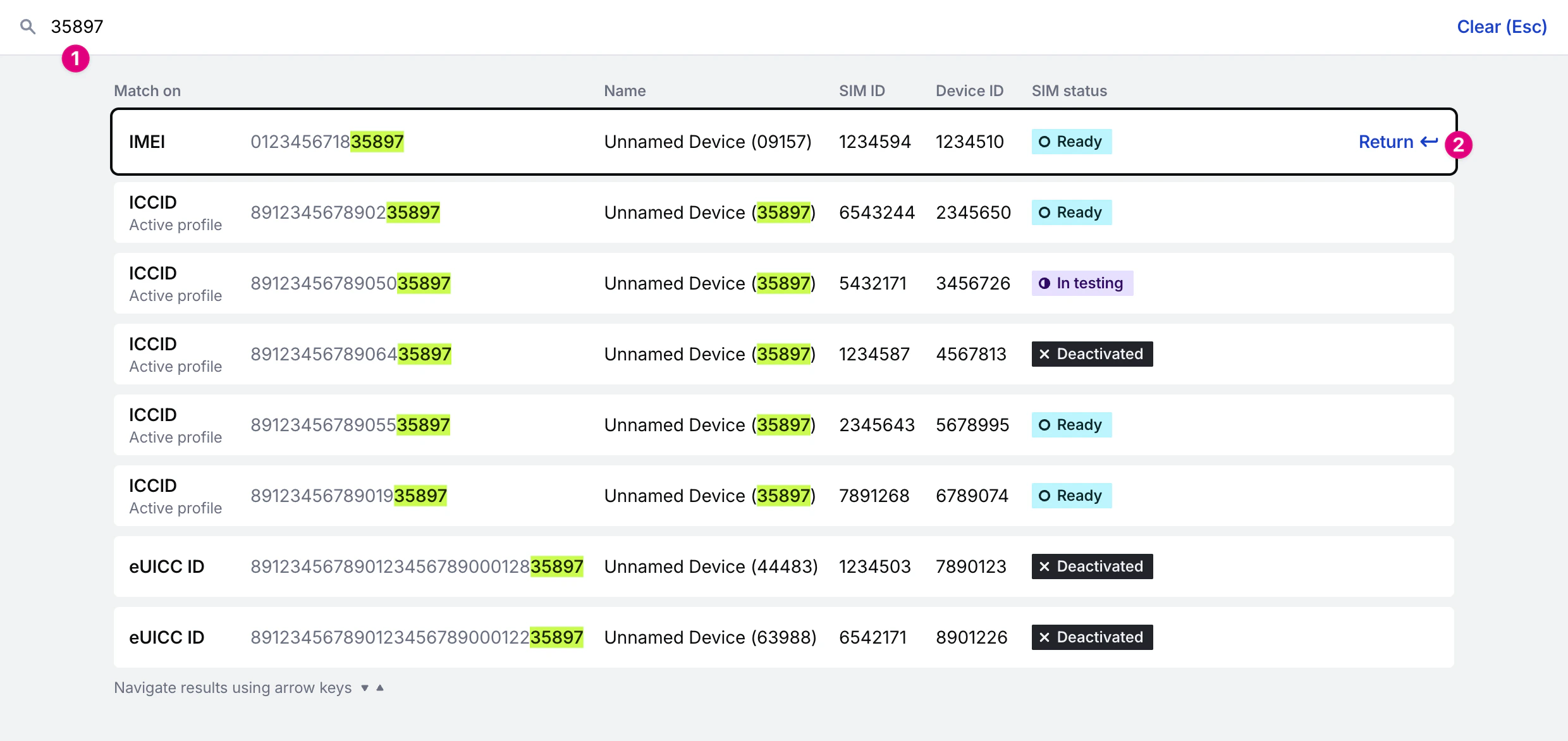
Search terms
You can search across the following data, returning results that begin with or end with your search term, using a minimum of 3 characters. Searching on SIM names will also return any name that contains your search term.- SIM ID
- SIM name
- SIM EID (eUICC ID)
- Installed profile ID (link ID)
- Installed profile ICCID
- Device ID
- Last known IMEI
- Phone number (if purchased)
Troubleshooting search results
1
Check for typos
If you are searching for a SIM in your fleet and unable to locate it, please first check for misspellings, and that you have typed in the correct and accurate information you are searching for.
2
Use at least 3 characters
Searches require at least 3 characters.
3
Understand search matching
Searches only return results that begin with or end with your search term, unless you are searching on name.
4
Verify organization
Confirm that you have the correct organization selected.
5
Wait for updates
If you have just activated or renamed a SIM, it can take a few minutes for the SIM to be available via search. The update process is constantly running, so try to wait a couple minutes, refresh the page, and try the search again.
6
Use unique identifiers
If your organization has many devices with the same name, there may be a large number of results returned and finding the exact device you want might be hard. In this case, try narrowing your search by using a different ID.
7
Profile availability
You can search for profiles currently installed on your SIM, and profiles manufactured on your SIM. Any other profiles. If your SIM has received over-the-air EUICC updates to uninstall a profile that was not manufactured on your SIM, that profile will not be searchable.
Searching by IMEI
The IMEI is the unique identifier of your hardware’s installed modem. We usually get this from data session information shared from networks, and when we do, we store it in our system and it is available for search. In some cases, we do not get the IMEI back from a network, in which case you should try the ICCID, SIM ID, or name instead. If you are trying to find a SIM by searching for an IMEI, it is always best to use the entire IMEI number. If you do not have the entire IMEI, here are some helpful hints to help get you the best search results:- Search using the last four or five digits of the IMEI.
- Do not search by using the middle portion of the IMEI.
- Search for the first few digits of the IMEI. As long as you include the very first digit of the IMEI, any number of digits will work (the more the merrier). A partial search that does not include the very first digit will not display your intended device.
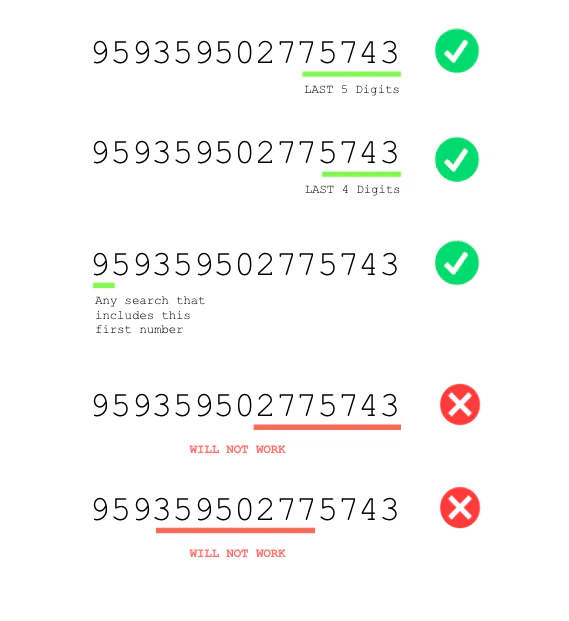
IMEI search examples
Still having trouble?
If you have recently updated any of the SIM’s information or added a new SIM to your organization, your new SIM or name updates may not be immediately available in Hologram’s search database. However, these updates are regularly processed within a few minutes on a rolling basis for accurate search results. If after a few minutes you are still unable to find a SIM via the search bar, please reach out to support@hologram.io with your search parameters and any other identifying information about the device so the team can investigate.Related guides
Filter SIMs pages
Use filters to find and manage specific SIMs.
Report on SIM data usage
Find detailed data usage information across your fleet with comprehensive filtering.