
How does my device connect using a Hologram SIM?

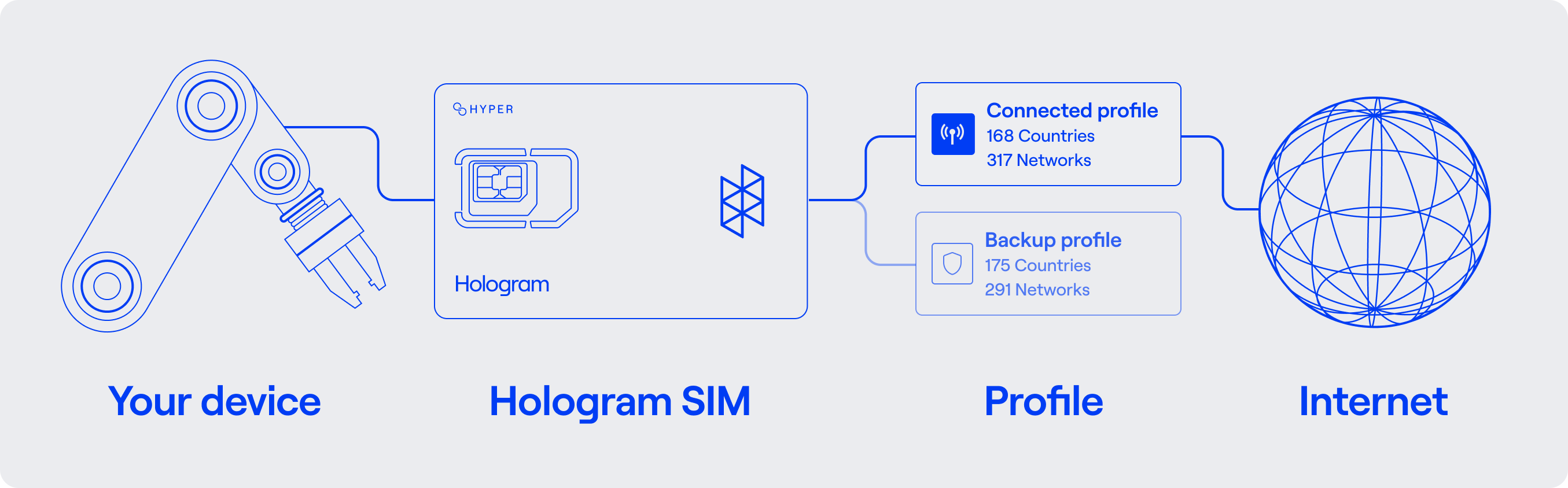
Your device connects to the internet through a Hologram SIM using the device’s modem. Each SIM can have one or more installed connectivity profiles. A profile lets your device connect to the internet through a specific set of networks and countries as defined by the SIM’s data plan. SIM connectivity overview
Device information

Hologram stores minimal information about your device, which we identify using the device ID. We receive basic information from networks about your device during data sessions. This includes the IMEI used to connect to a data session, which also lets us identify the the modem model when we have it using the IMEI TAC prefix. IMEI data is not sent by networks or carriers in every data session, so we default to showing the last known IMEI for your device. Your device must have the correct APN set to connect to the internet. Hologram’s default APN is hologram.

SIM information

Hologram Hyper IoT SIMs are identified by the SIM ID, which is Hologram’s unique identifier for a SIM card. Each SIM card connects to the internet through a connectivity profile. Most of our SIMs have a single installed profile. SIMs can have multiple profiles installed, and SIMs can switch between profiles on-demand using Outage Protection (if enabled) to prevent downtime and outages for your devices. However, only one profile can be active at a time, and the enabled profile ICCID is the ICCID of the profile currently active and able to use data. We call these SIMs “Multi-Core Hyper SIMs”. Hologram primarily stores and reports on information at the SIM level, not at the device level.

Profile information

A connectivity profile is a carrier-defined mobile core, with its own network settings that define how a SIM card connects to the internet. The enabled profile determines the network connectivity available to your device through a SIM when it connects to the internet. The data plan added to your SIM defines which countries and networks each profile can connect to, defining the coverage available to your device. Each profile is identified by the ICCID as well as Hologram’s unique profile ID (also known as the link ID in our v1 API). Each profile also has a unique MSISDN and IMSI. Profiles can be installed on a SIM using over-the-air (OTA) eUICC updates. If a SIM has multiple installed profiles, which we refer to as “Multi-Core SIMs”, they can switch automatically through fallback events if the primary profile loses connectivity through our Outage Protection functionality, or can be switched manually.

Profile names

Each profile has a name, which can be used to identify the profile in your dashboard and identify expected connectivity behavior.
Profile nameProfile short nameDescription
Global-3G3Our default global profile. SIMs purchased from the Hologram Store come with this profile installed by default.
Global-2, Global-1G2, G1Additional global profiles available to customers with an active contract that work with our Sales team.
USA-2 CAT-M1US2MTier-1 USA-only performance profile with Cat-M1/LTE-M connectivity, available to customers with an active contract that work with our Sales team.
USA-2 CAT-1+US2+Tier-1 USA-only performance profile with high-bandwidth Cat-1 connectivity and 5G Standalone (SA) support, available to customers with an active contract that work with our Sales team.
Canada-1CA1Tier-1 Canada-only performance profile available to customers with an active contract that work with our Sales team.
USA-1US1Legacy USA-only profile.
Brazil-1BR1Legacy Brazil-only profile.

Hologram connectivity identifiers and terminology

Profile identifiers and terminology

TermDefinition
Profile (Link) IDHologram’s unique identifier for a profile.
APNThe Access Point Name identifies Hologram as the service provider when a profile connects to the internet. APNs are per-profile, and in rare cases can vary between profiles.
ICCIDThe Integrated Circuit Card Identifier is the unique identifier for a profile on a SIM card.
Bootstrap ICCIDThe ICCID of the first profile installed on a SIM at the time of manufacture. This ICCID is printed on Hologram SIM 1FF and 4FF format SIM cards.
Enabled profile ICCIDThe ICCID of the profile that is currently active and able to use data. The enabled ICCID changes when profiles switch on multi-core SIMs.
Operational ICCIDThe ICCID of any additional profile beyond the bootstrap profile installed on a SIM.
IMSIThe International Mobile Subscriber Identity is a unique identifier for a profile. IMSIs can be retrieved using our REST API.
MSISDNThe Mobile Subscriber ISDN Number is a unique identifier for a profile which acts as the SIM’s phone number. The enabled profile MSISDN changes when profiles switch on multi-core SIMs.

SIM identifiers and terminology

TermDefinition
SIM IDHologram’s unique, primary identifier for a SIM card.
EID (eUICCID)The Electronic Identification Number (eUICCID) is a unique identifier for a SIM card.
CoverageThe list of networks, RATs, and countries that a SIM can connect to through a specific profile. Coverage is determined by the SIM’s enabled profile, and is defined by a data plan.
Data PlanA data plan defines the rates and coverage available to a SIM through its installed profiles.

Device identifiers and terminology

TermDefinition
Device IDHologram’s unique identifier for a customer device.
IMEIThe International Mobile Equipment Identity is a 15-digit unique identifier for a device.
IMEI TACThe Type Allocation Code (TAC) is the prefix of the IMEI, which represents the type of modem.
Last known IMEIThe last known IMEI Hologram has received for a device from a data session.

Outage Protection terminology

TermDefinition
Outage ProtectionOutage Protection allows a multi-core Hyper SIM to switch to a backup profile if the primary profile loses connectivity.
Fallback eventA network disconnection event that causes a SIM to switch to a backup profile if the enabled profile loses connectivity. Available on multi-core SIMs with Outage Protection enabled.
Fallback timerThe amount of time a SIM will wait before switching to a backup profile if the enabled profile loses connectivity. Default is 15 minutes. Available on multi-core SIMs with Outage Protection enabled.

Why is my device not showing an IMEI?

How to find SIM ICCIDs and EIDs

Data plans overview

SIM coverage

Cat-M1 (LTE-M) and NB-IoT coverage