


What are the IDs on a SIM card?
Every SIM ships with at least one ICCID, which is the ID of a profile installed on the SIM that gives you access to a cellular carrier network through Hologram. Our Hyper SIMs are Multi-Core and ship with one or more preinstalled profiles. Each SIM also has an EID, the unique global identifier of the eUICC SIM.Activating SIMs using an ICCID
The ICCIDs of profiles preinstalled on a Hologram SIM are printed on the triple cut card. One of these ICCIDs is printed with the barcode and directly on the Nano (4FF) SIM card. You can activate and search for SIMs by any installed profile ICCIDs.

Activating SIMs using an EID (eUICC ID)
Each eUICC-enabled Hyper SIM also has an EID, the unique global eUICC ID given to a SIM when it is manufactured. You can activate and search for SIMs by EID.
What is the “primary” ICCID or SIM number on a SIM card?
At any given time, only one profile on a SIM card can beenabled, active, and able to use data. This is the enabled profile ICCID. You may also see this referred to as the “active profile”.
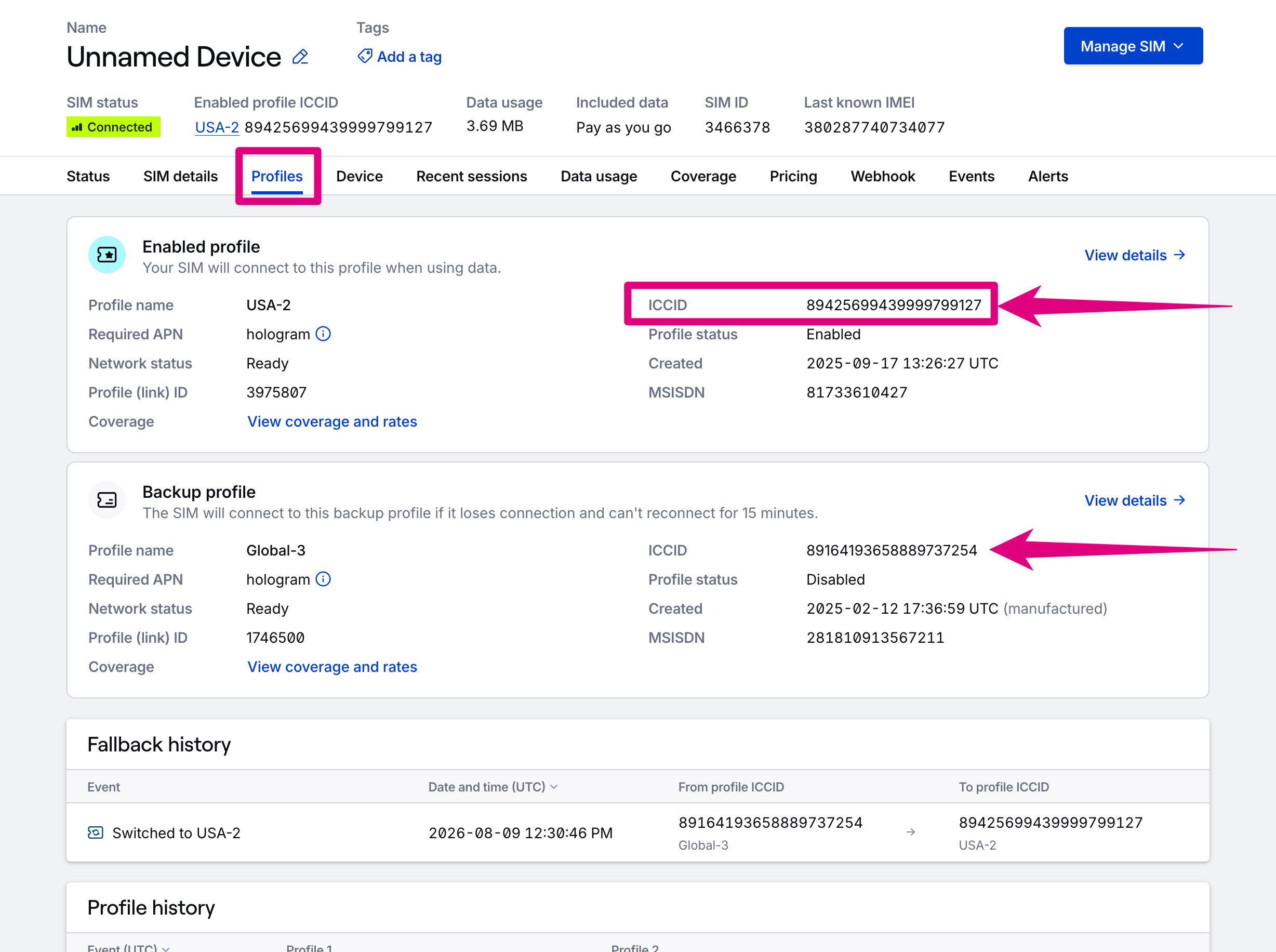
Note: ICCIDs are part of the profile on your SIM. If a profile is ever changed or removed, the ICCIDs on your SIM will also change. Multi-Core Hyper SIMs with network fallback change active profiles when switching to a backup profile, changing the active profile ICCID for your SIM.
Find ICCIDs and EIDs in a SIM page
Identifiers for SIM cards are easier to find in a SIM’s details page.- From the SIMs page, open a SIM.
-
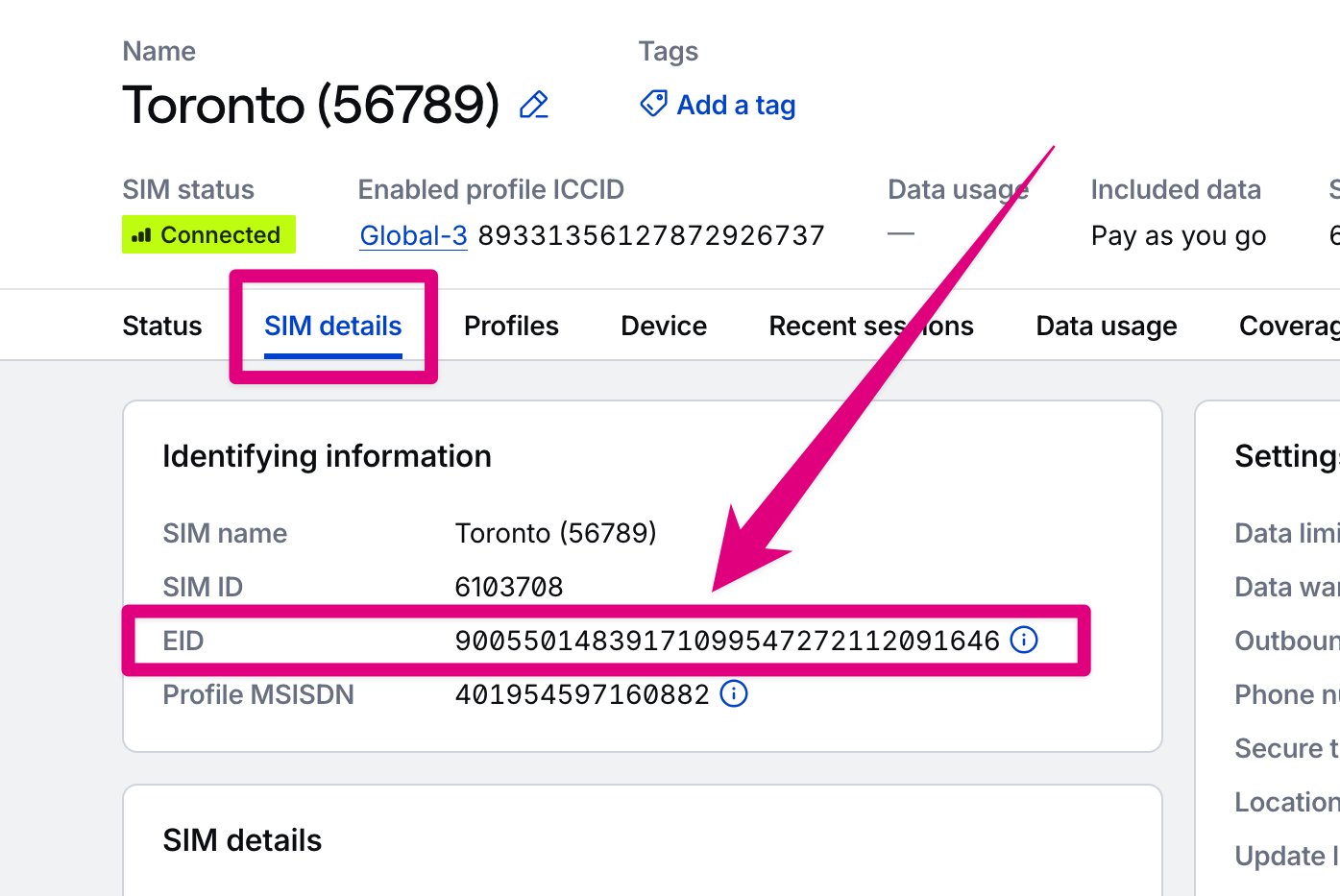
The EID is found on the SIM details tab, in the Identifying information card.
-
ICCIDs for currently installed profiles are found in the Profiles tab and in the header of the page.
- ICCIDs for profiles assigned to the SIM over time, including profiles that were later removed, are listed in the Profile history card at the bottom of the Profiles tab. Each row shows which profile the event affected and summarizes the ICCIDs involved in Summary. Filter the Activity to Profile assigned to see only installations and removals, or open a profile’s details to see history for that profile only. Profile installation history also appears in the SIM History tab.
- Manufactured profile ICCIDs are found in the Manufactured profile ICCID column of the SIMs pages. On the SIM’s details page, manufactured profiles are marked (manufactured) in the Profiles card on the Profiles tab, and manufactured profiles that are no longer installed are listed below it.
When do ICCIDs on a SIM card change?
An ICCID is the ID of a profile installed on a SIM card. When a profile changes on that SIM card, whether through an over-the-air (OTA) update, profile swap, or with Outage Protection via a network fallback event, those ICCIDs may change. The EID on a SIM will never change.What other IDs can be used to track a SIM card?
Each SIM is also installed in your physical device, which we represent using the Device ID, ordeviceId. This is the main ID used in the API. We give each SIM it’s own SIM ID, hologramSimId, the primary identifier we use to track Hologram SIM cards. This is a unique ID per SIM card like an EID, but is shorter to make it easier to work with file exports and reports.