

Note: SIMs in Test Mode will activate automatically after using free data, with no downtime or action required on your part.
How to end testing early and force activate SIMs
To force activate SIMs out of Test Mode, they must be on the same preconfigured data plan. Scroll the pre-deployment SIMs page to the right to see the data plan each SIM will activate into, or use filters to select SIMs on specific plans.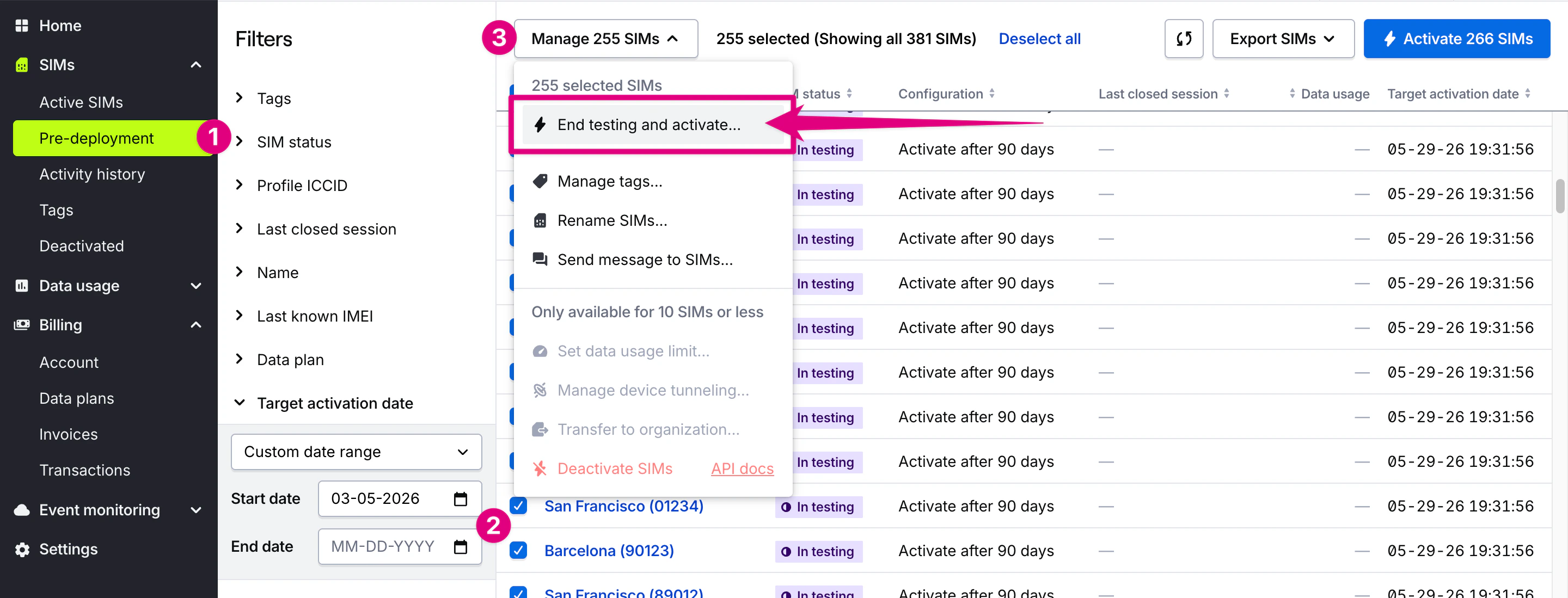
1
Navigate to Pre-deployment SIMs
Navigate to the Pre-deployment SIMs page in the SIMs section in the main menu.
2
Use filters to find and select the SIMs
Use filters to find and select the SIMs you want to activate. Required: Confirm that all selected SIMs are on the same data plan. If SIMs are on different data plans, you can filter and activate SIMs on each data plan separately.
3
Click the Manage SIMs menu
Click the Manage SIMs menu at the top of the page and choose End testing and activate.
4
Choose your new data plan
Optional. Confirm or change the target data plan from the available options.
5
Review pricing and coverage
Review the plan rates and coverage for the new data plan. Optional: Set a data usage limit — Pause at 10 GB (recommended), Unlimited, or a custom amount — or a data warning threshold. You cannot set a 0 B data limit on data plans that do not include data.
6
Review tags and naming
Optional. Update name prefixes or tags.
7
Pay and activate
Review the activation details and charges, then confirm the activation.
How to activate SIMs using the REST API
For programmatic activation, use the SIM Activation API endpoints to activate SIMs via REST API calls.REST API endpoint
Force activate SIMs (bulk)
POST /links/cellular/bulkclaimRelated actions
Set data usage limits
Set data usage limits to control costs after activation
Limited access: Learn more about Test Mode and streamline your deployments by contacting our sales team.